Up next in 10



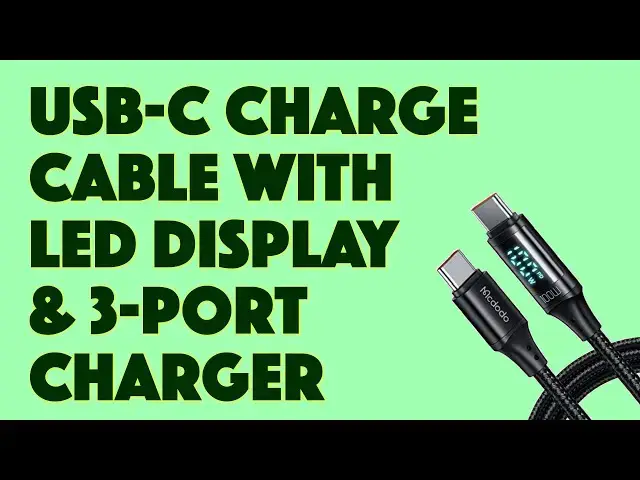
Still using boring old charging cables? Then you'll be amazed by the Mcdodo USB-C charge cables with built-in LED wattage display. Better yet, they're rated to 100W, ready for your most demanding hardware. Mcdodo also has a remarkably compact 65W 3-port wall charger too, both of which are tested by tech expert Dave Taylor in this candid demo and review video.
Check them out:
USB-C Cable: https://amzn.to/3gRRiFa
USB Charger: https://amzn.to/3zrMWey
Then visit Dave's Q&A Web site at: https://www.AskDaveTaylor.com/
#mcdodo #usbc #charger #charging #usbcable #wallcharger #65w #askdavetaylor
Show More Show Less View Video Transcript
0:00
A three port charger this small and this charging cable, it's got a pretty cool secret. Let's check them out
0:14
Dave Taylor here and I want to talk about charging. It's an endless topic because we have an endless number of devices and they constantly need to get more power
0:23
So we all spend our lives trying to figure out are they charging, are they charging as fast as possible
0:29
how many chargers and wall devices do I need to carry with me. It's kind of a pain actually
0:35
But things are slowly starting to unify on USB-C but even then you still have the question of
0:42
well how much power can my device take and how much power am I giving it right now
0:47
Because obviously if you can match that perfectly you're going to have the fastest possible charge
0:53
So McDodo, company with a funny name, sent me two different devices
0:57
This is their 65 watt, so right here, 65 watt three port charger that just plugs into the wall
1:06
You can actually flip up the prongs if you want to travel with it
1:10
But check out how small that is. It's pretty darn remarkably small
1:14
How do they make it this small? They use something called gallium nitride technology
1:19
I'll come back to that because what I want to start is by talking about this
1:24
This is the McDodo USB-C 100 watt cable and it is 1.2 meters or 4 feet long
1:33
USB-C on both ends and you say, okay, so it's a nice braided USB-C cable
1:41
So the heck what? There's a billion of those out there, right? And there are
1:45
But here's the thing. First off, this is rated to 100 watts, which is important
1:50
The most modern devices, especially laptops and such, are rated to take higher wattage so that they charge faster
1:58
But if you have a USB-C cable that doesn't specify maximum wattage, then I can guarantee it's at 66 watts
2:07
So what does that mean? If you plugged it into a 100 watt charger and then plugged it into your computer
2:13
you wouldn't be giving your computer 100 watts. Kind of a drag
2:18
So a 100 watt cable is what you really want to be looking for nowadays and that's what this is
2:24
Even if you're only using like a 65 watt charger, when you get to a bigger charger and a computer that can handle more wattage
2:32
and charge faster, your cable will be ready to go. Now, to be slightly cautionary, the company over enthusiastically says this will charge every device faster
2:42
and the answer is no. It'll charge devices that can handle 100 watts faster than a USB cable that only can handle 66 watts
2:51
obviously, because it's giving it more power. But the cable is not going to magically make your iPhone charge faster
2:58
So what's so cool about it? Well, let's plug this in. I just happen to have power right there
3:05
So I'm going to plug this in and then I'm going to plug in my cable here
3:10
And I'm going to do it on the top one, which actually gives it the most power
3:14
I'll come back to that in a minute. And then I'm going to plug it into, this is a Google Pixel 6 Pro
3:19
I'm going to plug it in and then check this out and give you a close up
3:24
But it shows you the wattage that it's delivering to the device. So insanely cool
3:31
So it not only shows you that, but you can see that there's a tiny PD being displayed
3:38
And PD means that it's using power delivery. And power delivery is one of these things you probably didn't even know existed
3:45
But your device now can negotiate with the charger and they will agree on a maximum wattage to give you the best possible charge experience
3:56
One of the most common protocols for that is something called power delivery
4:00
If the PD isn't illuminated and it just shows the W, then you're getting a slow charge, which means that the charger is being cautionary
4:10
It's saying, let me give you a relatively low amount of wattage because it's already detected what kind of device it is
4:16
But you can see on the bottom of the Pixel, it actually says charging rapidly
4:21
Which means it's getting the maximum possible wattage from this charger, which means it's going to charge super fast
4:28
So I am at 14% and it says in 90 minutes I'll be at a full charge
4:33
So that's not too bad for a phone, right? So I really like the cable. It's really fun. And I thought, hey, let's experiment with a little bit
4:42
So we can see that the phone is getting 22 watts. That's what we saw in that earlier image
4:48
So if I plug in this Lenovo Yoga to charge it, well, what kind of wattage does it take
4:54
So obviously it can't get more than 65 watts because that's what this is pushing out
4:59
But you can see in this image that we got 63, 64. So it looks like it's at 63 watts of electricity coming into this unit to charge it
5:11
So that's pretty cool. That's basically all the power this thing can produce
5:16
But let's try one more thing, right? So this is all the non-Apple gear
5:21
Let's just switch over to my MacBook Pro. This is an M1 MacBook Pro
5:26
And I'm going to plug it in here. And then let's see what this one does
5:32
Well, it starts out at 129.27. It's negotiating that protocol right now, which is kind of cool to watch
5:41
And then finally, I'll show you. It's going to take a little while to get up to, but it'll get to 66 watts
5:47
which is, number one, a watt higher than you would expect to come out of the charger
5:52
But it is the best possible charge that I can give this with this charger
5:57
Now, this MacBook Pro can handle 100 watts, but obviously the MacDodo charger isn't giving me 100 watts
6:03
So I'll just have to charge at the speed I charge at. OK, it looks like there it's stabilized
6:09
Actually, it's 65 watts, and it is indicating that it's also using PD power delivery. So cool
6:17
That's the cable. It's really a nice, thick, braided cable. It comes in a ton of cool colors
6:23
I'll come back to that in just a second. And then let me just talk just a little bit about the charger itself
6:28
because this is also really cool. So it includes two USB-C and one USB-A, and the USB-A is capped at about 30 watts
6:38
Here's actually an illustration from the company that shows you how power is distributed when you plug in one or two or all three
6:47
And obviously, the 65 watts you're sharing among the ports. So if you want the maximum possible charge to your laptop, which can take a lot of power
6:56
then don't also charge your phone unless you want to have everything charging overnight
7:01
in which case it doesn't matter if things are at a lower charge rate. So, very interesting document there
7:07
And so, I'm going to plug back in on that top charger. I'm going to plug it back into the power
7:14
and I'm going to just let my MacBook Pro charge away, and the display is working again
7:19
Now, what's interesting, again, like I said, is that you see that there's a negotiation going on
7:24
You don't plug in, and then boom, it's immediately at the maximum wattage
7:28
And I find that really interesting and really pretty sophisticated of them
7:32
So, that's everything I wanted to talk about with the cable and the charger, except we need to talk about the price
7:38
But before we get to the price, I'm going to ask if you could subscribe to my channel
7:42
Click or tap on that subscribe button, and also don't forget to click on the bell icon so that you can also get notifications
7:49
and we're connected. Now, you connecting to me is a great win-win because the more subscribers I have, the more gear I get
7:57
And for you, you now have a source of honest, candid, and straightforward reviews, so I'm sure you're going to want to check out my other videos, too
8:05
I hope so. Anyway, all right, cool. Now, let's unplug everything. So, let's start with this
8:12
This is the Muc-Doto USB-C 100-watt cable with built-in LED display, and it is in black or silver or blue or pink or purple
8:25
And this unit in black is $1499, currently discounted to $1109 on Amazon.com
8:33
If you need another USB-C cable or you just want to have that little display, this is a no-brainer upgrade
8:39
It's actually a pretty slick cable. In terms of the charger, this is the Muc-Doto 65-watt 3-port charger with folding prongs
8:51
and it comes in black or white, and it's $3599, currently minus a 30% discount, dropping it down to a remarkable $2519 at Amazon.com
9:03
Both of those are pretty killer prices for these devices, and they are going to make your technical and electronic world just a better place
9:12
How is that not cool? Anyway, that's everything. Let me get my MacBook Pro charging again because I know I'm going to need it
9:19
And obviously, I can plug in the cable in either orientation, so I can also have that wattage indication right here, too. Works just fine
9:28
Anyway, that's all I got. Hope to catch you in my next video
#Consumer Electronics
#Product Reviews & Price Comparisons