Up next in 10

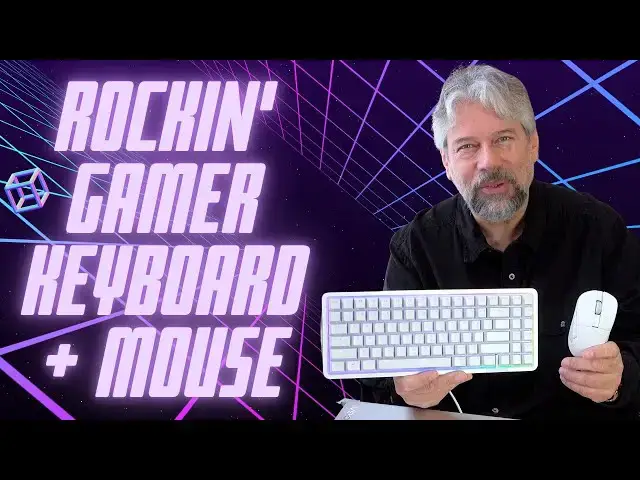
Mad Typing with the NZXT Function Elite MiniTKL Keyboard + Lift Elite Wireless Mouse
May 29, 2025


You don't have to be a hardcore gamer to appreciate the beautiful design and superb engineering of the NZXT Function Elite MiniTKL Keyboard and its companion NZXT Lift Elite Wireless Mouse, but if you are, you'll love 'em. Tech expert and writer Dave Taylor plugged both into his workhorse PC and found them to look as cool as they worked. This video review includes a detailed demo of the NZXY CAM control app too.
Check it out at Amazon:
Function Elite MiniTKL Keyboard: https://amzn.to/3PYp228
Lift Elite Wireless Mouse: https://amzn.to/4hggz6m
Visit Dave's Q&A Web site at: https://www.AskDaveTaylor.com/
0:00 Introduction
1:30 Keyboard Key Tech
3:05 The Typing Experience
4:08 The Lift Elite Mouse
6:24 CAM Software and Controls
7:55 Mouse Customization
9:00 Commentary
10:52 Pricing and Conclusions
#nzxt #keyboard #mouse #gaming #gamerkeyboard #gamermouse #askdavetaylor
Show More Show Less View Video Transcript
0:00
this is one of the best keyboards I've
0:01
ever used and it has a matching mouse
0:04
let's check them
0:12
out Dave Taylor here and I have to admit
0:15
my son is the gamer in the family me I'm
0:19
more of a writer I play games and I do
0:21
lots of other things with my computers
0:23
including a lot of video editing but I
0:25
spend a lot of time writing and so
0:28
keyboards become crazy critically
0:30
important yeah we're moving it to the ER
0:33
where you can dictate or you can have ai
0:35
help you but still a good keyboard is
0:38
worth its weight in gold and I will tell
0:41
you that I have tested a lot of
0:43
keyboards and I am rarely experience
0:46
something as enjoyable as this this is
0:50
the NZXT function Elite Mini tkl
0:54
keyboard and it has so many great
0:58
features obviously it has built-in
1:00
lighting and there's software that lets
1:02
you control the lighting but we'll get
1:04
to that it is a wired keyboard and on
1:07
the back it has little feet if you want
1:09
to use them it has this it's just this
1:12
great texture with grippy edges rubber
1:15
edges so when you go to pick it up
1:18
there's never any worry it is fairly
1:21
heavy at 2.6 lb but that's because they
1:24
have put a lot of effort into creating
1:27
really great keystroke experience
1:30
so I will tell you it uses double shot
1:33
PBT key caps and it has magnetic H or
1:37
hall effect switches so it is incredibly
1:41
reactive and you can actually have it
1:43
pull up to 8K versus a typical keyboards
1:47
at 1K now as a writer I don't really
1:51
care because I'm not going to be typing
1:53
that quickly but if you're a gamer and
1:55
you have this plugged into your big
1:57
gaming PC like my son would have then
2:00
having it be able to do like multiple
2:02
keystrokes super super super fast is
2:05
like a secret extra weapon so that is
2:08
really great and it's super fast at
2:10
reacting so when you experience
2:13
something and you press a key
2:15
immediately with like almost zero
2:17
latency that keystroke is going to be
2:19
recorded in the program and you're going
2:21
to be reacting so that's going to give
2:23
you an edge it also has adjustable
2:26
actuation what's actuation it's how far
2:29
you have to a push down for a key to
2:32
register that you've pushed it and you
2:33
can actually adjust that from 6 to 4 mm
2:38
you can adjust the sensitivity there's a
2:41
lot of stuff that you can change and
2:43
improve on your keyboard experience in
2:46
fact it even comes with a key removal
2:49
tool and a couple of extra key switches
2:52
in this little box so you can actually
2:55
move around your keys and one of the
2:57
other things I don't know if you can see
2:59
but the individual key caps also light
3:02
up depending on how you have it set in
3:04
their cam software now I will tell you
3:08
that the typing
3:11
experience is just delightful it's just
3:14
like a real classic keyboard and because
3:18
it's so heavy it does not move around
3:20
however enthusiastically you are using
3:22
your keyboard for whatever reason then
3:25
it has all of that and it has a function
3:28
row it has arrow keys it has a
3:31
navigation cluster it's a really wellth
3:34
thought out keyboard and it's only a 75%
3:38
layout so it's smaller than like a big
3:40
full-size keyboard but I'll tell you
3:43
compared to the keyboard on my laptop
3:45
which is how I usually write this is
3:48
head and shoulders just so much better
3:51
it's such a better experience that I
3:53
have just taken to just carrying it with
3:55
me and then I just plug it in so it is a
3:58
wired keyboard
4:00
and it has a very nice rip cord style
4:03
cable and so it's usba on one end and
4:07
then the other end is
4:09
USBC which means if you have USBC on
4:13
your device you could also get a
4:15
different cable and just do c to C and
4:18
that would work better and then let's
4:20
talk about the mouse just for a second
4:22
and I'll come back to it but the mouse
4:24
also is a wireless mouse so it's kind of
4:27
interesting it's a wired keyboard that P
4:29
pairs with the wireless mouse and this
4:33
is the lift Elite wireless mouse so
4:36
remember this is the function Elite mini
4:38
tkl so they work together and the mouse
4:41
has a dongle and that's a usba only
4:45
dongle and it has a little thing you can
4:47
stick on the wall that lets you put the
4:50
dongle somewhere so you don't lose it
4:51
when you're not using the mouse and then
4:53
the other side's
4:54
USBC because it comes with a USBC to
4:58
usba charging cable because it's
5:01
wireless it needs to be charged now the
5:04
cam software from the company will also
5:07
show you its charge level but check this
5:10
out you can see in this closeup it's
5:12
super interesting design with this open
5:14
bottom so I really like it this is a
5:18
26,000 DPI Optical sensor Mouse with 650
5:23
IPS tracking it has Optical switches and
5:27
it's again a really nice it's a textured
5:31
plastic sort of shell it's only 57 G so
5:34
it's super light I find it really easy
5:37
to work with and then you just plug that
5:39
dongle into your computer and it will
5:42
automatically turn off when you're not
5:44
using it and then when you wake it up it
5:46
goes on it boom it's connected and
5:48
you're ready to go again now I will say
5:51
I was a little disconcerted when I first
5:53
got it and charged it and I'm looking
5:55
I'm like where's the onoff switch there
5:58
is no onoff switch cuz it it just does
6:00
that automatically which is a little bit
6:02
interesting so it has a 4K or 8K polling
6:05
rate remember the keyboard has an 8K
6:08
polling rate so there's a lot going on
6:10
now I've talked about these let me show
6:13
you a little bit about the lighting and
6:16
show you the cam software you can see
6:18
all the different controls and
6:20
adjustments you can make so let's switch
6:22
things around let me give you a quick
6:24
demo of the software this is the NZXT
6:27
cam program which you can download for
6:29
free and as you can see along the top
6:32
there's lighting performance remaps and
6:36
macros and lighting might be the most
6:38
fun so let's look down and see and you
6:41
can see the keyboard so if I make some
6:43
changes like let's change the
6:48
speed
6:50
then now watch this keyboard you'll see
6:53
the colors are moving at a little bit
6:55
more enthusiastic rate and we can change
7:01
it
7:03
to pulse color or obviously lots of
7:07
different
7:08
options and then we can go from Rainbow
7:11
we can just pick random
7:13
colors now more interesting to people I
7:17
think is that the keyboard is highly
7:21
configurable and you can see here you
7:23
can change the actuation and snap
7:26
override and the polling rates and and
7:29
this part here gives you some
7:31
recommendations for settings for
7:34
different types of things so for typing
7:36
for example then you want to turn off
7:39
rapid trigger and then at the top we can
7:42
go to remaps if you really want one key
7:45
to actually function as a different one
7:48
you can specify that and you can also
7:50
set up
7:53
macros the mouse has its own
7:56
area and the mouse you can see that
8:00
you can set up how long nothing happens
8:03
for it to turn off and I really like
8:05
that actually it took a little bit of
8:07
getting used to not having an onoff
8:09
switch but that's okay and then here
8:13
instead of having different tabs
8:14
everything's on the one window or the
8:16
one screen and now we can change polling
8:19
rate liftoff height motion sync you can
8:23
remap all of the mouse buttons if you
8:25
want you can even add macros so it is
8:29
simp simple but extremely helpful now
8:32
let me jump back on camera pretty darn
8:35
cool right I should also mention that it
8:37
comes with these and these are not
8:39
Band-Aids they are in fact grip tape so
8:42
you can put these on the two buttons
8:46
here so that you have a little bit
8:48
better grip on them if that's something
8:50
that's of interest to you I don't know
8:52
that I would do that but I appreciate
8:55
the flexibility of having it be included
8:57
so it's not a little like 9 9 cents plus
9:00
shipping add-on it is just included in
9:02
the box with the mouse so this is the
9:06
setup and I got to say that it's pretty
9:09
amazing for gaming but it's pretty
9:11
amazing all around this is a beautiful
9:13
keyboard and anything you're doing where
9:16
you're really relying on your keyboard
9:18
being a really solid device and really
9:21
like able to like withstand your most
9:24
excited moments then this is a real
9:29
sweetheart of a device now I will tell
9:32
you a little bit more so it is 1.6 in by
9:37
5.1 in by 15 in as I said it's 2.6 lb it
9:42
is pretty hefty it is not a plasticy
9:45
sort of thing this feels like a solid
9:48
and professional device and indeed it is
9:51
this is the kind of keyboard you'd see
9:53
if you went to an e-gaming sort of
9:56
competition or event these are the kind
9:58
of keyboards that people are going to be
9:59
using there and that's because they're
10:02
so precise they're so reactive there's
10:05
so much adjustability they're really
10:08
pretty solid and in terms of the
10:10
keyboard again this is 57 G it's super
10:15
light and it's wireless so it's really
10:18
easy to work with I think I've shown you
10:21
everything about these devices so I will
10:23
just say if you're looking for the best
10:26
possible keyboard experience and mouse
10:28
of course but mostly keyboard experience
10:30
let me close this up so you can see a
10:32
little better if you're looking for the
10:33
best possible keyboard experience this
10:35
is definitely on your short list this is
10:37
one to check out and if you're a big PC
10:41
Gamer then this is a gamechanging level
10:44
keyboard if you've just been using the
10:45
cheap keyboard that came with your
10:47
original setup so definitely this is one
10:50
worth checking out I am going to ask you
10:53
to subscribe to my channel go ahead and
10:55
click on that subscribe button hit that
10:57
Bell icon for notification and please
11:00
give me a thumbs up if you found this of
11:02
value and I certainly hope that you did
11:04
excellent now let's talk prices this is
11:08
the NZXT function Elite Mini tkl
11:12
keyboard comes in black or white I'll
11:15
let you figure out which one this is and
11:17
it is
11:19
$199.99 amazon.com it is pretty spendy
11:22
for a keyboard but this absolutely feels
11:25
like the last keyboard you'll ever
11:27
acquire and by the way it has the
11:29
company name right there on the front
11:31
it's all very simple and elegant and
11:35
then this is the NZXT lift Elite
11:39
wireless mouse and it also comes in
11:42
black or white so you can match your
11:43
colors and it is
11:46
$79.99 also at amazon.com so a really
11:51
solid upgrade a little bit spendy but if
11:53
you think about this will be the last
11:55
keyboard you'll ever want to buy because
11:58
it's that good so whether you're a
12:00
writer whether you are a gamer however
12:03
you're using your keyboard if you're
12:05
relying on it this is going to make your
12:07
life better how is that not awesome
12:10
anyway that's what I got hope to catch
12:13
you in my next video
12:16
[Music]
12:35
he
#Computers & Electronics
#Shopping