Up next in 10



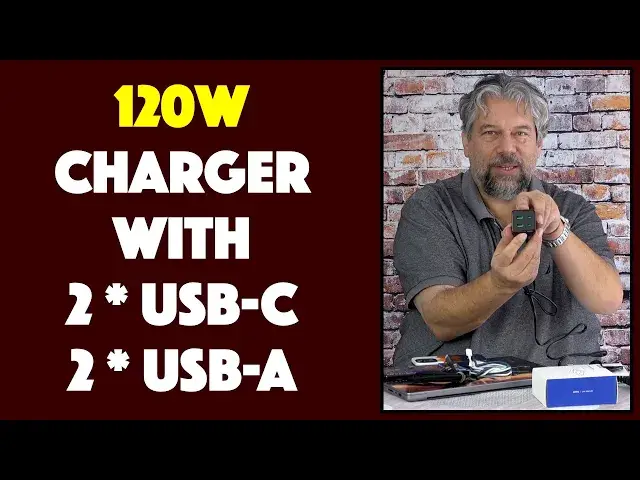
Tired of lugging around power chargers for all your devices and then realizing you can't plug them all in simultaneously anyway? Kovol has the solution with the Kovol Sprint 120W 4-Port Charger device. Tech expert Dave Taylor plugs in a variety of devices and computers to explain how it works and why it might just be "the one charger to rule them all".
Also demonstrated: Kovol Sprint 100W 6.6-foot USB-C charging cable.
Check it out on Amazon:
120W Charger: https://amzn.to/3mGe17b
100W Cable: https://amzn.to/3EHa1cY
Check out Dave's Q&A Web site at: https://www.AskDaveTaylor.com/
#usbc #120w #charger #gan #kovol #askdavetaylor
Show More Show Less View Video Transcript
0:00
Is this the one charger to rule them all? Let's check it out
0:10
Dave Taylor here and I'm checking out this. This is really cool. This is the Koval Sprint
0:17
120 watt four port charger. It has two USB-C and two USB-A and if you just use one of the ports
0:27
it can deliver up to 120 watts of power. That's a lot. So when I used it with a 100 watt rated cable
0:35
and I'll come back to the cable in a second, I was able to get 100 watts coming into my new
0:40
MacBook Pro which means that it was charging super fast. Less than two hours from dead to 100%
0:48
That's pretty nice. But where this really gets cool, let me just move these boxes out of the
0:52
way a little bit, is if you have more devices like an iPhone 13 Pro or a Google Pixel 6 Pro
0:59
right? So I can plug both these in. Both of them can be charging and my computer can be charging
1:06
all off of one charging block. That's a big win. Now it doesn't have little prongs that fold out
1:13
because it's a bit heavy for that. So instead it actually comes with a little wire and this wire
1:20
see I haven't actually opened it yet because I like to keep my cables neat, but I'm thinking
1:25
this is probably a six foot wire. Let's see. Yeah, it's about six feet. So plug it in. It's a two pronger
1:32
Plug it into a handy power source or outlet and now the little green lights on the bottom turn on
1:39
to show that it is hot and running. And at this point, actually I have a lot going on here. So you know
1:46
what we're going to do? We are going to dump the boxes. We don't need the boxes, we need the devices
1:51
So here we are with the 120 watt 4-port charger and I'm going to go ahead and plug in. So this
2:00
is the Coval Sprint 100 watt cable. It's 6.6 feet and it is $12.99, super cheap, but it's super
2:10
important. If you're going to use more than 65 watts of power out of this, you need a USB-C
2:17
charging cable that's rated at the higher wattage. That's why I got this one and this lets me deliver
2:23
a full 100 watts to my computer, which is the maximum that the MacBook Pro will take. So I plug
2:30
that into one of the USB-C ports and then I'll just go ahead and I'll just swing it around here
2:36
and I'll plug it into my, what is this, a 2021 MacBook Pro M1. So what's nice, like I said, is it
2:45
can take 100 watts and you can open up your system report and you can see, as I have here, that it's
2:51
getting 100 watts. It is charging, it's charging fast. So this is rocking right now. But of course
2:58
I have these other devices and they need charging too. Now the upside is that this does support
3:04
things like PD 3.0, which is power delivery and QC 3.0, which is quick charge and PPS, which is
3:12
the programmable power supply, lots of different standards. But what they're all supposed to do
3:18
is they're all supposed to deliver the maximum power that a device can handle so the device
3:23
charges as quickly as possible. So my white cable is USB-A to USB-C and my blue cable is USB-A
3:34
to lightning. So I'm going to plug both those into here and so you can see I have all three devices
3:42
ready to roll and then I'm going to go ahead and plug in the Pixel and that's charging. You can't
3:51
see very well, there's a tiny little battery icon that shows up and then I will plug in my iPhone
3:57
and that one is usually a little bit more colorful. So let's see, there we go. So you can see there
4:03
that that's also charging. So now I have all three devices charging simultaneously from a single
4:08
wall plug using a single power adapter. That's really awesome. Now the downside is because I'm
4:15
pulling all of this power, then this, the USB-C going to my MacBook Pro has dropped down from 100
4:23
watts to 65 watts. You can see that in this power report. Now 65 watts is considerably lower but
4:30
especially if you leave your computer off so there's nothing else going on, it'll charge pretty
4:35
darn fast anyway. And what this means if you're doing the math is that you could plug in and
4:40
charge two MacBook Pros or a Chromebook or a PC or any other devices that want a lot of power. You
4:48
can plug two in and each of them will get 60 watts which is not the maximum possible power for most
4:55
devices but it's plenty enough that it'll be a positive charging trend. So if I am at a office
5:02
for example, I can have this plugged in and charging and I can be charging a MacBook Pro
5:08
on a different kind or maybe a MacBook Air and I could also be charging my phone. All of those off
5:13
of this one device. Super nice. Now it's using gallium nitride 2 technology. So gallium nitride
5:21
is a way that these companies have figured out that they can get a lot more power out of a very
5:26
small space. So this is it looks maybe a little chunky but if you think about how chunky multiple
5:32
power adapters would be, suddenly doesn't seem so big. So it's 1.8 inches by 1.8 inches by 3.4
5:40
inches long. Super easy to work with and it has a lot of different circuitry protection. So it has
5:46
protection against surge, overcurrent, overvoltage, short circuit, high temperature and overcharging. All of those are built into the technology so it will just power down and stop delivering power
6:00
if the device reports that it has any sort of issues. Super great. If you're not sure, they come
6:06
with a 12-month register and it's actually a 24-month warranty for this device. That's pretty
6:12
nice. So 24 months from now hopefully the world will look pretty different but whatever it looks
6:18
like you are going to have something that's still covered and still delivering power to a lot of
6:23
devices simultaneously. Super super cool. Now let's get back to the price but before we get to the
6:30
price I'd like to go ahead and ask if you could subscribe to my channel. A click or a tap on that
6:35
subscribe button and we're connected. And leave me a comment. Give me some feedback. What else would
6:40
you like me to have shown or talked about? Okay this is the Coval Sprint 120 watt four-port
6:50
charger and it is $119.99. Currently running a promo that drops it to $99.99 at amazon.com
7:00
If you're fed up with having multiple power adapters this is a great solution. If you're
7:05
equipping a like I don't know home office or a co-working space or you just want to have the
7:13
maximum possible power flexibility in a conference room at work or something this or a couple of
7:19
these is a no-brainer. And finally lest I forget I will also highlight that this you might as well
7:27
just get one while you're at it. This is the Coval Sprint 6.6 foot 100 watt rated USB-C to USB-C
7:38
cable. It is a thick braided cable. I love this sort of cable. They just feel like they're going
7:43
to last a million years. Super easy to work with. These two together are a great solution for all
7:50
your charging needs and a lot more. That's all I got. I need to get everything plugged back in
7:56
to make sure I have everything charged as best I can. Let's get that one plugged in
8:04
and there we go. All right that's it so I'll hope to catch you in my next video
8:26
you
#Consumer Electronics