Up next in 10



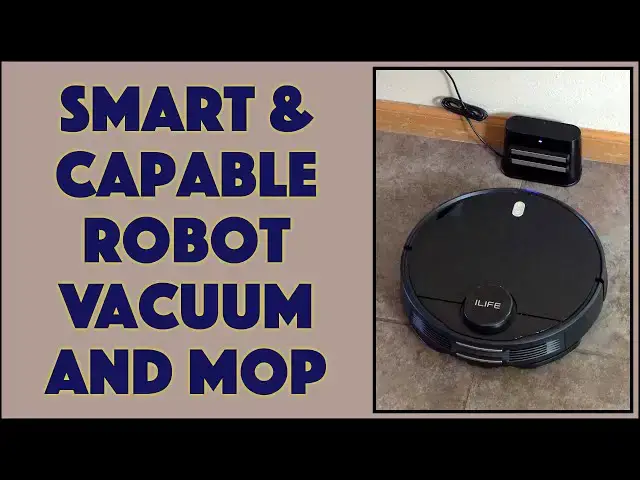
Tired of vacuuming every few days or mopping weekly? Why not have a robot pick up the job? Tech expert and homeowner Dave Taylor checks out the ILIFE A11 Smart Robotic Vacuum Cleaner and finds it does a really good job with both vacuuming and mopping hard floors. It does have a couple of quirks, though, as he describes in this detailed demo and review.
Check it at Amazon: https://amzn.to/3LRwPMi
Then visit Dave's Q&A Web site at: https://www.AskDaveTaylor.com/
#ilife #vacuum #robot #a11 #robovacuum #robotvacuum #askdavetaylor
Show More Show Less View Video Transcript
0:00
It vacuums, it mops, it's smart
0:02
Let's check it out. Dave Taylor here, and I'm checking out this
0:13
This is the I-Life A-11 robotic vacuum cleaner. It's pretty sweet. So, it's vacuum cleaner and mopping device
0:22
And if I spin this around and open it up, you can see it has buttons
0:27
it has a storage bin that is for dust and this one's also for water
0:35
There's a spot on the top. There is a filter to try to get that air to be clean and get as much dust as possible
0:44
But it comes with the second one too. If you're just going to use it for vacuuming or carpet or something
0:50
then you can use this and get larger capacity for your dust
0:54
which honestly, with multiple pets, This is kind of the way that I generally go, but it can also mop
1:01
So you use this one, and I'll just put it back in, fill it with water
1:08
It's very chatty. So you fill it with water, and then you put this
1:14
This is the mopping attachment, and it's a little dirty because it's been mopping my floor
1:19
which shows you it actually worked pretty well. And all of these tend to have interesting underneaths
1:25
So on this one, the mop part goes on this side. And then this side is obviously dedicated to vacuuming
1:33
This is the spinning brush. This little thing twirls around and tries to get all the bits that are on the edges or corners
1:41
And then, of course, you have wheels and you have the navigation system
1:44
So on the front, there's various sensors so that it doesn't smash into walls or get confused
1:52
And it works remarkably well, I have to say, uses something. called LiDAR 2.0, which is a way of mapping and understanding how the terrain it's working in
2:03
is actually laid out, which is critical, because not only do you want it to get to every spot
2:08
but you want it to actually get back to its charging base when it's done. And it does just that
2:14
It works really well. They also use an algorithm, and I love the name. It's called CV Slam
2:20
What's Slam? It's simultaneous localization and mapping. And I'll show you. show you on the app comes with an app and on the app you can see there's a map of the main floor
2:34
of my house so it can figure out where am I what have I done what do I still need to do and perhaps
2:41
most importantly where is my charging station so I can go and charge in fact let's cut to a shot
2:48
of it finding and going into its dock and docking and the reason I show you this is because I
2:55
think that that's one of the easiest ways to understand how smart one of these vacuums are by asking
3:01
the question can you find your charging dock and can you dock correctly as you can see it did a great
3:07
job now it features 4,000 pascales of suction so it's a really good vacuum on the vacuum side
3:15
it has a lot of suck which is what the pascal's measure it's also a human simulated cleaning
3:24
path, which is important. There's two ways that these sort of devices tend to clean or vacuum
3:30
One way is it just sort of randomly goes around until I don know it gets tired or it figures it gotten 90 percent and then it goes in docks and charges right And you like did it really get everything But the much better approach
3:43
is what they call the human simulated. And what it does is it figures out rectangular regions
3:48
And then it goes up and down and up and down and up and down and up and down in that region
3:53
And then when it's done, it then moves to the next one or moves to the next area
3:58
So it's a much better strategy. It's much better at getting. full coverage and frankly when you watch it you get a higher degree of
4:05
confidence that it's doing a good job now it does have a charging base as you
4:10
can see here this is something you just leave on your floor somewhere plugged
4:15
in so I generally just put it directly below a power outlet it's easy enough and
4:20
then it docks with these two metal strips here all it does is as you saw in
4:27
that docking video it then finds the dock charging station and then
4:31
turns around and then pushes back until they're touching and now it's ready to charge that's it you
4:37
don't have to do anything it's super easy it has a 5200 milanph hour battery which gives it over two and a
4:44
half hours of runtime my experience i have about a thousand square foot main floor and i just turn it on
4:51
and let it go and it does the entire floor in a single charge that's pretty nice they say it can do
4:58
up to 2,600 square feet. I'm not sure it would get that much on a single charge. But of course
5:04
if it's running low on charge, you can go back to the dock, charge up, and then come back out
5:10
and resume where it was because it's smart. It has that map. It has a coverage map of where it's
5:16
already done. So there's something very encouraging about having it say, oh, I'm low on charge
5:24
but I'll come back. And you're like, cool. This is exactly what I don't want to
5:28
to do, right? So you could do customized cleaning areas. In fact, let me just launch the app and just show you some of its many cool features
5:38
So let's get that going. There we go. So you can see, I'm already on a map of my main floor. And if I go to the more button, there's a lot of different things I can do. I can specify just scrubbing or I can have it just work on edges. You can spot clean. You can define an
5:58
area, you can say, just do everything twice, which obviously can take a long time and probably
6:03
will involve docking and recharging, but it can do that. That's totally cool
6:08
You can schedule things. So if you really want, if you go to work every morning at 8 a.m., you can have this thing turn
6:15
on automatically at 9 a.m. And every day, it's mopping and vacuuming
6:20
And all you have to do is occasionally remember to empty the bin and make sure that there's water
6:24
in it. That's all you've got to do. Super easy. So let's cut to a close-up of it actually working so you can see a little bit about that
6:44
Now, one of the other things you can do is you can actually adjust if you wanted to do vacuuming and mopping
6:50
They call mopping seepage. I'm not sure that's the best word for it, but that's okay
6:55
And I can just say, you know what, I would like to actually adjust that
7:00
Whoops, have to have the mop pad installed. It knows see they smart and it knows to communicate with the app from the actual vacuum But I can then turn off I turned off mopping now so it just going to vacuum In which case if I going to really be doing that then I should really change those bins because why not have the one with more capacity And if you noticing some of them
7:25
will look a little dusty, it's because I've been using this for a couple of months. I really like
7:29
it. Okay, what else can I show you on the app? I think that's about everything. So let me go
7:35
head and turn off that recording. I will say it's really fun to be remote and actually have the
7:43
app running so you can watch from work. You can check in and say, hey, look, it's done the
7:48
entire living room and now it's doing the dining room. So much nicer than you doing it. And let me
7:54
show you what else it comes with, comes with a warranty, and I got to give them props really good
8:00
user manual. It's atypically well written and well laid out. Um, so
8:05
used to manuals that are just afterthoughts and then poorly translated. This one's really good
8:11
which is really helpful because this does have a lot of smarts and a lot of modes. So, let's see
8:18
I showed you the docking station. I showed you the alternate bin. It also comes with a rubber
8:26
brush and I think this is if you only have hard surfaces. This will work better in conjunction with the mop
8:33
has a spare filter which is really handy it has a spare mop unit right so this
8:40
one at over time it's going to get it pretty grungy at which point I can take it
8:45
off and put this new one on so I can get that replacement and if you're not someone
8:51
who likes to have apps on your phone sorry getting some dust off this is the remote
8:57
control it comes with two and it even comes with batteries it's really everything
9:00
you need and what I really like especially with that schedule in the app is that you can set this up
9:08
at like grandma's condo and just let it go and every morning at 5 a.m. it starts up and it does a quick
9:15
vacuum of the whole space and then it goes back to the dock station and if you put that like
9:20
under a table or something she'll never realize she won't have to worry about it and every day
9:26
it's a little bit clean it's a little bit nicer now we should talk about the
9:30
quality of the job it does. And like all of these units, it does a good job, but not as good a job
9:38
as a human sitting there manually vacuuming or manually mopping. But I figure I don't do vacuuming
9:46
and I don't do mopping on a daily basis. But with something like this, literally, probably almost
9:52
every day with these sort of devices, as I leave the house, I just push the button and start it and let
9:57
it go. And the proof that it works is that every time I go to empty the bin, there's plenty of dust
10:03
and cat hair and dog hair and all sorts of like dirt and debris. All of it has been picked up from my
10:10
carpet and from my floor. So again, my floor, I occasionally have to do a proper mopping with
10:17
soap, but for between those periods just to keep it cleaner than just ignoring it, yikes
10:24
then these work great. They're really, really a nice adjunct or addition to your occasional proper cleaning
10:34
And that's really all I want out of it. And it does a really good job
10:37
Now, two caveats with this. The first one is that I actually have lost one of these because these just pop on and it looks like it hard to take off But in fact it is not super hard because more than once it somehow gotten underneath like the leg of a table or something and then popped off
10:59
And while the vacuum is very smart, it doesn't know when that has happened
11:04
So more than once, I've looked at the vacuum and I'm like, something's wrong
11:08
And then I flip it over and I realize, oh, the brush has gotten lost again. It does come with an extra one, so that's good
11:15
I wish they would have had it screw on, which I've seen from a lot of other vendors
11:20
The other thing I will say is that when you put the mop on
11:25
that putting this mop accessory on gives it just a little bit of a different profile when it's moving around
11:34
And that's enough that if you have the base station on carpet rather than a hard surface
11:41
that I found that it has a very hard time docking. Solution's really easy
11:46
If you're using it just for vacuuming, keep the mop unit off. And if you want to use it for both mopping and vacuuming, then put this on the hard surface in your house
11:56
Don't put it on carpet. And in general, you want to do that anyway, because if you have it on carpet and then it finishes and the mop is wet, then what's going to happen is it's going to have some of that water go into the carpet, suboptimal
12:09
Easily solved. You can simply not use it for mopping and just use it for vacuum
12:14
vacuuming or you could put this on the hard floor area of your house, whether that's wood or tile or linoleum or whatever. Easily done. And if you want to put this under a table or behind a couch or something, as long as it's accessible enough for this to be able to maneuver and get to it, then it's a nice way to keep things out of view. It's really all I have. I am a fan of this. I think that they've done a really nice job. The app in particular makes it really fun
12:44
And I like to have a clean house, but I don't necessarily want to do the work
12:50
So devices like this are absolutely fantastic because they do a lot of the heavy lifting
12:55
And if it's not a hundred percent job, hey, you know, it's like getting a maid to come in
13:00
and realizing that, you know, they don't do the best job, but it's better than not being done
13:05
And that's pretty darn important. So it's everything I got. The only thing we need to talk about is the price
13:10
But before we get to the price, I'm going to ask if you can subscribe
13:14
to my channel. Click or a tap on that subscribe button, then turn on notifications please
13:19
and we're connected. Great. This is the I-Life A-11 robotic vacuum cleaner, and it's 399-99 at
13:29
Amazon.com. And you definitely want to check because I've seen price discounts from $70 to $80. The most
13:37
recent one I saw was $80 off, making it $319.99 at Amazon.com. You know
13:44
watt for 300 bucks I would definitely appreciate having this do a lot of the work for my
13:52
cleaning in my house and is exactly what I do and it works great and if you're still doing
13:57
your vacuuming by hand or you're not doing it ooh get one of these instead that's all I
14:03
got I'll hope to catch you in my next video
#Home Appliances
#Vacuums & Floor Care