Up next in 10



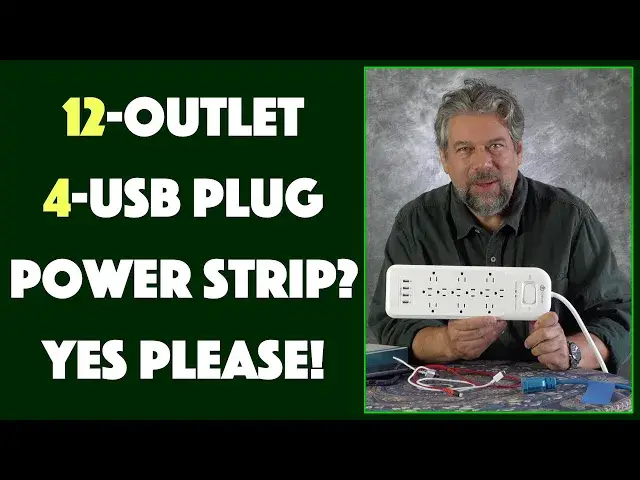
Power strips. Boring, right? But I bet you have at least one power strip that frustrates you because you can't get all your clunky adapters plugged in simultaneously. That's one of the many reasons you're going to really like the iClever 12-Outlet Power Strip [model IC-BB01]. The four 2.4 amp USB-3 plugs just add to the flexibility of the unit too. Basically, the iClever 12-outlet 4-usb power strip is a must-have for your office, home office, A/V setup or even your home. Review by tech expert Dave Taylor of https://www.AskDaveTaylor.com/
Check it at Amazon: https://amzn.to/2FFdtf0
Show More Show Less View Video Transcript
0:00
Will this become your favorite power strip? Let's check it out
0:03
Dave Taylor here and I'm talking about something pretty boring but pretty darn
0:14
important. Whether you have a big AV setup by your television or you have
0:19
some complicated gaming computers or you just have a lot of devices, right? It's a
0:24
power strip. Now what makes this interesting this is the iClever 12
0:28
outlet power strip. I'll give you the model number. It is the iCBB01. It comes in a
0:36
swanky box. Probably don't need the box anymore. So here it is and it comes with
0:42
12 outlets. So as you can see down the middle there are six in a pretty
0:47
standard layout but then there are six more widely spaced and facing outward. So
0:54
this means that these are perfectly oriented for all those big power
0:59
adapters. Now when I walk around my office and I look at all the power
1:03
strips we have in use there are definitely multiple where we're just
1:07
done. We need more plugs and we just don't have them. This solves all of those
1:12
Now not only that it also comes with four USB plugs on the bottom and it has
1:20
double breaker switch, overload protection, overcurrent, short circuit protection, lightning protection. I was tempted to actually have a lightning
1:28
storm while we were recording this just to see but turns out I don't have that
1:32
app. And it's a 4200 joule surge protection so not a huge amount of surge
1:38
protection but still a whole lot better than nothing, right? So let's see. It works
1:43
with the power plugs. The outlets themselves are 1875 watts, 15 amps and
1:50
then the USB, the four USB 3s at the end here are 5 volt or 2.4 amp and all of
1:58
this, this whole thing works with 110 actually with a hundred volts up to 220
2:04
and 50 or 60 Hertz. So it should work in a variety of different countries. Of
2:09
course I have the version that has, let me unplug it, has the standard American
2:15
three-prong but my guess is that they probably make it with other configurations too. That would be something you'd want to check. It has two
2:23
LED status lights. Actually while it's unplugged I can show you it has a very
2:28
nice six foot, this is a super heavy-duty cable. This is a thick chunky cable and
2:34
it's a flat wall connector which is nice if you want to slip this behind the
2:39
couch or something or behind your desk I suppose and you know 6.6 feet and you
2:44
plug it in and I just happen to have an extension cord here on my table and now
2:51
there's a toggle switch that goes from off to on and protected. It's also, you
2:57
can reset everything by doing that. Then there's two LEDs on the top. The
3:01
illuminated one says that it's protected which means that the fuse circuitry and
3:06
all the protection and everything is working and then the other one indicates
3:10
that it's not grounded. So if you have an old two prong and you put in a three
3:14
prong but you don't actually ground your outlet this is going to warn you because
3:18
it's not really how you're supposed to do things. So you might want to get an electrician to fix it. Now how do you test a power outlet? I mean honestly I
3:27
don't know. So here's what I thought. I thought alright well we have USB so I'm
3:31
going to plug in a couple of USB cords and then I'm going to plug in two devices to
3:36
charge them. So first off I have my handy iPhone 11 Pro and then I have a brand
3:44
new Google Pixel 4a and I thought alright we can do this right we can
3:50
charge both and so I actually plugged them in gave them an hour and they both
3:55
charged pretty impressively considering there's no extra anything right so the iPhone 11 Pro got a 48% charge in an hour which is solid and the Pixel
4:07
actually was actually better it got a 60% charge in one hour just plug
4:12
directly into these USB plugs. Now that doesn't entirely surprise me because
4:16
iClever knows a whole lot about power charging and charging adapters and
4:21
everything because honestly 50% of the chargers we have in my office are from
4:26
iClever. They make great stuff I've reviewed a lot of their products and
4:30
this is just a super helpful thing that you have four USB and 12 you know
4:38
regular 110 volt power chip plugs or outlets in this interesting orientation
4:44
that gives you the ability to actually use every darn plug because there's
4:48
still too many companies that have all that transformer and everything right
4:53
there at the plug. Why they can't have like three inches of cord and then the
4:58
box and then the rest of the cord kind of escapes me maybe there's some
5:02
electrical reason if you know leave a comment and tell me what the deal is
5:05
because otherwise that seems like that would be a vastly more logical design
5:09
and would give you a lot more flexibility with all of these zillions
5:13
of devices we have that require their own custom charger and their own wall
5:18
plug and all of this sort of stuff right. So one more thing is that this also
5:23
turns out to be easily wall mountable because they have four little screw holes
5:28
on the back so you put four screws in the right place on your wall you put
5:32
this on you drop it down and now it's just sitting on your wall imagine this
5:37
right next to your desk how handy would that be right so many things that you
5:41
can plug in and you're right there and they're easily controlled and when
5:45
you're done boom turn it off and you're good to go. Now there's lots to like
5:50
there's lots I like about this but I do have a criticism the criticism I have is
5:54
that the button here at the top is a little wobbly and I don't really
5:59
understand why they didn't make it feel a little more firm so that it didn't
6:03
have that play and wiggle in it this just makes it feel a little cheap which
6:08
is surprising because the rest of it's super well made and it's even made of a
6:12
flame and fire retardant plastic so even if there are issues this thing is not
6:18
going to burst into flames which is pretty much a great idea so let me give
6:23
you some dimensions the cable itself as I said is 6.6 feet and then this unit is
6:28
14 inches by 4.25 inches and it's a 1.4 inches thick and it's 2.5 pounds
6:36
including all the shipping and packaging it feels like it's somewhere around 2
6:40
pounds most of the weights at this end which is probably where the circuitry is
6:44
but this is certainly really really helpful and if you like go to a trade
6:49
show this would be great to have in a trade show booth because you can plug everything in through to this so really really nice really dull pedestrian
6:58
category but it turns out really helpful to have really good power strips right
7:03
so definitely one worth checking out now let's talk about the price but before we
7:08
get to the price I'm going to ask can you subscribe to my channel please really do appreciate when you do that it's just that little red subscribe
7:15
button tap or click on it and we're good to go and give me feedback right so what
7:20
do you think I should have tested with this power strip I could obviously have plugged in 12 different devices but honestly it's going to power them all
7:28
right that's what a power strip does so I chose not to do that so hopefully the
7:32
phone test was more interesting so this is the iClever 12 outlet power strip and
7:39
it is a extremely modest $23.49 at amazon.com that is kind of a no-brainer
7:45
just go and get one there's a link you can go ahead and grab right out of my
7:49
description of this video and you can get one for yourself and you will thank
7:53
me later so with that I'm gonna plug things in because actually my phones
7:57
aren't quite fully charged yet kind of the way that works and there we go so
8:03
they're both charging we're good to go and I'll catch you in my next video
#Consumer Electronics
#Power Supplies
#Consumer Resources
#Product Reviews & Price Comparisons