Up next in 10



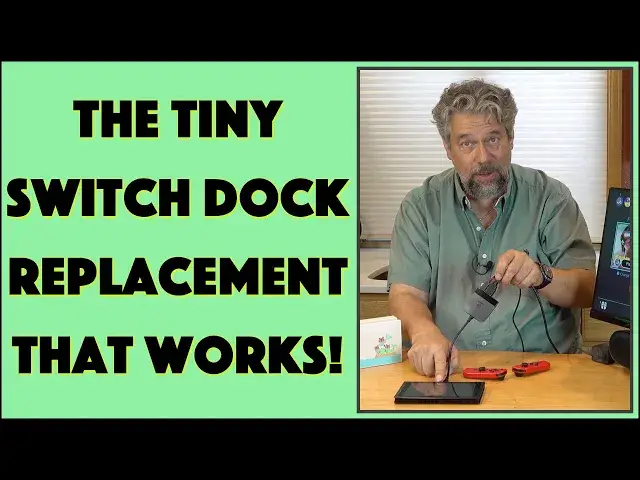
The Nintendo Dock works great if you want to play your Switch on your home TV, but if you travel, it's big, clumsy, and susceptible to damage. What if there were a much smaller solution that was easily portable and worked just as well? Imagine, you could play your Switch on hotel TVs and any other device you could access, even a big computer monitor. Enter the Hagibis Nintendo Switch TV Dock. Smaller than a pack of cards, this tiny device works great, as tech expert Dave Taylor demonstrates in this hands-on demo and review.
Check it out at: https://amzn.to/3PovVan
Then visit Dave's Q&A Web site at: https://www.AskDaveTaylor.com/
#switch #nintendoswitch #switchdock #dock #hdmi #hagibis #askdavetaylor
Show More Show Less View Video Transcript
0:00
Can this really replace this for your Nintendo Switch
0:03
Let's check it out. Dave Taylor here, and I borrowed my daughter's Nintendo Switch because I keep watching her travel with this
0:19
These are docks and they're really nice, but they're big and they're a little clunky
0:24
And I read about this company that makes a small device. this size that actually replaces the dock. And I thought, hmm, let's see if that's actually true
0:37
Now, this is the Hagebis switch dock, and it's a portable TV dock and charging station
0:44
And you'll notice on the front that it has three ports. And they are USBA
0:51
H-D-M-I, and USB-C. How does that work? Well, the USB-C, I have a Nintendo charger here
0:58
So we're going to go ahead and just plug USBC into the dock
1:03
And then we need HTML. Well, I happen to have a computer monitor here with no speakers
1:10
So I plugged in an external speaker. So let's see if all this works. HTML
1:15
So I'm plugging this in too. And now I can use USBA if I need to
1:21
You could, for example, I think hook up some speakers through that if you wanted to
1:25
But I'm not going to do that. I'm going to actually just do it right off of the display device as if it was a television with built-in speakers
1:33
And then there's USBC on the end. Now, all of this generally fits into the back of the dock, but we don't really want to do that
1:41
So I'm going to take her switch. This is not the switch light because the switchlight, hopefully you realize the difference, it doesn't have video out
1:51
So the switchlight ain going to cut it But let turn this on and look at that It is working and you saying interesting
2:04
Okay, and notice we also got the sound and I can use this as if I was just using regular old, you know, the switch or I was using it on a TV
2:16
And you can hear I have the volume up pretty loud. but yes, this is fully functional
2:23
This is working just fine. And I'm going to go ahead and bring up Fortnite
2:28
because Fortnite actually has theme music when it's in the warm-up screen
2:32
So let me just have a second here to get this screen on. And now it's loading, so it'll do that for just a little bit
2:40
It doesn't take too long on a good internet connection. And we should switch into Fortnite
2:45
and we should be able to enjoy the Fortnite music too. There we go
2:52
And so there's everything. I'm using the controllers from the switches perspective
2:57
It thinks that everything's hunky-dory and it's in a dock or something. And you could see, I guess if I go back to the home screen, let's bounce back there now
3:06
It is charging. You can see that little electrical bolt right next to the battery indicator
3:12
So all of that is happening. And what have I done here? I've plugged this in here
3:17
I have used the original. Nintendo Switch charger with USBC and I just have
3:25
HDMI going into a display device right I could just as easily have this into a TV I
3:31
could be in a hotel room and as long as I brought my own HDMI cable I could plug my switch or my daughter's switch into a huge TV in a
3:42
hotel and lay back and enjoy it or watch her enjoy exploring Zelda or something So it really a pretty remarkable device And obviously this size difference is ridiculous And not only that but these docks are expensive This is the Animal Crossing Special Edition dock
3:59
That's even more expensive. That's another story. Even the most generic dock is a lot more expensive than this device
4:06
Now, let me unplug it again so you can again see just how small this thing is
4:12
It's really remarkable. It's that big. That's it. So, what does it have
4:18
Like I said, it has HDMI out, and that's up to 4K at 30 hertz
4:23
That USB 3 port can do 10 gigabits per second, and it works with the Nintendo Switch or the Samsung decks
4:32
and other devices that can push video out through USBC. This might be worth trying out, too
4:39
I'm not going to promise anything. It is a 100-watt power delivery port from USBC to
4:45
the actual device. So remember, this is not a hundred watt charger, but it works perfectly well. And I could
4:54
use a more powerful charger if I wanted to, and that would charge the switch even faster
5:00
It does require external power. If you plug this into your switch and then you plug
5:05
HTML into a TV or any other display system or a projector, how fun would that be, right? It's not
5:12
going to work because you have to power the dock. That's really important. And they say at least
5:18
39 watts. So if you have like a little 20 watt charger for your tablet or something and you think
5:24
you can use it with this, it's just not enough juice. You're going to want to give it a little more
5:29
power. So use your original switch power charger. Works great as you can see. Now, this is also
5:36
the most muted of all the colors. There's six different styles and color combinations
5:42
Three of them have the the HDMI and the USBC switched So three of them are a little bit more square and in these three with the hdmi in the middle are a little bit sleeker so six different combinations so now you
5:55
wondering all right well how much is it i mean these docs they're pretty expensive so how much
6:00
is the cost to replace it with this little tiny gizmo and before we get there i'm going to ask if
6:06
you could subscribe to my channel a click or a tap on that subscribe button turn on notifications also
6:12
and we're connected great So this, turn it this way, this is the Hagebus switch dock, six different color combinations
6:22
1999 at Amazon.com. You heard me right, 1999. And when we bought it, we actually bought, I bought three
6:31
one for each of my kids, and we got it on Prime Day with 5% discount and everything. It ended up being
6:37
about $14 each. And now all three of my kids just have these in their
6:43
switch bags. So whenever they go somewhere, if they decide they don't want to play on this
6:48
little screen, but they have access to a bigger screen, they now have everything they need to make
6:53
that work. Way better. These docks are really nice. It's a really solid and reliable connection
7:00
But you know what? So is this. And look how much smaller it is. So that's all I got. If you're a
7:05
switch fan or if you have a Samsung decks, I'm not sure what that is, but if you have one of those
7:10
this is a really interesting thing to check out. I have a link. in my description. That's all I got. I better get this disconnected before I start ruining
7:19
my daughter's Fortnite Streaks. So I'll have to catch you in my next video
#Consumer Electronics
#Virtual Reality Devices
#Gaming Reference & Reviews