Up next in 10



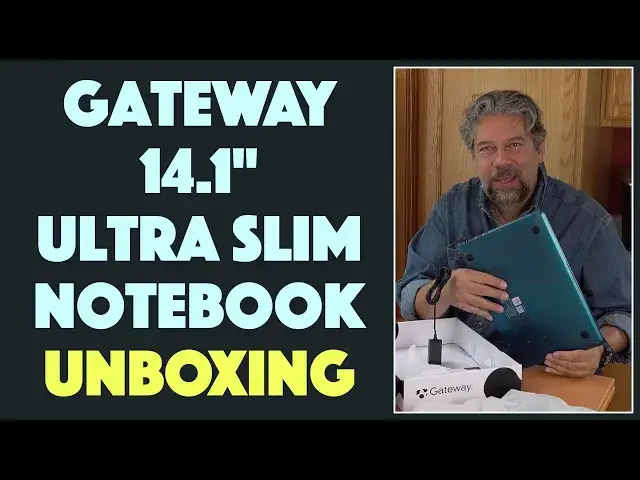
Gateway is back and they have quite a lineup of budget notebooks, tablets and 2-in-1 units, all sold exclusively through Walmart. Tech expert Dave Taylor of https://www.AskDaveTaylor.com/ got his hands on the brand new blue Gateway 14.1" Ultra Slim Notebook and here's his unboxing. What's in the box? That's what you're going to find out!
Check out the Gateway line at https://www.walmart.com/gateway/
Show More Show Less View Video Transcript
0:00
A Gateway notebook? What? Let's see what's in the box
0:11
Dave Taylor here and I'm checking out this. Yes, a Gateway notebook. Imagine that. So Gateway was a
0:18
big PC brand in the 90s. I even had a Gateway Tower. But then they sort of went by the wayside
0:25
and they stopped being available for sale. And then Acer bought the company some years ago and
0:31
now they've reintroduced the Gateway brand exclusively through Walmart. So they sent me
0:38
the 14.1 inch ultra slim notebook to check out and we're going to unbox it and see what's inside
0:44
So this is, like I said, the Gateway 14.1 inch ultra slim notebook featuring an Intel
0:51
i5 1 gigahertz CPU. But it's a multi-core so it can go up to 3.6 gigahertz, 16 gig of RAM
1:00
256 gig SSD, 14.1 inch LCD IPS display, running at a relatively low resolution of 1920 by 1080
1:10
But this is not intended to be a high-end laptop or notebook. This is the perfect thing to get your
1:16
kid who's stuck having to do class online or maybe you just need a second backup notebook
1:21
when the first one's not available. So let's actually go and look inside. And for that
1:27
we need an unboxing tool. So let me go ahead and cut the plastic. And then this is a pretty
1:33
tightly made box. Let's see if we can get it to open. Oh, looks like we're good. So I can now
1:38
safely close my knife. I do not want to cut myself. And let's see if we can open this up. Here we go
1:45
All right. So first thing we see is we see an info card from THX. So the audio system is tuned by THX
1:56
And THX is part of Lucasfilms. It's the same company that gives you all those awesome sound
2:01
effects and audio systems in movie theaters so that our favorite movies just sound fantastic
2:08
They actually can tune audio systems on other devices. What is audio by THX going to sound like
2:14
on a notebook? I don't know. But pretty cool. Now, let's see what else is in the box. And while
2:21
I'm doing that, I will tell you I asked them to send me a blue one. And they sent me a blue one
2:28
This is one nice looking computer. And I love the color. Holy cow. And it's not plastic. This is a
2:34
metal color. So that's really nice. Now, this features also Bluetooth 5.1. There's a fingerprint
2:41
scanner that works with Windows Hello. There's a one megapixel forward webcam. Yeah, I know. Your
2:47
phone probably has a better forward-facing camera. But this is not intended for selfies or anything
2:52
This is just for things like Zoom or Skype. All right. So 10-hour battery and tons of ports. We'll
2:58
get to the ports in a second. Let's just open this up and see what this baby looks like. All right
3:03
Well, more stuff to take off. And that's a very nice looking keyboard. It's a really smart looking
3:10
design. This is a computer no one's going to be embarrassed to crack open. And somewhere here is a
3:15
fingerprint scanner. It looks like it's right here on the edge of the touchpad. I'll have to experiment
3:20
with that. And I will do a separate review and demo of this unit. Right now, we're just looking at
3:26
what's in the box. But hey, what the heck. Let's see if this thing will turn on. And it does turn
3:33
on. It even gets the little Gateway logo on the screen. How delightful is that? So let's see
3:39
And it boots into Windows. And I don't know that I need to show you it booting into Windows. But
3:46
sure, we'll let it do that while I talk just a little bit. So on the left side are a bunch of
3:52
ports. So this has a Kensington lock for schools that want to buy this and make sure the laptops
3:58
don't walk away. That's what that's for. And then there's looks like a power plug, USB 3, HDMI
4:05
USB-C. Really interesting that they chose to include both of those. Still booting. And then on the other side, we have micro SD, a headphone jack that's really great
4:19
and another USB 3. Oh, hi, Cortana. I got a much better idea
4:30
Goodbye, Cortana. So I'll deal with all that later. But let me give you a close up. So again
4:38
on the left side, we have this is like HDMI, USB-C, USB 3.0, power, Kensington lock port
4:47
And then on the other side, if we switch to that close up, then you can see it's a micro SD slot
4:53
and headphones jack and another USB 3. So really nice setup here. So 13 inches by nine inches by
5:01
eight tenths of an inch, 3.5 pounds. So it's a little heavy, but you know, to really get those
5:08
super light notebooks, you have to pay a little more for their engineering. This is not what this
5:12
is for. So Windows 10 Home, I've given you all the port layout. Let's see what else is in the box
5:18
right? We can talk about the computer another time. So underneath this, we have some paperwork
5:26
Let's see, limited warranty, quick start guide, 50% off your first year of Kidomi. Don't think
5:35
I'll need that. And of course, the power adapter. So let's see what this looks like. And I will note
5:41
that that's literally all that's in the box. I mean, what else do you need in a notebook box
5:47
but comes with a very nicely designed power adapter and the prongs unplug or snap out. So
5:54
it's very portable. So that's a plus. Nice size, nice design. But my minus here is that they have
6:02
a unique and custom power plug. So I'm sure that plugs into this here. Yep. But the downside is
6:12
that so many laptops are using USB-C or something like that for power. And this really is one of
6:19
these situations where if you lose this adapter, you're kind of out of luck. So this is a pretty
6:25
darn important component here for this laptop. So not super thrilled with that design choice on
6:31
their part, but be that as it may, this is, let me turn it around so you can see the logo. This
6:38
is the Gateway Ultra Slim Notebook. Now, I want to tell you that the whole Gateway line from Acer
6:45
through Walmart starts at $179 for something that's essentially like a Chromebook. And you
6:51
can go up to $199 for a two-in-one, which is great. Then you can like pop the screen off and
6:56
use it as a tablet for $199. Pretty sweet. And you can go all the way up to about $1,000 for a full
7:03
15.6-inch laptop with lots of power and capabilities. Beyond the scope of what we're
7:08
looking at right now, obviously this is a little bit less expensive. But before we get to the price
7:14
I'm going to ask, can you subscribe to my channel, please? Just go ahead and click or tap on that
7:18
little red button on the lower right corner, and that way we'll stay in touch. And you'll know when
7:23
I finally post the demo and review of this computer, you'll get a notification for that too
7:29
Super helpful. Now, this lovely blue computer is the Gateway 14.1-inch Ultra Slim Notebook. Comes
7:37
in this blue or black or green or rose gold exclusively through Walmart. And this one is $479
7:48
Or Walmart does have a financing plan where it will cost you $45 a month for 12 months. I will
7:54
note that that's a 20% APR. So you're paying about 80 extra bucks for your laptop to have
8:00
them finance it for you. If that's what you got to do, that's what you got to do. $45 a month is
8:05
pretty painless. Either way, you can check it out and learn a lot more about this and the full Gateway
8:10
line at walmart.com slash gateway. And as for me, I'm going to get back to chatting with Cortana and
8:17
configuring this unit so we can run it through some tests and see how this thing really works
8:22
So with that, I'll hope to catch you in my next video
#Laptops & Notebooks
#Consumer Electronics
#Mass Merchants & Department Stores