Up next in 10



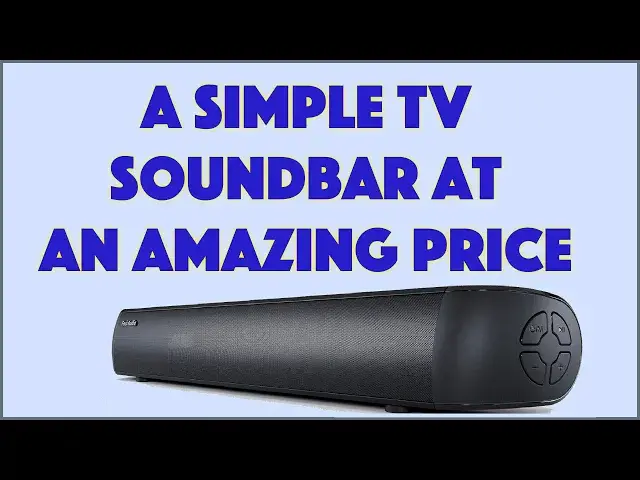
Turns out you don't have to spend hundreds of dollars for an entry-level TV soundbar. The Fosi Audio A3 40W Soundbar includes Bluetooth, Optical, HDMI ARC, even USB input and it will definitely sound better than that tiny speaker on your TV or computer monitor. Tech expert Dave Taylor checks out the Fosi Audio Soundbar and finds that there's a lot to like, particularly at its rather astoundingly affordable price.
Check it out at: https://amzn.to/43xEWWP
Visit Dave's Q&A Web site at: https://www.AskDaveTaylor.com/
#fosiaudo #soundbar #budget #tvsoundbar #askdavetaylor
Show More Show Less View Video Transcript
0:00
It's a mini soundbar with a mini price. Let's check it out
0:11
Dave Taylor here and I'm checking out this. This is the Fossi Audio A3 40 watt Bluetooth soundbar
0:18
and it's pretty darn sweet. It's also ridiculously inexpensive. We'll get to that though. Now
0:24
let me tell you that it is small. It is designed for small TVs or even computer monitors or
0:31
something. This size works great. You can see that sort of relative ratio of sizes. I don't
0:36
know that I'd use this with a 75 inch TV or something, but you're probably going to want
0:41
something a little bit more sophisticated. This is really about giving you lots of features
0:47
at a really amazing price. We'll get back to the price in a bit. Now, let me show you that in
0:52
addition to having all of these different input ports and this closeup shows you we have HDMI
0:59
USB-A, optical and AUX line in and of course DC power, but it also has wall mounts and it even
1:08
includes the screw kit so you can actually mount it on the wall underneath your probably modest
1:14
sized television. One place this would be great is in a bedroom. Now, I've already hooked it up
1:20
with this system and let me just get these wires to be neat. It is via AUX onto my TV here and I
1:30
have a device hooked up so we can actually go and let's see if I can get this to work. Let's go see
1:39
here and here and play and with any luck we will be able to watch Pulp Fiction
1:51
And unfortunately, we're starting with ads, but let me tell you one of the things that you get
1:56
with this is you get a remote control, but first let's just mute the ads. So let me tell you here's
2:05
the remote control and you can see it's pretty straightforward and easy to use and the most
2:10
important thing is that it has different input options along the top and bottom. So there's four
2:15
on the top and one stuck on the bottom. Not sure why they don't have five along the top, but that's
2:20
their design. And then you have these different EQ settings. It is five EQ settings, bass, music
2:28
movie, game, and news. And the difference is the relative bass versus center or sort of mid-range
2:35
And that mid-range can be a game changer because all of a sudden you'll be able to hear the audio
2:41
you'll be able to hear the dialogue, you'll be able to hear what people are saying rather than
2:46
it being 90% sound effects and rumbling and music and then you can just barely hear the person
2:52
talking. That's not so good. And it looks like we are in the Miramax part here. So we're just
2:58
about to start the movie. So let me unmute it and we'll get back here. So it'll jump right into some
3:08
dialogue and we're not going to go too far down the film here. Unfortunately, it's a totally great film
3:13
absolutely worth watching. But while that's happening, let me tell you, oh here we go
3:19
and I can change the volume. And it gets pretty loud and I can change EQ modes
3:34
Right. So that's movie, this is bass, this is news, and probably shouldn't have that language
3:42
here, but we'll just let that slide and let's go ahead and pause this. I don't want to get in
3:49
trouble with the YouTube gods of having a movie I don't have permission to show you. So right
3:54
so that's this, the remote control. There are duplicated functions on the side here, those four
4:01
buttons. Probably you'll never use them, but if you lose your remote control, it is really nice
4:06
to know that you have that as a backup. And of course, I can also switch to things like Bluetooth
4:12
and watch the front. So now it's switched to Bluetooth and so now I'm going to grab my phone
4:17
did you hear it even said Bluetooth? And let's just play some music. And I'm going to turn it way up on my phone
4:29
To point out, it gets pretty loud and let's see, I think I could turn the volume down
4:36
on the soundbar. And that's generally when you have a source that has a volume control
4:43
and a playback device that has volume control. It actually tends to work best to turn the volume
4:50
up on your source and then down on the speakers. That's what we just did. That minimizes all the
4:56
distortion you can get, but don't turn it all the way up on your source. That will give you
5:00
distortion. That's not what you want. Okay, we don't want to talk about audio. Suffice to say
5:04
it has Bluetooth, it has AUX in, it has HDMI in, but not HDMI out. So you can't use it as a
5:11
pass-through. You'll have to have a TV that has the right setup, including ARC, or you can use
5:17
optical. And let me just show you, it comes with a RCA to 3.5 millimeter jack. This is very common
5:25
especially on older TVs, is that your audio out, and then that is AUX or audio in for this
5:32
And then here's that wall mounting kit. Very nice. And it comes with an optical cable
5:38
which is a sort of interesting connection on each end. If you have the option of optical
5:43
connectivity with your television, that is the way to go. It's going to give you the best quality
5:47
sound. And it also includes a 3.5 millimeter to 3.5 millimeter AUX cable, which I'm actually using
5:55
right now to actually have this hooked up to my TV slash monitor. And let's go all the way back
6:01
here to home. Let's see. I guess we'll just leave it there. So at least that's a little more
6:12
visually interesting, right? So let me tell you, let's see. So Bluetooth 5.0, which is the latest
6:18
version of Bluetooth. So that's great. Gives you more range and better connectivity. HDMI ARC
6:23
optical AUX, USB-A. We already looked at that. The front display, the side controls, the remote
6:30
control, the wall mount. We covered everything. Oh, dimensions. It is 3.3 inches deep, 2.5 inches tall
6:38
and about 18 inches long, and it weighs about three pounds. So it's not necessarily something
6:44
you'll be toting from room to room, but it's pretty darn easy to work with. And if you have a
6:49
TV sitting on your chest of drawers in your bedroom, it's easy to have this sitting right
6:54
underneath it. It needs its own power. So you'll need two power outlets, one for this and one for
7:00
your source video device. But that's pretty easy. And that's really everything. All we need to talk
7:05
about is the price. And I promise you'll be blown away by the price. But before we get there, I'm
7:10
going to invite you to subscribe to my channel. Go ahead and click or tap on that subscribe button
7:15
And don't forget to also do that with the little bell icon so you get notifications of new content
7:22
And if you appreciated and liked this video or found it valuable or helpful
7:26
always appreciate a like or a thumbs up. Great. Thank you. Now, this plus the remote
7:32
is the Fossi Audio A3 40-watt Bluetooth soundbar. And it is incredibly $39.99
7:40
currently minus 10%, dropping it down to $35.99 at Amazon.com. That is a no-brainer way to
7:48
significantly improve the sound of your computer display of your small TV. I will just tell you
7:56
no TVs are designed for you to use them as the only audio out. Every modern TV, even little guys
8:03
are designed for you to plug in an external speaker. This is the lowest cost, simplest
8:10
easiest way to start moving your way into that world. And then from here, you can go to hundreds
8:15
or thousands of dollars for huge 7.2 audio systems and stuff. But this is a nice 2.0 soundbar
8:24
And it's a nice first step. And it's definitely could be great for a dorm room or something too
8:29
And that's all I got. So I'm going to go back to Pulp Fiction because it's totally worth watching. And I hope to catch you in my next video
8:59
Transcribed by https://otter.ai
#TV & Video
#Online Video
#Consumer Electronics
#Audio Equipment
#Media Streaming Devices
#Virtual Reality Devices