live_tv
Livestream Starting Soon
00
Hours
:
00
Minutes
:
00
Seconds
Up next in 10



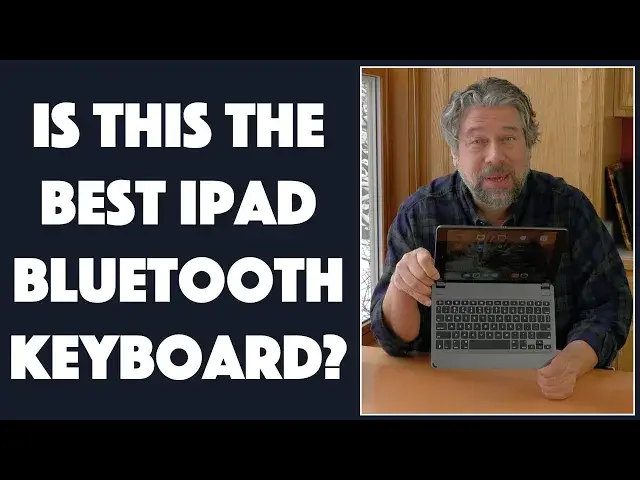
Love your iPad but hate the on-screen keyboard? Makes sense, it's okay for typing in a word or two but if you're doing any meaningful writing, there's not much that beats an actual keyboard. Which is why the BRYDGE Wireless Keyboard line is so cool. Tech expert Dave Taylor of https://www.AskDaveTaylor.com/ checks out the BRYDGE Wireless Keyboard for the 10.2" 7th Generation Apple iPad and finds that it's a great addition to your iPad accessory set.
However, it has some limitations you should know about before you buy one, not the least of which is its rather hefty price tag. Dave explains...
Done watching? Check out the keyboard at https://www.Brydge.com/
Show More Show Less View Video Transcript
0:00
A full Bluetooth keyboard for your iPad
0:02
Let's check this out. Dave Taylor here, and I have the new Apple iPad 7th generation
0:17
So, this is a 10.2 inch screen. Not to be confused with their 9.7, 10.5, or 11-inch screens
0:25
That's a lot of subtlety. It's very confusing, Apple. Why don't you just have like two different sizes of iPads and be done with it
0:32
But don't forget that mini. I love my iPad mini. Separate conversation
0:36
Anyway, so I have the Apple iPad and one of the things that's really nice is it's really good for consuming information
0:44
But if you want to create things, it's pretty darn tedious to type on screen
0:49
Enter this. This is the bridge wireless keyboard for the 10.2 inch seventh generation iPad
0:57
And as you can see, it's really just a keyboard, and it has these two little clamps on the end
1:04
And it turns out to be nice and easy. You just take your iPad and you gently put it in those two holders
1:12
And it turns out that the way the screen works, you can see here once you get it positioned properly
1:19
it's positioned just so the edges of these actually are the same as the edge of the screen
1:26
so you don't lose any screen real estate at all. Now, the keyboard's particularly interesting for a lot of reasons
1:32
one of which is it's obviously designed for iPad OS. So there's actually specific keys on here for your iPad
1:41
But before we get there, I just want to show one super important thing
1:44
that becomes an issue for some buyers is when I have this on my iPad
1:50
it doesn't actually offer much in the way of protection. So they actually tell you you can't use a screen protector, so you can't put something on the front of it, but the entire back is fully exposed to the world around you
2:05
Now, the overall profile is certainly very slim, but if you want a super slim laptop, maybe you should buy a super slim laptop
2:14
But anyway, so it offers lots of great functionality. It's very well thought out and well designed, but as I said, there's no getting around
2:24
the fact that it doesn't actually come with a fully enclosed case
2:28
Now, for some people, that's a real shock. And when they get their bridge wireless keyboard they love the keyboard but then they like I kind of thought it was an all case so that a really important thing for me to start out with so if that what you looking
2:44
for that's not what they offer but then again the apple smart keyboard for the same iPad also
2:51
doesn't offer any protection on the back at all it's really a foldable keyboard that just fits on the
2:57
front just as this one does though its design is a little different so with that and
3:02
Let me just pull this off for a second so you can get a better view of the keyboard itself
3:07
And let me give you a close up because it's pretty important to look at all these keys
3:12
But this is a one piece of aluminum body with 1.2 millimeter key travel
3:17
So it actually is an actual keyboard and when you push a key, you can feel it
3:23
And in fact, the iPad's like, why are you pushing the J key
3:26
Works with Bluetooth 4.0, which is fine. Bluetooth 5.0 is the latest standard
3:32
But for something like this, you don't have to worry about issues like latency and stuff
3:36
So no big deal. The hinges give you a lot of viewing angles, whatever your preference is
3:43
So if you want to have it sitting on your belly while you're laying on the couch, they got you covered
3:48
The keys are backlit. This is really cool. And there's three levels of backlight
3:53
One of the many function keys along the very top is the backlight
3:57
And you can just push it and it goes from off to load, medium to hide off, obviously, in a side
4:02
cycle. It also gives you easy access to like setting the brightness on your iPad itself
4:08
Really, really nice. So in fact, the iPad OS specific keys include a home button, which at any point is the same as pushing the home button on the iPad itself, and it has a power button
4:22
And obviously, this needs to be charged. So the power button also has a tiny LED to show you if you need to charge it
4:30
and then when you are charging it, and how do you charge it? Micro USB in the corner
4:35
Plug it into any USB charger. Takes a couple of hours, and they say the charge will last a year
4:41
I haven't tested that. It's a long time to be using a keyboard
4:45
but suffice to say that it should certainly give you a couple of months of use, and then just every once in a blue moon
4:51
just remember to plug it in overnight and you'll be good forever, right? So automatic switch off
4:57
Another really important feature is that if I'm used, using this and I then just say well I done So I going to close it up and I going to go do something else It turned off So that how they get this phenomenal battery life And you don ever have to worry about turning it on or off In fact opening this up automatically turns on the keyboard just as it wakes up the iPad for most situations
5:23
And I will log in. Let's see. I can log in through the keyboard and now I'm in and then obviously I can go to something like pages and here I am in pages and I can just type in what I want
5:37
So, oops, it logged. Ah, I think I hit, accidentally hit the lock button
5:43
That was not good, although it was a good demonstration. So, it's a nice keyboard
5:52
Is it as nice as a full-size Mac keyboard or something? No
5:56
But is it better than that on-screen keyboard on your iPad? Oh, heck yeah
6:01
If you're going to be using this to be doing school work or actual work
6:06
or even just doing research or something. This is so hugely better
6:10
This is my daughter's setup too, actually. So she's in 10th grade, and she adores this thing
6:16
She loves this keyboard because she's been suffering through just typing on the iPad
6:22
which is kind of crazy. And, you know, why that you would ever need to do that
6:26
but that's just my bias. So we hooked this up. We got it all to all configured
6:30
And she was just like, oh, my God, this is amazing. And it really is a pretty cool piece of engineering
6:36
So, you know, there's a lot going for it and there's a lot to like about it as long as you understand its limitations
6:43
One, it's not directly interfacing with the iPad and there's three dots on the top of the modern iPads because that's how the Apple smart keyboard interfaces
6:54
Why other companies can't reverse engineer and use the same connector? I don't know, but you end up with Bluetooth, which is, you know, functionally probably identical
7:03
Works basically the same. Maybe it's a little smoother because I don't think the Apple keyboard needs separate charging
7:09
because it just taps power right off of here. But that means your iPad battery is being drained
7:14
So there's your tradeoffs. However, I will say that the bridge is on the high end for third party keyboards for the Apple iPad
7:23
This is, well, hang on, before I tell you the price, let me ask if you can subscribe to my channel
7:29
I really appreciate when you do. And I'm pretty straightforward and honest with my reviews
7:32
So please go ahead. up and will be friends forever. So the bridge keyboard
7:40
And they have them in all different sizes for all different types of iPads
7:44
Comes in silver or space gray or gold. You probably want to match the color of your iPad As we did here you can see they almost exactly the same color very nice is 12999 at bridge now that pretty expensive because less than more
8:04
and you can have the actual Apple a sort of advanced keyboard and so then it gets to the question
8:10
of is this worth $130 when for just a smidge more you can get the Apple solution and the answer
8:17
is you really want to try them both. And I know that's hard to do because nowadays, there aren't
8:22
that many stores that stock this sort of stuff. But I think Bridge did a really great job for what
8:28
they did. I'm just a little surprised it's as spendy as it is because the Apple solution is only
8:33
just a little bit more. And generally in the Apple ecosystem, they're at the top end and everyone
8:39
else fills in the space below. And you can certainly get what looks like an Apple smart keyboard
8:46
sort of case for your iPad for like 50 bucks on Amazon
8:52
Is it as good? Does it work as smoothly? Is it as elegant? Is it as good as the bridge keyboard
8:57
Probably not. But 50 bucks versus 130 bucks versus 150 bucks, we don't all have an infinite amount of money to buy every single thing
9:06
that has an Apple logo on it. Right? I know you agree with me there
9:11
So my assessment, all in all, of the bridge keyboard, is that it's a really great solution
9:17
It's a really solid option for my daughter with her schoolwork and everything
9:21
It's a little on the spendy side, but the bigger issue is just make sure when you get it
9:26
that you know it's not protecting your iPad at all. It's a keyboard that you're adding
9:32
so you have more functionality for your iPad. So if that's a big issue
9:36
then that's something you want to compensate for or something you want to really think about
9:41
Again, the Apple Smart keyboard has that very same issue. look at your options. If this is a good choice, then the keyboard itself is really nice. You can
9:51
definitely type pretty fast on this. It has a really nice feel, and that 1.2 millimeter key travel
9:56
is a solid thing. So with that, I think I shall go back to my Great American novel, which I'm
10:03
not actually working on, but we'll just rodent with that. And that means that I'll catch you
10:08
in my next video
#Consumer Electronics
#Product Reviews & Price Comparisons