Up next in 10



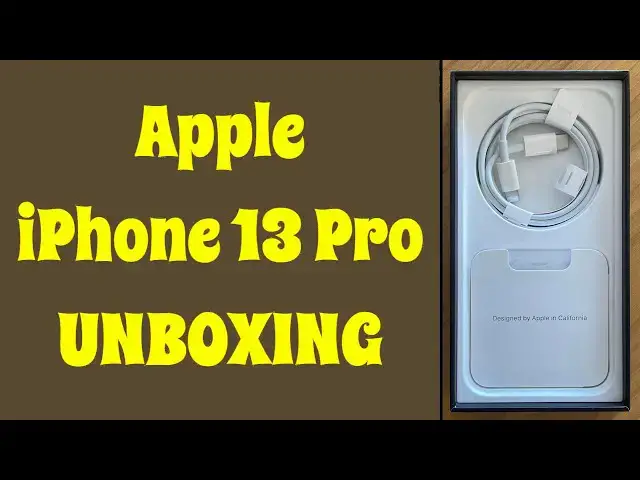
When a brand new Apple iPhone 13 Pro shows up at the office, what's a techie to do but unbox it? Tech expert Dave Taylor pops open the box and shows you everything that's inside from Apple. It's... less than you may think. But, oh, that beautiful phone...
Check it out at: https://www.apple.com/iphone-13-pro/
Check out Dave's Q&A Web site at: https://www.AskDaveTaylor.com/
#iphone13 #iphone13pro #unboxing #askdavetaylor
Show More Show Less View Video Transcript
0:00
My iPhone 13 Pro. Let's unbox it
0:02
Dave Taylor here, and my iPhone 13 Pro just arrived
0:14
Yay, UPS. It didn't show up at the last possible minute, which means it's time to unbox it and see what the heck's inside
0:22
Now, I ordered the iPhone 13 Pro, and let me tell you a little bit about it as I unpack this
0:30
It features an A15 Bionic six-core CPU, comes in four different configurations, 128 gig, 256 gig
0:40
512 gig, and one terabyte, and it does indeed look like I do have an Apple product in the box
0:48
Ah, let the heavenly choir sing. This is the Sierra Blue. It's a kind of light looking
0:53
picture here, but it's the Sierra Blue iPhone 13 Pro. So, it features a 6.1 inch Super Retina
1:01
XDR display at 2532 by 1170, 460 pixels per inch. That is really high density
1:10
This should be a really crisp picture. It's 1000 to 1200 in HDR mode, and it's brightness
1:16
and it's IP68. So, I really like that these modern smartphones are making them a little
1:22
bit more tough. So, I don't see anything else of interest in here. So, we shall fling that
1:27
because this is the unboxing we really want. So, now you can see all of the beautiful sides of it
1:35
and everything. Let's open it up. Now, I have my opening knife, but I don't think we need it
1:39
because Apple has a tendency to design things really well. So, let's pull that off. Let's pull
1:46
this off, and I think it's ready to open. So, let's open this baby up. Ah, there we go. Okay
1:53
so now, of course, with an unboxing, you want to know what's in the box. So, this iPhone 13 Pro
2:00
4252 milliamp hour battery, which compared to my iPhone 12 Pro, is a big jump. That was only
2:07
a 3600 milliamp hour battery. So, everyone's saying these things have great battery life
2:14
and it has 12 megapixel cameras all around. So, the front-facing camera, which you can't see yet
2:19
because I have the paper on it, is 12 megapixel. And then on the back, there are three 12 megapixel
2:25
cameras, telephoto at f2.8, wide at f1.5, and ultra wide at f1.8. So, it's a lot of camera going
2:35
on here. And then, a nice screen. This is a really beautiful phone. So, it features a ceramic shield
2:43
front and a textured matte glass back. The texture and everything on the back is really beautiful
2:50
This is a really nice looking phone. The extension for the cameras is pretty hefty. There's a lot
2:57
sticking out there. I don't know if you can see that, but this is going to be a phone that probably
3:02
is going to do well with a case with a cutout, because then that'll sort of even out the back
3:07
It does support dual sims. You can use a nano or an e-sim or both. And in terms of dimensions
3:13
let me power this up while I'm talking. Let's see, do we get the Apple icon? There we go. So
3:22
it's 5.7 by 2.8 by 0.3 inches. The whole phone's about seven ounces, and it's pretty spendy. But
3:31
I'll get to the price in just a second. While this is waking up, let me show you what else is in the
3:36
box, because we did talk about unboxing, right? All right, the second thing in the box is a
3:42
lightning to USB-C charging cable. So, it also works with Qi wireless charging, as you would
3:51
hope it would do. And this gives you that other option. And I'm pretty sure we're going to pretty
3:57
soon see iPhones with USB-C and lose lightning. I wouldn't mind that. I'm not a huge fan of
4:03
lightning connections, although it's better than the old 20 pin. Remember those? Yikes
4:07
And then what else is in the box? You know, that's kind of everything in the box. The only
4:12
other thing is this tiny little envelope. What's in the envelope? Documents. So, let's see, what
4:19
documents does it ship with? First off, an Apple sticker. Who doesn't need an Apple sticker when
4:24
you just bought a thousand dollar phone? And then there's the iPhone. This looks like some
4:32
terms and legal issues. And then there is a SIM removal tool. And that's it. That's everything in
4:38
the box. This is the, you know, super streamlined box that Apple's doing now, where they put almost
4:45
nothing in there on the assumption that you probably already have everything you need
4:49
And I will admit, I have a lot of wall chargers from previous generations of phones. And remember
4:54
you trade in your earlier generation phone to get the new one, you generally don't have to trade in
5:00
your charger. So it just travels from the old phone to the new phone. However, this phone
5:05
the iPhone 13, you're really going to want to get some high wattage chargers. So if you're using
5:12
and you're able to plug it into like a 15 watt charger, then you're going to get a much faster
5:17
charge than if you use an old ancient five watt wall plug. So, you know, have a double check and
5:22
see what you've got there. So it looks like I have my phone, I can select my region and everything
5:29
I'm not going to show you me setting it up. It's gonna take a while, but suffice to say, I am
5:35
pleased. This is a nice device. It has a nice feel to it. It's a smidge on the heavy side
5:40
but there's an amazing amount of tech inside of this device. So price wise, it is $999 for the
5:48
128 gig, $1,099 for the 256 gig, $1,299 for the 512 gig. And if you're the kind of person that wants
5:58
a terabyte of storage on your phone, then you can get an iPhone 13 Pro with one terabyte of internal
6:06
storage for $1,499. That is a lot of money for a phone. This also, you can get it for AT&T or Sprint
6:15
or T-Mobile or Verizon. I'm an AT&T user and that's what I'm going to do. And they have this
6:21
great quick start system. If you have your old phone and your new phone, you can put them next
6:25
to each other and all the data will stream across. It's very slick and faster and better than just
6:31
trying to use iCloud. So I've got some installation to do. I hope you found this interesting. Go ahead
6:37
and give me a subscribe. Hit me up with a thumbs up or a comment. Tell me if you're getting an
6:42
iPhone 13 Pro and what color you got. So that's all I got. I'll hope to catch you in my next video
#Gadgets & Portable Electronics