Up next in 10



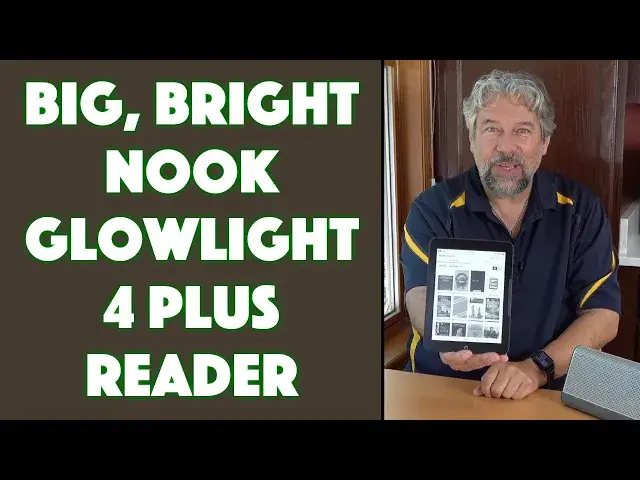
The NOOK GlowLight 4 Plus features a huge 7.8" display at 300ppi with 16 gray levels, IPX7 waterproof protection, and audio features. Yes, this unit includes Bluetooth and a 3.5mm audio jack so you can enjoy audiobooks from your Nook in addition to eBooks. Avid reader and tech expert Dave Taylor checks out the Barnes & Noble NOOK GlowLight 4 Plus and finds that there's a whole lot to like about it!
Check it out at: https://www.BarnesAndNoble.com/
Visit Dave's Q&A Web site at: https://www.AskDaveTaylor.com/
#nook #ebook #reader #barnesnoble #glowlight4 #glowlight4plus #askdavetaylor
Show More Show Less View Video Transcript
0:00
This is the latest e-book reader from Barnes & Noble
0:02
Let's check it out. Dave Taylor here, and I'm checking out this
0:13
This is the Nook, Glowlight 4 Plus ebook reader from Barnes & Noble
0:18
Now, the name didn't change much, but the technology has definitely changed since the glowlight 4
0:24
Most obviously, the glowlight 4 had a 6-inch screen, and this is a 7-inch screen. and this is a 7.8 inch 300 pixel per inch 16 level gray scale screen running at 1404 by 1872 pixels
0:39
So it is bright. It has a high density. There's a lot of gray scale. And it is still that e-ink
0:46
So this thing, when you charge it, you're going to be able to read your books for anywhere from three weeks to a month without having to worry about recharging
0:53
Really nice. Now, another big, big addition here is. it adds audio circuitry. So it has built-in Bluetooth. So you can pair with a pair of headphones
1:04
and listen to an audiobook. Or what I really like is it has a 3.5 millimeter jack so you can
1:10
plug in a speaker and you can actually listen to an audio book through a speaker. We'll do that
1:15
in just a second. Now, the Bluetooth's a fairly old version, Bluetooth 4.0, but I think they chose
1:21
that because it's very low power. And it's still going to work fine if you're within like 15 or 20 feet
1:28
of your device, you'll be great. So IPX-7 waterproof, yes, you can read in the bath and if you
1:34
accidentally drop it and it slips into the tub, then rinse it off and let it dry 100% fully
1:42
especially that USBC charging port. Make sure that's completely dry before you try to use it. But it
1:49
is waterproof. It is very nice to think that if someone knocks you and your dacquery goes all
1:56
over this, just rinse it off and you're good to go. Now, part of the way they did that is they
2:00
actually redesigned the screen So it is a solid screen There no edges or ridge or anything to collect dust So it actually also is going to work really well at the beach It is a flush front
2:16
It is a glare-free display. It's a little hard for you to tell on my camera
2:20
But it also, importantly, has glow-light illumination and night mode. And the way I always set it up is I turn the brightness up pretty high
2:29
And then I turn on night mode so that at sunset it goes into a sort of arm
2:35
orangey color and then at sunrise it goes back to that white color and that's really good for your eyes
2:42
It makes it easier for you to sleep at night, all sorts of positive things
2:46
Now, one of the other advantages this has over a, for example, Amazon Kindle is that in addition to that swipe gesture
2:56
it also has physical buttons on both sides, left or right-handed. So you can also just go to the next page by tapping on that. In fact, let's go into one of my
3:05
books and very typical e-ink experience and then I can just click to go to the next page and go back
3:15
super easy or I can just do swiping I actually prefer swiping that seems to me a little bit more
3:21
of a normal gesture but you're good either way so really nice 32 gig of storage also means that you have
3:29
a ton of space for books obviously audiobooks take more space so you're not going to be able to have
3:35
hundreds of audiobooks, but if you have two or three of your favorite audiobooks and a dozen or two
3:40
titles, actual e-books, you're going to have crates a space. It's going to work out really nicely
3:45
Battery-wise, it's a 2,500-m-amp-hour battery, which, like I said, gives you somewhere between
3:52
three weeks and a month of typical reading, and if you listen to audiobooks takes a lot more juice
3:58
it's going to run nine to ten hours with an audiobook, and when you are ready to charge it
4:03
There's nothing, no buttons or anything on the top or on the left hand side, on the right hand side is a power button
4:11
And then on the bottom is USBC and that 3.5 millimeter jack
4:16
That pretty much everything here So 7 inches by 5 inches by 3 tenths of an inch 10 ounces it really light There a lot to like here I really think you need a cover for it
4:29
but I have a pre-release version of the unit, so don't quite have those covers out yet, but they will
4:36
By the time you can pick up one of these, you'll be able to pick up a cover for it. Now, let's have a little fun with this. So the first thing I'm going to do is I'm going to plug it into a speaker
4:45
and it looks like it just powered off so I'll have to wake it up again so I'll let you see what I'm doing so you push the nook button and then you slide and then I'm going to choose an audio book and there we go so I can change the volume
5:02
at least here in her and I don't have the rights to actually let you listen to this audio book but you can see the user experience is pretty straightforward you can change
5:15
playback speed it goes all the way from half speed to 3.5x speed I would be
5:23
pretty amazed if people could process information that quickly but you have the
5:27
choice you can also this is really cool set a sleep timer so if you find that
5:33
you fall asleep while listening to your audio book in the evening you can just say
5:37
play for 15 30 45 minutes till the end of the chapter and then turn off so
5:43
So instead of waking up and finding out, oh, you finished the audio book and didn't hear any of it, you can just say, give me 15 minutes
5:50
And then if you're still kind of awake, you're having a tough evening or something, you can put on another 15 minutes
5:56
So that sleep timer is very cool. And that's pretty much everything with audiobooks
6:03
If I go back and we go to a regular book. And again, you can do both of these super easily
6:10
And then very typically, if I tap at the top, then I can tap on the uppercase, lowercase, A
6:18
And then it gives me access to a lot of controls that let me change typeface, let me change type size
6:26
let me change spacing between lines all of those things that make e so much more flexible than a regular book And that pretty much all I got for you It really straightforward Pairing Bluetooth
6:41
you just go into settings, Bluetooth, and then turn on, like my headphones, just put it into pairing
6:47
mode, it'll show up, and you choose it, and boom, you're done. And now it's going to be ready
6:51
to go. Every time you turn it on, it'll automatically reconnect. So if you want to do little
6:57
earbuds that are wired, that's also an extremely viable option. Again, you got that 3.5
7:03
millimeter, so it's really easy to deal with. So lots to like here. I think this is a really nice
7:10
device, and I think that there's a lot of really good ebook readers out there, and this is definitely
7:16
one to check out. And, you know, if you're like me, someone who's reading all the time
7:22
having this in your bag or in your backpack or just sitting in your car or something is a huge win
7:29
So that's everything I got. Definitely one to check out. Now, we do need to talk about the price
7:35
So let's get there too. Now, before we get to the price, go ahead and click on that subscribe button if you'd be so kind and subscribe to my channel
7:43
Really appreciate when you do that. Now, this is the Nook, Glowlight 4 Plus, ebook reader from Barnes & Noble
7:52
and it is $19999 at Barnes & Noble.com. I expect it will show up on other sites
7:59
and it might show up with a slight discount, but that puts it at about 50 bucks more
8:04
than the glow light for. And honestly, for the larger screen, for the audio capabilities
8:10
and for the waterproof feature, all of that is a no-brainer upgrade
8:15
So definitely wanted to check out. I'm going to go back to my book
8:18
so I'll have to catch you in my next video
#E-Books
#Audiobooks
#Gadgets & Portable Electronics