Up next in 10



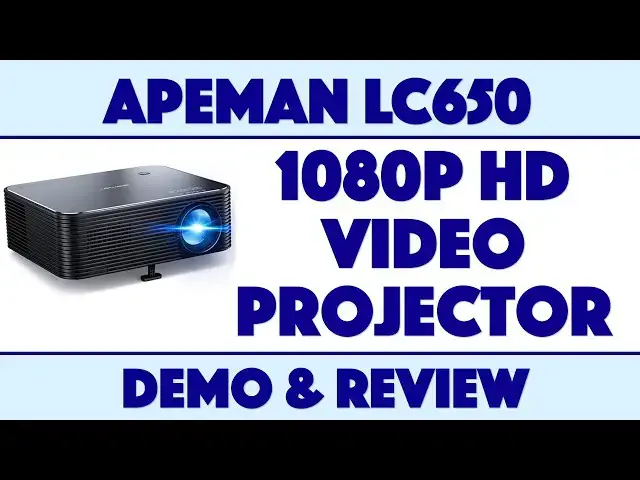
Want to turn a wall in your house into a movie screen? Or maybe project a movie onto your garage door so the neighbors can enjoy too? Tech expert Dave Taylor of https://www.AskDaveTaylor.com/ checks out the Apeman HD Video Project LC650, featuring 6000 lumens and native 1920x1080 1080p HD resolution. It's pretty big, but it packs a very nice projection system, as he demonstrate in his demo and review.
Learn more about it: https://amzn.to/3aLWy5s
Show More Show Less View Video Transcript
0:00
An HD video projector for around $200? Let's check this out
0:12
Steve Taylor here and I'm looking at this. This rather substantial piece of electronics
0:17
is the Apeman HD video projector LC-650 and it's pretty darn nice. It is big but that's because
0:25
they've really engineered it well. It also puts out a lot of brightness and there are so many
0:32
small micro projectors that are like you know the size of a Rubik's cube or even smaller the size of
0:38
your cell phone and they just don't have much brightness. They put out 100 lumens, 200 lumens
0:44
and what that means is you can project a very small image in a very dark room and that's about
0:50
it. But this, this is almost at a professional level. This puts out 6,000 lumens which is nice
0:56
and bright. This means you can project this onto the wall of your house or onto your garage door
1:02
and it's going to look pretty darn good. You know can you make it the size of a billboard on the
1:06
sides of a road or the side of the road? No, it's probably not that bright but it is definitely
1:10
bright enough to work really well in a house or in a small office situation and of course this is
1:17
great for offices. So you want to put something in your conference room so people can project
1:22
their presentations while you're falling asleep because presentations, keynote, powerpoint, aren't there better ways to do things by now? But whatever the case, this is super easy to
1:32
work with. You can even have it mounted upside down. There's a way you can mount it. They sell
1:37
a kit. You can mount it upside down from the ceiling, change a setting so it inverts the image
1:43
and then you're good to go. Now one of the challenges with these is what's called
1:47
keynote and that is when you project an image instead of it being perfectly square it ends up
1:53
being sort of at a weird, I don't know, parallelogram. It's not even a parallelogram, a weird rectangle
1:59
shape right and that happens because instead of me projecting it perfectly square on, I tilt it up
2:06
right so it's on the table but I want it to be a little higher up on the image. So one of the
2:11
things that 8-Man included in their remote control is keynote adjustment and it's, or sorry
2:18
keystone adjustment. That's the word, keystone, right? So it's super easy to work with. You use
2:25
the ring to dial in the focus. You use the remote control to adjust keystone and you're good to go
2:31
however weirdly you're projecting it. But let's talk some specs real quick then I'll talk you
2:36
through the cables and then we'll switch to giving you a demo of how this all works. Pretty slick
2:41
Now super important, its native resolution is 1080p at 60 hertz. That means it's 1920 by 1080
2:49
and it can do 60 frames per second. Now there are a lot of projectors that say they can do 1080p
2:56
or HD or 4k but the question is what's their native resolution because having the projector
3:02
accept a higher signal and then push out a lower resolution signal is not really kind of doing all
3:09
that super high fancy stuff, right? So there are definitely projectors out there that say that
3:14
they're 1080p HD and then you read closer and it's 720 or something. So this is native 1080p at 60
3:23
hertz. So that's really nice. It's going to look like probably your TV if you don't yet have a 4k
3:27
TV. Like I said, 6000 lumens, super bright, keystone correction, the optics are sealed
3:34
That's part of why this is big. It's a sealed optical system so it doesn't have any issues with
3:40
collecting dust which is obviously important if you have this stuck on your ceiling for months or
3:44
years on end. Dual stereo speakers. It actually has decent sound, not amazing sound, but considering
3:52
that its primary purpose is to project a video image, the sound is entirely acceptable and usable
3:58
and the fun part is really the remote control. Now this remote control has a lot of features and a
4:03
lot of controls. It's fairly straightforward to use. It does give you volume. The pause and play
4:10
is only when you're playing media through this as opposed to just streaming from the HDMI wire
4:17
It's pretty easy to figure all that out and power on, power off, all of that takes two
4:22
triple A's which it doesn't include but you probably have some in your house. I certainly
4:27
have a lot of them. Battery life. I'm sorry, there is no battery life. This is important
4:34
This does not have any sort of battery. It has to be plugged in all the time so you're not going to
4:39
be able to take this on a wilderness hike and then project it on a rock wall. It's not going to work
4:44
right? But the bulb life is actually 50,000 hours so this is going to last a really long time
4:51
Will you see 50,000 hours? No, you might get pretty close because it has a temperature
4:56
detection shut off. A lot of the issues with bulbs is overheating so this has a built-in
5:01
temperature sensor system and what the company says is generally speaking you're going to be
5:05
able to use it for about five hours and then it will shut down for a while and if that's what it
5:10
takes to keep the bulb alive then that's actually not a bad thing. It does have a really interesting
5:15
heat dissipation system that is so quiet that it's about like 25 or 30 decibels which is basically
5:22
underneath the background noise you're going to have in your home or office. So it really is
5:27
super quiet. You won't hear it at all even on the demos we'll get to in just a second and it does
5:33
give you a nice long life. So on the top there is the power button, redundant power button, which
5:40
you probably don't really need. The front has a hole for a speaker and it has a little foot that
5:46
you can, obviously if it was upside down it would work better, but it gives you a little foot that
5:51
you can adjust and then of course that plus keystone gives you the ability to move your image
5:56
up on the wall. Super helpful. The sides are basically all about cooling and then on the back
6:04
is a series of inputs. So it's HDMI, two USB, an AV in which is really sort of like component
6:13
and then an AUX out. So if you want to use this but you want better sound you can plug in a better
6:18
speaker. Easy enough. And then in the bottom corner it actually has power. So it includes an
6:25
HDMI cable and it's a nice, nice heavy one. It's actually a nice cable and it includes this AV to
6:32
component adapter. So that's how you can get it if you have like a video game system this will work
6:38
And let's see it also includes a cover for the lens. What I have added to this mix for the demo
6:44
is I have added the Apple Lightning to HDMI adapter so I can use my iPhone 11 Pro to push
6:52
video out to the projector. And I also have a handy little flash drive. This actually, on this flash
6:59
drive I've loaded on some AVI, some movies, some mp3s, a bunch of photos, and we'll see. Not everything
7:06
will work I suspect, but it's going to be pretty close. And to be able to have a whole bunch of
7:11
content on something this small, stick it in here and boom you're ready to go. How nice is that? So
7:18
let me just one more thing before we switch out. And the other thing I would tell you is the size
7:23
So this is 10 and a half inches by nine inches by three and a half inches and it is five pounds. It
7:30
is not the lightest projector in the world but again if you're looking at projectors that actually
7:36
have really good quality and that are nice and bright then you're picking up weight because
7:41
there's more circuitry and heat dissipation and all sorts of stuff that the companies have to add
7:46
So about five pounds, you know, 10 by nine inches. It's small but it's not very small
7:55
You could certainly throw this in your suitcase if you were off for the weekend and you wanted to
7:59
turn the basement at grandma's into a movie theater. But you know it's definitely not something you're
8:04
going to just tote around on a daily basis. Why would you do that anyway? It doesn't make sense, right
8:09
So enough chatter. Let's switch and let's do a demo. So we're all hooked up and right off the
8:16
bat what I'm doing is I'm using HDMI with the adapter not included and plugged in my phone
8:23
So that means we can, for example, watch my own video channel on YouTube
8:32
Now pretty nice, right? So HDMI obviously gives you the ability to go and launch other apps and I can
8:40
go into things like Netflix or Amazon Prime Video and you'll see obviously the lighting is not
8:49
perfect in as much as I'm trying to light for my video in addition to showing you the projector
8:56
But trust me the fact that you can see this with this level of lighting shows just how bright this
9:01
thing is. If we go to let's pick a really cheesy movie and this is Forbidden World. This is cheesy
9:10
old sci-fi and we're not going to watch much of it because I certainly don't have rebroadcast rights
9:16
But let's just give it just long enough so you can see it's pretty cool. Now the volume control
9:25
is on the remote and as I said one of the things they did really great is they have
9:30
sensors for the remote on the front and back. So either way you're good. So let's turn the volume up
9:40
This looks really bad. Let's just stop here. So anything you can put on your screen basically
9:49
you can stream onto the projector and then the remote gives you control. Let's go back so at
9:57
least we see something. Gives you control over the volume but it doesn't give you control over
10:03
pause play which is a little confusing because as you can see in this close-up the remote has
10:08
a pause and play button but that's only for video you're playing directly on the device
10:14
So let's do that. So what I'm going to do is I'm going to switch inputs. Right well I suppose I
10:19
should point towards the device. I'm going to switch inputs and we're going to go to USB 1
10:26
Now this could be something like your Amazon Fire TV stick or a Google Chromecast or really any
10:34
device. This could be an Apple TV. It could be a Blu-ray player. Right so what I have is I just
10:40
have a little thumb drive and the thumb drive I pre-loaded with some video content, some audio
10:45
content, and some photos. And you can see this is the built-in 8-man navigation system and it does
10:51
it by media type. It's not glamorous. They clearly have not spent a ton of money on 3D rendering and
10:58
shading but it's functional. So let's start with movies and you can see it only sees content in the
11:04
C USB-C drive so I'll choose that. And now here are some sample movies and I don't even know what
11:11
they are but let's just do this real quick. Unsported file. Okay well this one works though
11:20
So as you can see now I have pause and play capabilities and that's great. And this is a
11:28
video that I shot on my phone. So now I've copied it onto the flash drive and now I'm projecting it
11:34
Pretty nice. Now let's back up further and I'm going to go to music and I just put some
11:43
music in here. Let's see if we got any that works. Whoops. Let's try that again
11:53
So it demonstrates the audio quality of the device which is surprisingly decent for a video
11:59
projector. Most of them don't have any speakers or have like one tiny little speaker. This does
12:05
better than that. Is this going to duplicate the experience of having it in the movie theater
12:13
No. But is it decent? Yeah. And then I can look at photos and again each time we're seeing that
12:22
it's showing me that just the USB-C drive is there and if I choose photos I can navigate through them
12:28
or I can just wait and it actually is automatically in slideshow mode. So these are old photos. Not
12:35
all of them are old but this is me on well that one was me on the news. How about that? So cool
12:40
Right. So all of these features I really like. They've done a really nice job. Let's go back
12:48
back, back, back. So you know basically you have all the different inputs and you have all the
12:55
different ways you can play it and this is really bright. As I said before you know 6,000 lumen gives
13:01
you a lot of projection ability. This is daytime with additional lights and all I've done is this
13:08
is a sort of almost like a fabric. It's almost like having basically a bed sheet but it's actually
13:14
designed for projection. You certainly don't need that. Projecting onto a wood wall like I have
13:19
behind me it's not going to look good. I tried it. That's why I did this. But generally speaking if you
13:24
have a white wall or the side of your house or a garage you might be really surprised just how well
13:30
this will work and that 6,000 lumens is going to give you a lot of projection ability. You can even
13:36
get a hundred diagonal inches or much much bigger. So all depends on what your expectations are and
13:41
how dark you can make the environment of course but this is a pretty sweet device and its price
13:48
is actually pretty darn reasonable too. So let me tell you about the price. So before we get there
13:54
however I'm going to ask if you can subscribe to my channel. Really appreciate when you subscribe
13:59
to my channel because then we stay in touch. I get access to a lot of gear. I'm going to give
14:03
you the pros and the cons and demos and show you how it works. Why wouldn't you subscribe right
14:09
Click or tap that button and now we are connected. Great. So this with the remote, with the wires
14:15
with the adapters, all of this is the Apeman HD Video Projector LC650 and it is $269.99
14:26
But when I checked just a few minutes ago on YouTube, no I checked on Amazon, when I checked
14:32
a few minutes ago on Amazon it was down to $212.49. That's a substantial savings. So this basically is
14:40
just a little above $200 to have something that would work great for an office. If you're having
14:46
to build an office in your house and you want a projector for I don't know why you're just really
14:51
used to projecting your keynote presentations or your powerpoints, you can do this. You can mount
14:57
this upside down on your ceiling and then there's a button that lets you change the settings so it
15:02
inverts the image and then you have a remote control. This is just like the pros have right
15:07
and you could do this all for $200 and a little bit. So really definitely one worth checking out
15:12
There are a lot of projectors but don't be fooled the really tiny ones just don't have the lumens and
15:17
they just can't project very bright at all. This does not suffer from that so it's definitely worth
15:23
checking out. And with that I think I'm going to go back to the girls on their tube being pulled
15:28
behind a boat and remember those glorious old days which means I'll catch you in my next video
#TV & Video
#Online Video
#TV & Video Equipment