Up next in 10



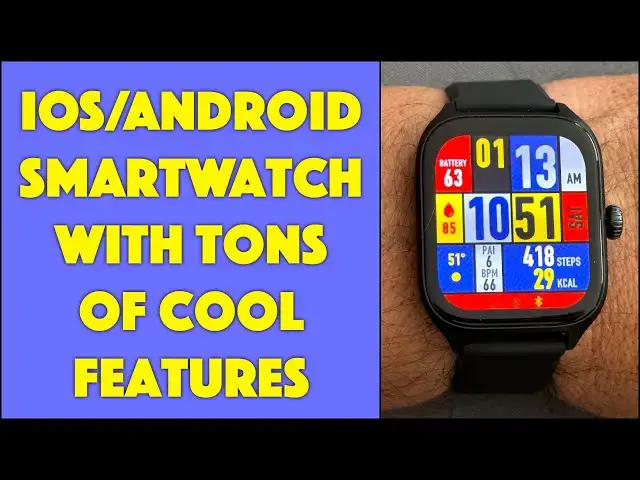
You don't need to go to Apple or Samsung to get a great smartwatch, as Amazfit demonstrates with its new GTS 4 Smartwatch. Tech expert Dave Taylor put the GTS-4 on his wrist and found quite a bit to like with this watch offering 4-5 days of battery life, GPS features, health and sleep tracking, awareness of 150 sports, and an app that includes over 100 watch faces too. Review includes detailed demos of both the watch and the Zepp app.
Check it out at: https://amzn.to/3RrxWU6
Then visit Dave's Q&A Web site at: https://www.AskDaveTaylor.com/
#amazfit #gts4 #smartwatch #amazfitgts4 #askdavetaylor
Show More Show Less View Video Transcript
0:00
Looking for a smartwatch? Then this should be on your shortlist. Let's check it out
0:11
Dave Taylor here and I'm checking out this. This is the Amazfit GTS4 smartwatch. And Amazfit
0:18
if you haven't heard of them, have made a ton of different smartwatches. And their evolutionary
0:23
steps have been really fascinating to watch. Each watch is significantly better than the previous
0:29
And this is a solid contender. This is a solid possibility for you if you're looking for a
0:34
smartwatch. As you can see, it has a lot of watch faces. In fact, there are over 150 watch faces in
0:41
its library. And this is just one of them. I'll show you in a close-up some of the other choices
0:47
that you have. It's really fun. Now, you'll also notice it has a rather striking 1.75-inch AMOLED
0:54
screen. It's 7 ounces. It's super thin. In fact, it also uses a quick-release. So if you don't
1:03
like this sort of rubberized strap, no worries. You can put any quick-release 20-millimeter strap
1:09
on here at all, including putting a leather strap on if that's your preference. It is primarily
1:15
designed for health and fitness, but it's also what I generally call a notification watch
1:20
Now, having said that, let me hasten to say you can actually receive phone calls on it and you can
1:27
talk to people. You can play music on it. So it's not just receiving notifications. It gives you
1:33
some ability to interact. Pretty cool. One of the biggest features is it has dual-band GPS that they
1:39
say is 99% as accurate as the GPS on a separate standalone unit. Why would you want that? Well
1:48
if you're going for a hike, it's a fitness watch. So it can track your hike, but it can show you on
1:53
a map where you are. And if you just say, I'm done or I'm lost, you can actually use an app on the
2:01
watch to say, take me back to my starting point. And since it uses the GPS system, it actually
2:09
knows where you are and you can navigate in real time. You don't need to have your phone. You don't
2:13
need to pull your phone out. The watch will do that for you. Another really cool feature, built-in
2:19
Alexa, and there's an offline voice mode too. But with Alexa, you can literally just pull it up to
2:25
your wrist and just talk to it. And then the lights turn on in your house as you're pulling in or your
2:31
security system turns off or whatever it is you use Alexa for, you can do it from your watch
2:37
Pretty sweet. Obviously, Bluetooth connection to your phone. I paired it with my Apple iPhone 14
2:44
Pro. You can use it with Android phones, works with Samsung and Pixel and LG and you name the phone
2:52
It's going to be able to work with this through their app called Zep. I'll come back to that in
2:57
just a minute. So you can store and play music. Like I said, it has 150 sport modes. So last night
3:06
when I got on my elliptical, I just turned it on and said start and it just started tracking all of
3:12
my biometrics in real time, storing them all and then synchronizing that with the app on the phone
3:18
which is really great. So what's it's storing? Well, it uses BioTracker 4.0, which is a biometric
3:26
sensor system. There's a lot of stuff on the back. In fact, let me give you a close-up so you can see
3:31
the back of the watch. That's almost all sensors and BioTrack 4.0 tracks your heart rate, your blood
3:38
oxygen saturation, your stress level and your breathing rate, which means yes, it also can do
3:44
sleep tracking. So one of the very first questions you should have then is, what about battery life
3:50
Because my Apple watch lasts about 30 hours without it dying. Well, the good news is that I've been
3:56
using this for two days now and it's still at 65% battery. And you can see I have it on full
4:02
brightness because I like that. And it has an always on mode. So when we get to the demo, we're
4:08
getting closer and closer. When we get to the demo, I'll show you the always on mode, which just shows
4:15
you the time. And then when it gets a notification, you can change this, but it can like wake up on
4:20
notification or on your wrist movement or on a tap. And then you go to whatever your watch faces
4:27
So it's never just dark, which is really nice. So let's go back now. 150 sport modes. It auto
4:34
recognizes eight sports and there's an update coming that will actually let it give you actual
4:41
data about your physical, I don't know, status. And you can get that via like earbuds. If you're
4:50
using this via Bluetooth to listen to music and you're doing a certain sport, it can tell you
4:56
you've run a mile and your heart rate is so really, really neat. It's also waterproof to 50 meters
5:02
So if you want to wear it while you're swimming, they got that covered too. Oh, so much. Now I want
5:09
to give you two demos. And the first one is I just want to show you what you can do on the watch
5:14
And then I want to show you what you can do on the app. So let's switch to those. We're starting
5:20
with the always on mode, but if I moved my wrist or I can push the button, then it brightens up
5:25
and gives me my watch face. So I can push and hold. I don't think I moved it there, push and hold
5:32
and I can try different watch faces. These are the ones I've already downloaded from the app
5:38
and I can just tap and that becomes my new watch face. And you can see heart rate
5:44
footsteps, or a number of steps I've taken, and charge level. I swipe down and I get that sort of
5:50
common little set of mini icons that let me do certain functionality, like put it in theater mode
5:57
I'm not going to actually do that. There's more. And I can also go back. If I swipe from the bottom
6:04
then I can see my notifications. Not a lot going on yet this morning. And then from the right
6:10
I can get other views and other information. And here's how I'm doing with my heart rate
6:17
which is always a little elevated when I'm actually doing a video. It's just sort of how it goes
6:22
And I can go back. Let's go back here. And if I swipe from this side, now I'm in Alexa
6:28
So that's pretty easy to work with. And those are the primary functions. Let's see
6:36
I can go to settings and you can see there's a bunch of different settings you can change here
6:42
And instead of that, let's just push the button one more time. And now you can see here are all
6:50
the primary features and functions. And so I can swipe down. And obviously, if I'm going to do
6:57
stuff like check my blood oxygen level, that's not going to work really well since it's not on
7:02
my actual wrist. So lots and lots of great functions. And notice it also does cycle tracking
7:12
Many people are interested in that feature. And there's even a find my phone feature
7:18
which is really great. And so it has all of the features of the big fancy ones too
7:25
Let's go back to that main screen. And now let me switch because I want to show you the app too
7:32
Great. Hang on just a sec. So here we are in the ZEPP app and you can see it gives me the same
7:38
information in a different format. And I never get sleep data because I actually don't like wearing
7:43
watches while I sleep. So I just sort of don't get that information. But you can see that its
7:49
most recent record of my heart rate was 75 beats per minute and that it categorizes me as being
7:56
relaxed from a stress perspective. And there's lots of other things. Here's my elliptical workout
8:02
where I burned 329 calories yesterday. That was pretty good. And I can then go to the watch by
8:10
I think tapping there. So now you can see it's figured out what watch face I'm using. And then
8:16
I can do things like change my watch face. So here's the library of lots of faces. Now the
8:23
animated ones like that do consume more energy. So I would be cautious about picking one of those
8:30
But let's pick this one. And then all I have to do is tap on sync and watch the watch itself
8:41
Once it's synchronized, it should just automatically switch to the new face
8:45
So let's see how that works out in just a couple of seconds. It's going pretty quick. But it's
8:51
really fun. And one of the faces you can choose is your own photo with the watch information
8:58
superimposed on top. So there we go. Now we have our new watch face. Super easy and fun
9:04
One of my favorite features actually. Health monitoring. You can set up your notifications
9:10
I have everything turned on except for the standing reminder which I don't tend to be
9:15
very good at. That's another story. They have their own app store. Check this out. So there's
9:21
third party apps and games and stuff where you can actually grab them if you want. Oh and check out
9:28
the always on for this particular watch face is just the hands. That's a really smart look
9:35
And you can get to like watch settings. It's so much easier to change things in the app
9:40
than it is on the watch itself. But you can turn off things like the always on display if you don't
9:48
want it. Let's go back. And there are some app specific app settings. So for example for weather
9:56
I went into weather and that let me switch from Celsius to Fahrenheit which is my preference
10:01
And you can see I am currently in Gunbarrel which is a suburb of Boulder Colorado
10:08
And let's see. So here's a bunch of other things you can check for firmware updates and everything
10:14
Really really cool. And then if you go down the bottom here you can see there's other information
10:19
you can get and store. So it's really easy to work with. I really like the fact that I can leave the
10:26
watch on my wrist and then use the app to manage 95 percent of what I want to do. So cool. Let me
10:33
jump back on camera. It's a pretty cool watch actually. Now I did want to point out a couple
10:39
of things. The first of which is that it uses a custom charger. It comes in the box which literally
10:45
contains the watch the charger and instructions. That's it. So kind of a big box for such a little
10:50
watch. But I think that they're thinking of the thud factor right. But that's the charger. And if
10:56
you lose this wire you're out of luck. So I consider that a limitation. I really wish more watches would
11:03
just use Qi charging. I know it's not really designed for that. But even just as an emergency
11:08
backup it would be nice to know that if my cable broke or frayed or I lost it or it's at home and
11:16
I'm at work I wouldn't have to worry about it because I'd have this alternative. Instead what
11:21
I would recommend is if this is going to be your watch then you probably want to get a spare one of
11:25
these cables because it's easier to get it when you don't need it than to have to wait and wait
11:31
and wait watching your watch slowly go down in battery because you have to order a new one
11:37
So that's a limitation. And otherwise you know it really is an interesting option. And price wise
11:45
it's pretty close to the Apple Watch SE which is about $50 more. So it all depends on what you're
11:53
going to use it for. What you're going to use it with. And especially whether you're a fan of
11:59
Google or Samsung or Apple maybe you don't like some of those really big corporations for whatever
12:05
reason. That's cool. I don't judge you. So maybe you'll never put an Apple Watch on your wrist or
12:11
maybe you're an Android person and it would just be weird to have an Apple Watch with an Android
12:15
phone. So this is a very legitimate competitor and you're seeing it was just in always on mode
12:23
so you probably couldn't tell but it was just showing the time and then as soon as it noticed
12:27
my motion then it brought up that whole full bright watch face. So we need to talk about the
12:33
price. But before we get to the price I'm going to ask if you could subscribe to my channel
12:38
A click or a tap on that subscribe button then turn on notifications so you know about my new
12:42
content. We're connected. Fantastic. All right this is the Amazfit GTS4 smartwatch. It comes in
12:51
autumn brown, infinite black, misty white or rosebud pink. This is obviously the black watch
12:59
and it is $199.99 at amazon.com which is a pretty solid competitive price for a watch with
13:07
this many functions and features and an always on mode. I really like always on. I really dislike
13:13
looking at my wrist and seeing a blank black screen. That just seems kind of lame. So I'm so
13:19
glad all the latest generation are now putting something on that screen so you can see what time
13:24
it is. Basic functionality for a watch right? So that's everything. I'm gonna go and listen
13:31
to some music off of my watch which means I'll have to catch you in my next video
#Fitness Equipment & Accessories