Up next in 10


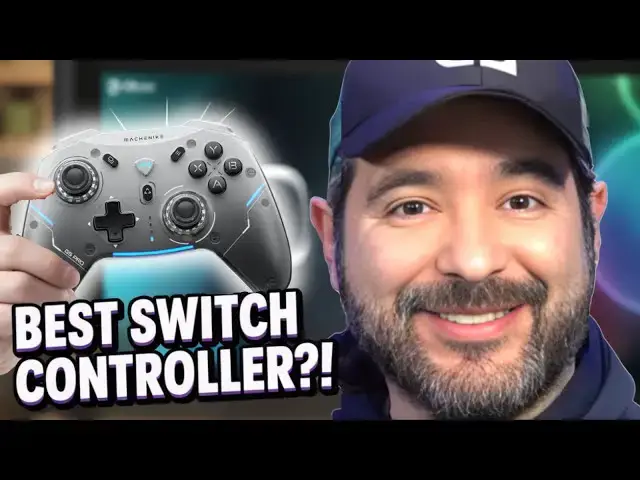
Today I’m unboxing and testing the Machenike G5 Pro Wireless Gaming Controller — and yes, it works with the Nintendo Switch! This sleek controller packs a punch with RGB lighting (5 modes), Hall Effect analog sticks and triggers, a 6-axis gyro, programmable back buttons, and tri-mode connectivity (USB, 2.4GHz, and Bluetooth). It looks amazing and feels premium right out of the box.
Product Links:
Amazon: https://amzn.to/4692BjJ (affiliate)
- Hashtags & Tags:
- #HallEffect
- #LowLatency
- #TriMode
- #MagneticDock
- #Machenike
- #G5ProMaxSE
- #vqcm
- #vqimedia
🔹 Used on Nintendo Switch in this video
🔹 RGB LEDs with 5 customizable effects
🔹 Drift-proof Hall Effect sticks
🔹 Fast, precise analog Hall Effect triggers
🔹 Motion controls with 6-axis gyro
Show More Show Less View Video Transcript
0:00
we are going to check out this
0:02
controller that was sent to the channel
0:03
this is the G5 Pro Max SE controller by
0:08
Machine Machineke i think that's how you
0:11
pronounce it this was sent to the
0:12
channel and it looks like a pretty cool
0:14
controller you can see that it has RGB
0:16
lighting it even has like its own little
0:19
uh little base to rest the thing on this
0:20
works for the PC the Switch and your
0:23
Android and iOS device so let's go ahead
0:26
and unbox this bad boy yeah so I'm
0:30
starting to get some more controllers
0:31
and accessories and stuff sent to the
0:33
channel which is pretty cool you know
0:35
it's it's a way to show you guys
0:36
products and whether you guys would be
0:38
interested in checking them out and
0:40
stuff and with you know like the Switch
0:42
2 and other controllers and consoles
0:44
coming out and stuff we're going to be
0:45
seeing a lot more of these on the
0:47
channel so make sure you guys hit that
0:48
subscription button so you don't miss
0:50
when I upload so here's the controller
0:53
inside and we also have the base and
0:56
then I had a lot of paperwork that
0:58
looked like it fell let me pick it
1:01
up it looks like we got our
1:03
instructions game pad instructions
1:06
that's cool uh some stickers I guess if
1:08
you want to add these to your base or
1:11
something like that decorate it make it
1:13
look nice we're not going to mess around
1:14
with that now we got our
1:18
type-C yeah our type-C cord so I believe
1:21
this is what you plug into your console
1:23
so your base could charge so let's go
1:26
ahead and take a look at the base real
1:29
quick the ace of
1:31
base all right so we got some rubber
1:33
grips on the bottom looks pretty
1:36
standard put the thing on top on the
1:38
back we have both a USB and a type-C uh
1:42
port so looks like you might be able to
1:44
charge something else if you plug it in
1:46
at the same time we'll have to test that
1:48
and again this works for PC Android iOS
1:52
and Nintendo Switch i'm going be using
1:53
it on my Nintendo Switch cuz it's always
1:56
good to get a controller that could be a
1:58
substitute for a Pro Controller right
2:01
this looks like it has some really good
2:02
weight to it it feels good i like the
2:05
design nice sleek gray alien spaceship
2:08
looking design right here guys it has
2:10
like a texture on the back so has a good
2:13
little grip we got some trigger buttons
2:15
uh and we got some nice shoulder buttons
2:18
now there are some features on this and
2:21
I'm not the most technical sound guy but
2:24
I know what I like and what I first like
2:26
is the Hall effect joysticks that this
2:28
thing has hall effects are important to
2:30
me because drift you know like a lot of
2:33
times these controllers begin drift but
2:35
Hall effect joysticks are nice they feel
2:39
great they feel pretty solid and uh
2:42
overall the design is like an Xbox
2:45
controller for the most part you can see
2:47
it has the D-pad um D-pad feels okay i
2:50
would have liked it to be a little bit
2:52
more squishy if that makes sense and a
2:54
little bit bigger but it feels all right
2:56
and then we also have some other buttons
2:58
like the capture the menu and stuff like
3:00
that we're going to be taking a good
3:01
look the buttons kind of have like a a
3:05
gloss um I guess it if your fingers get
3:09
sweaty it might help it i don't I don't
3:12
I don't know uh my main thing is if a
3:14
controller works so this one also
3:17
apparently has ultra low latency it says
3:20
uh thousand hertz pulling rate i don't
3:22
know what that means on top of that it
3:24
says that it's a it's able to be
3:27
wireless so if you go on the back you
3:28
can switch your platform you can see
3:30
this little switch back here has PC
3:32
Nintendo Switch and then 2.4 for I guess
3:36
your Bluetooth so you switch it in the
3:39
back we're going to be switching it to
3:41
uh Nintendo Switch on the back so we're
3:44
going to be testing it on that on top of
3:46
this it says there's a built-in
3:48
gyroscope for motion control support so
3:51
I'm actually interested to see how that
3:53
works um I can't think of a game off the
3:55
top of my head that uses motion control
3:57
except like Zelda Breath of the Wild but
4:00
even then I'm not sure um and then of
4:03
course the U RGB is
4:06
customizable and you get the the base
4:10
put the base right on in and uh that's
4:14
how you go so we're gonna plug this
4:15
sucker in just to see what it looks like
4:18
um while it's glowing right because uh I
4:21
think that's an
4:24
important Right so we're going to put
4:26
the type-C in the back of that and we're
4:30
going to put uh Actually I I lied we're
4:33
going to put the USB in the back of this
4:35
because the type-C is going to go into
4:37
the
4:39
controller there's some type-C's at the
4:41
back of that let's go ahead and uh we're
4:43
going to plug
4:46
in just to test it out real quick into
4:49
the PC port uh put it the USB in
4:53
there there it goes it's charging uh as
4:56
far as customizing the
4:59
RGB let's go ahead and take a quick
5:02
gander apparently there's an app that
5:04
you download for your phone to customize
5:06
it even further but uh that's just
5:08
outside my wheelhouse i'm more
5:10
interested in checking out the
5:12
controller and seeing if it works but
5:13
yeah it gives you like a little QR code
5:15
for uh additional customization and
5:19
things like that so I'm guessing that's
5:20
where the RGB uh colors come into play
5:25
now real quick before I begin playing on
5:27
the Switch just a heads up you have to
5:30
do switch mode so you got to put on
5:32
switch and then you hold the function
5:34
key which is this button and A for three
5:37
seconds and then it'll switch your
5:38
layouts because you know how like Xbox
5:41
the X and Y and the A and B are reversed
5:43
you have to get it into switch mode so
5:44
to do that you have to hold the function
5:46
key and A and then it'll correct the
5:48
face stuff so then you just ignore the
5:50
X's and all that so it'll be in switch
5:52
mode and it'll work picture perfectly on
5:55
it now if you want to make things easy
5:58
you could just hook it wired with the
6:00
wire that's included and it'll instantly
6:02
respond and work with you on your
6:04
Nintendo Switch no problem at all
6:07
playing it wired again pretty easy
6:10
plug-andplay i'm assuming you could do
6:12
that with your PC as well it instantly
6:14
work uh but to connect with your phones
6:16
and stuff you'll have to use the uh the
6:20
dongle which was included with it so
6:22
this dongle is like a Bluetooth dongle
6:25
that you put into your uh USB port so
6:29
this is the dongle of course pretty
6:31
standard if you've seen one you've seen
6:32
them
6:33
all probably just goes into your
6:35
Nintendo Switch so I'm going to play
6:37
wired real quick it does seem like it's
6:40
pretty responsive not half bad then
6:42
again I'm pretty stupid when it comes to
6:44
technology and finding out how bad lag
6:48
is and stuff for me I'm pretty simple if
6:51
it works it works right and so far seems
6:55
like it's working everything's
6:56
responsive uh again like I mentioned
6:58
with the triggers uh the triggers feel
7:00
pretty good uh on the top or the
7:02
shoulder buttons I should say and uh
7:04
you're able to customize the macros and
7:06
everything for me I'm basic i don't need
7:09
customized uh layouts for FPS's and
7:13
stuff like that uh I'm an old school
7:16
gamer so I'm sure you guys could find
7:19
something useful with that especially if
7:22
you're competitive I guess uh again
7:25
there's software that you can download
7:27
onto your iPhone or your Android and you
7:30
could customize stuff i'm assuming
7:31
that's how you would customize the
7:33
lighting and things like that there's
7:35
actually more in-depth reviews on
7:38
YouTube if you want to go ahead and
7:39
check those out but for me I'm basic
7:41
like you guys how easy it is it to plug
7:44
in and use and does it work and I have
7:47
not played Kirby in forever now if you
7:50
want to pair it via Bluetooth for the
7:52
Switch you got to have it on the 2.4G
7:54
Switch which is Bluetooth and as long as
7:57
you have ProController wired
7:59
communication enabled uh it'll work
8:02
instantly so I have the dongle plugged
8:04
into the Nintendo Switch and it's it's
8:06
responding now we're going to check a
8:08
fun one called Iron Meat shout outs to
8:11
Retroware for Iron Me it's basically a
8:14
Contra clone but it has its own charm on
8:16
it we're playing again Bluetooth
8:19
wireless on the Nintendo Switch you
8:21
connect it with the 2.4G and as long as
8:24
you have uh ProController communications
8:26
on it'll instantly like detect it so
8:29
worked pretty good worked like a glove
8:33
and if you haven't played this game and
8:35
you're a big Contra fan you're you're
8:37
missing out right now it works pretty
8:39
good but it feels like it's a pretty
8:41
solid uh controller i don't feel too
8:43
much as far as lag goes i saw some
8:45
people in some reviews saying there was
8:47
there was lag but in my opinion I'm not
8:50
I'm not feeling anything like that uh to
8:53
me it works again I'm not looking into
8:56
all the advanced customization options
8:58
and stuff like that but I'm pretty sure
9:00
they're pretty easy to figure out if you
9:02
guys wanted to uh try them out i'm not
9:05
going to use this on my iPhone either i
9:08
don't really mobile game as much you
9:10
know no no need for the WWE Champions
9:14
Time but uh for the Nintendo Switch and
9:17
what I need it to be used for as I suck
9:19
at this game um works pretty good you
9:21
could either just plug it in wired and
9:23
it would respond as long as you have it
9:25
in Switch mode and
9:28
uh or you could just use Bluetooth and
9:30
it and it worked as well um and again
9:33
don't forget you have to switch your
9:35
controller layout to Switch mode because
9:37
XB A and Y are different than on Xbox
9:42
but other than that it was pretty good
9:44
and you know a neat little neat little
9:46
controller with a little uh charger base
9:50
good little features and
9:57
stuff
9:59
so awesome and again this is a game that
10:01
you guys should definitely check out if
10:04
you have
10:06
not shout outs to
10:11
Retroare look at this lots of blood
10:14
chaos you name it so yeah this was the
10:18
G5 Pro you guys want to go ahead and
10:21
check it out max SE controller from
10:25
Machini uh special thanks to them for
10:27
sending it out to the channel i like it
10:30
i like it it feels nice it doesn't feel
10:32
like a cheaply made controller so check
10:35
it out
#Computer & Video Games
#Gaming Reference & Reviews