Up next in 10


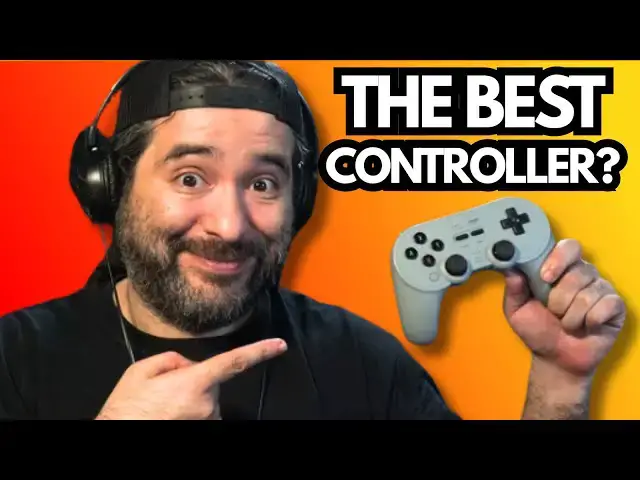
The 8BitDo Pro 2 Hall Effect Edition might just be the best controller you can buy in 2025. This upgraded Bluetooth gamepad works seamlessly with Nintendo Switch, PC, Steam Deck, Android, iOS, and macOS—and it finally kills stick drift for good.
✅ BUY IT HERE ➤ https://amzn.to/4mpAyCx
In this unboxing and hands-on review, we’ll show why the Pro 2 Hall Effect Edition is a game-changer:
Zero stick drift thanks to premium Hall Effect joysticks
Ultra-responsive buttons and analog triggers
20+ hour rechargeable battery
Pro-level features like remappable buttons and custom profiles
Works flawlessly over Bluetooth and wired USB
Compatible with Switch, PC, Steam Deck, Android, iPad, Mac & more
Whether you're tired of Joy-Con drift, looking for a better PC controller than the Xbox or DualSense, or just want a reliable multi-platform gamepad—the 8BitDo Pro 2 is the controller to beat in 2025.
Show More Show Less View Video Transcript
0:01
this is the 8bit dude Pro2 Bluetooth
0:04
gamepad this works for Switch Apple
0:06
Steam Raspberry Pi Windows Android it's
0:09
a all-in-one awesome Bluetooth
0:11
controller 8bit Dude does fantastic
0:13
stuff and I'm pretty excited it's been a
0:15
minute since I've checked out a
0:16
controller on the channel so let's go
0:18
ahead and check it out i got the gray
0:20
version because it's kind of like a
0:21
hybrid between the Super Nintendo and
0:25
PS1 let's pull it out look at that oh my
0:28
goodness now one big feature about this
0:31
is it has Hall effect joysticks so Hall
0:34
effect joysticks are all the rage i wish
0:36
the Switch 2 controller had Hall effect
0:39
joysticks but it doesn't but these are
0:42
awesome and it it feels like high
0:45
quality so we're going to take a look at
0:46
this you can see it has the Nintendo
0:49
layout has the XBAY has the D-pad has
0:53
the start select has a few other buttons
0:55
and features but you got to love the
0:57
joysticks on the back we have the
1:00
trigger button so that's cool and you
1:02
can switch the modes with this switch
1:04
right here so you can go from Switch to
1:06
Windows to Android you name it right so
1:10
this is the gray edition let's go ahead
1:12
and pull this little sticker off here
1:15
and it's been a moment since I've done a
1:17
I guess a hardware review so I'm going
1:19
to leave a link down below in the
1:20
description for you guys to check this
1:22
out there's also a black version a white
1:25
version and the gray version all right
1:27
and again this is compatible with the
1:29
Switch Windows Apple Steam Deck
1:31
Raspberry Pi there's two prolevel back
1:34
buttons and there's ultimate software
1:36
that you can use for PC Android and iOS
1:39
I guess to program it or to set uh I
1:42
guess safe zones and stuff like that all
1:44
that technical babble but you should be
1:47
able to connect it pretty easy it's
1:48
Bluetooth wireless Bluetooth there's
1:50
rumble vibration there's motion controls
1:52
it's USBC and uh 20 hour rechargeable
1:56
battery and I'm going to do my lint test
2:00
which is playing Super Mario Brothers i
2:02
have this connected to my Switch it was
2:04
as easy as plugging it in with the
2:06
type-C that came with it and it
2:08
instantly paired it i let it charge for
2:10
a little bit and we're good to go and I
2:13
like I said it feels great inside my
2:15
hand and we're going to play it this is
2:17
how I detect whether a controller is
2:19
worth its beans or not so right away I
2:22
can tell you guys there's not much lag
2:24
usually the 8bit do controllers work
2:26
pretty good with that so jumping feels
2:29
good and I like the buttons because they
2:31
have like a spongy membrane feel to them
2:34
inside like when you push it it just
2:36
feels good like you're squishing down
2:38
something controller feels comfortable
2:40
uh you can also use the analog stick
2:42
like I mentioned they're Hall effect
2:44
analog sticks you could use the analog
2:46
stick that feels all right but the most
2:48
important thing when you're playing
2:49
these older games is how is the D-pad
2:51
feel the D-pad feels pretty good it's
2:54
hell of a lot better than what you have
2:55
on the Switch Pro i'll tell you guys
2:57
that much so right now uh playing Super
3:02
Mario Brothers on the Switch online it
3:05
feels good it feels good as uh what was
3:09
that bell Bib Devo or Tony Tony Tony
3:11
somebody that's an 80s 90s movie buff I
3:14
mean music buff tell me
3:17
um all right so we
3:19
got everything working pretty pretty
3:22
good on here Mario Brothers works like a
3:25
glove we're just going to play the first
3:27
stage or else I'll be here all day but
3:29
yeah the 8bit do controller that I'm
3:32
using right now feels good and light
3:36
pretty easy to
3:39
pick up and play so not half bad let's
3:42
go ahead and try the next game right
3:44
we're going to try something else as you
3:46
can see I'm moving through the menus no
3:48
problemmo by the way so works really
3:51
good the house button is this bottom
3:53
left button so that takes you to the
3:55
home so you could do uh you do home
3:58
right away just like that all right i
3:59
want to test out the joysticks i want to
4:01
see if they actually work uh for any
4:05
kind of video game that uses 3D so why
4:07
don't we just keep up the Mario theme
4:10
and we'll go with it's a me
4:13
Mario right so let's go ahead we'll
4:16
start sucker right here it's been a
4:18
minute since I played Mario 64 but I
4:21
really want to see if if you could play
4:23
the 64 games using the analog stick
4:26
that's one that's one test I want to see
4:27
and again I'm using this on the Switch
4:29
but you can use this on Android you can
4:31
use it on Windows you could use on iOS
4:34
it's good for Steam games uh perfect for
4:36
Switch so far all right we got our
4:38
moment of truth yep okay the analog
4:41
stick works perfectly and the right
4:44
analog stick works good for the camera
4:48
as
4:49
well the
4:58
triggers okay i haven't played this in a
5:00
while so I gotta get used to
5:03
uh got you get used to the
5:06
buttons all right perfect all
5:10
right so the analog sticks do work it
5:13
does take some getting used to cuz of
5:15
course N64 controller
5:18
um it's a lot different than the 8bit do
5:21
but it does work
5:23
you
5:29
got you got to remember on the N64
5:33
certain buttons were the C buttons
5:35
certain buttons moved um the camera
5:38
around and stuff so you might have to
5:40
remap them but luckily you have the
5:44
software uh but yeah it looks like it
5:46
works
6:00
but it's not perfect does it work could
6:03
you make it work sure you could
6:07
um it's absolutely not perfect
6:13
though see like the trigger button did
6:16
that the right analog stick doing that
6:18
button Y is zooming around that's B a so
6:24
that's ZL does the ground pound for the
6:26
Z button
6:29
so zoom in is R so you gota you got to
6:33
get used to it you got to map it out
6:35
figure it out but it does work if you
6:38
map it the way that you want I'm sure so
6:41
yeah I always like the 8bit do products
6:44
shout outs to them for sending this to
6:46
me full disclosure I was sent this to
6:48
check out and review i got nothing bad
6:50
to say about it it does the job for what
6:52
I need you just plug it in you can play
6:55
your Switch games you can play whatever
6:57
it works and they got other details and
7:00
stuff I guess to make it work the way
7:02
that you want they always have a decent
7:04
line of products so I just wanted to
7:06
share this with you guys shout outs to
7:08
8bit Doom for sending this my way
7:11
appreciate it guys thank you always for
7:13
watching it's been a while since I've
7:15
done a video like this it feels like
7:17
2019 8bit Eric all over again does it
7:20
not it kind of does it kind of does so
7:24
let me know your thoughts you guys have
7:26
any other 8bit dues that you can
7:27
recommend or have you guys tried this
7:29
one out um again I like the look of it
7:32
has that PlayStation aesthetic feels
7:34
great it doesn't feel cheap and it also
7:36
has the buttons of the Super Nintendo
7:40
layout so pretty good pretty good in my
7:43
opinion uh I got nothing else to say uh
7:47
check it out if you want link below in
7:49
the description and as always guys thank
7:52
you so much for watching we got plenty
7:53
more stuff coming with the Switch 2
7:55
coming out lots of accessories and
7:57
things like that coming so we're going
7:59
to be covering a lot of ground here and
8:01
it's going to be exciting so I'll see
8:03
you guys on the next video thank you so
8:05
much for watching as always peace out
#Games
#Computer & Video Games