Up next in 10

Vue.js 3 vue-file-toolbar-menu Example to Create File Toolbar Navigation Menu in Browser Using TS
Jan 9, 2025

Get the full source code of application here:
https://gist.github.com/gauti123456/bef40825c66ee2811142c57d41bdaa49
Show More Show Less View Video Transcript
0:00
uh hello guys welcome to this video so
0:03
in this video I will show
0:04
you how to build out a very simple file
0:09
toolbar navigation menu inside vuejs 3
0:12
so there is a package which allows you
0:14
to do this automatically so you will see
0:17
this navigation menu it's a file toolbar
0:20
menu so if you're building some kind of
0:22
an application related to files you can
0:25
have this automatic menu integrated
0:27
which contains all these options to
0:30
create a file open a file exit then we
0:33
have the edit button which have undo
0:35
redo buttons view
0:38
button you can even Define your own
0:40
custom buttons as well then we have the
0:42
help
0:43
menu so this is a very simple package
0:47
inside view3 if you do are building out
0:50
any sort of application if you want to
0:52
integrate this file menu there is a
0:55
package route right here if you go to
0:57
npmjs.com
1:00
and just search for this men uh package
1:02
view file toolbar
1:05
menu so just search for this package
1:08
view file toolbar
1:11
menu so this is the command I've already
1:14
installed
1:16
it and it's almost having 575 weekly
1:20
downloads and it's supported for view3
1:23
the latest version of UJS so now to get
1:25
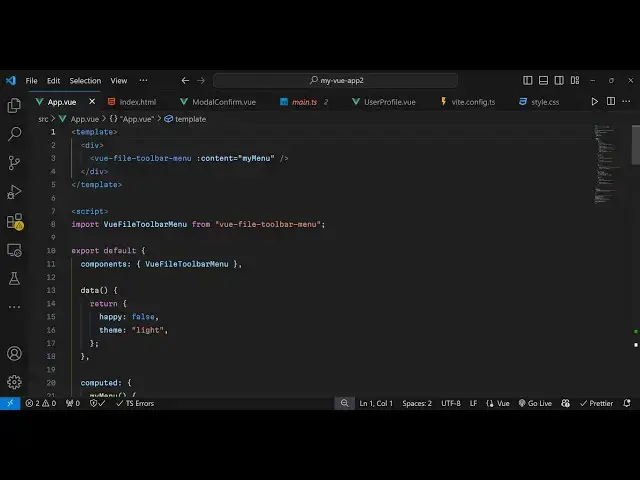
started just inside your app. viw file
1:29
we will addit this directly so I will
1:33
start it from scratch
1:35
so first of all we will Define the
1:40
actual menu inside our template so
1:43
inside the div we directly use view file
1:49
toolbar
1:53
menu and it we pass this prop property
1:58
here which is content and here we Define
2:01
our
2:02
menu so now we need to Define this
2:05
actual component and also pass this
2:08
attribute so now in the typescript code
2:11
which is
2:12
script first of all we import the module
2:15
which is view file
2:18
[Music]
2:19
toolbar menu and it will be coming from
2:22
this view file bar toolbar
2:26
menu and then we'll be exporting it
2:28
export default
2:33
and the components here which will be
2:36
simply our view file bar toolbar menu
2:40
and then the actual
2:45
data so inside this we are passing two
2:51
properties the theme you can even pass
2:54
it can have various themes light and
2:56
dark theme as well so then we we will
3:00
have the function here computed
3:06
function and here you define our
3:11
menu so you can see we are passing this
3:13
my menu so we are just defining this so
3:17
inside your menu you will return a
3:19
series of items this will be an array
3:22
here so each item will have its own
3:25
object which contains the text so text
3:28
is file and then the actual menu so you
3:31
define the actual menu items inside file
3:35
item so we will
3:37
have a series of object so text here
3:40
which will be new
3:43
file then you can even provide an icon
3:46
here which will be buil-in icons all
3:48
these icons are available on this
3:50
package note add so when you click it
3:53
this menu item you can buy this on click
3:55
listener side by side so you can just
3:59
put a alert statement new file created
4:02
but in the production application you
4:04
will put your logic so whenever you
4:06
click this you you will put your backend
4:09
code and connect it and then similarly
4:13
you be having the second menu item this
4:16
one will be responsible for opening the
4:18
file so here you'll be having the
4:20
another icon folder open and same we'll
4:24
be clicking and binding this on click
4:31
and same if you also want to put a
4:34
separator in between items you will put
4:37
it like this separator so it will just
4:40
add this a visual separator that the
4:42
user can see in between the menu items
4:45
and then we see the uh third item which
4:49
will be for exiting the
4:51
app we'll have this icon which is exit
5:07
so like this so now we have three items
5:09
right here
5:10
uh if you try to refresh your
5:14
browser you will see this file menu and
5:17
we have three items this is a new file
5:20
open file and exit so we have three
5:22
items right here so this is our one item
5:27
in the menu similarly we can design more
5:34
items
5:37
so
5:43
just after this we Define the second
5:47
one which I will say
5:53
edit now you will see the second item
5:55
appearing so now similarly we will put
5:59
the menu here and we will have the
6:02
series of items right here which you can
6:05
have we will have the undo and redo
6:08
buttons we will have two menu items
6:11
right
6:12
here alongside with the icons as well so
6:15
this is actually very useful because we
6:18
have pre-built menu icons as well which
6:21
lets you build this file toolbar menu
6:24
very easily so this package allows you
6:26
to uh Design This and similarly I will
6:30
paste all this so we also put some CSS
6:34
code as well you can customize this add
6:37
a background color as well so I I have
6:40
given all the source code in the
6:41
description
6:43
so so if you want to customize the
6:46
background color it's supposed change it
6:48
to any other
6:54
color so you can see it changes to green
6:57
color when I click it so
7:00
this is actually the module you can
7:01
directly use it inside view 3
7:04
application to create file toolbar menus
7:07
so thank you very much for watching this
7:09
video and do check out my website as
7:11
well free mediat tools.com uh which
7:14
contains a thousands of tools regarding
7:16
audio video and image and I will be
7:19
seeing you guys in the next video
#Other