live_tv
Livestream Starting Soon
00
Hours
:
00
Minutes
:
00
Seconds
Up next in 10

Vue.js 3 vue-bottom-sheet Example to Build Bottom Sheet Footer Swipe Menu in Browser
Jan 9, 2025

Get the full source code of application here:
https://gist.github.com/gauti123456/97b3f077ee2057fd7eb9501832cb9492
Show More Show Less View Video Transcript
0:00
[Music]
0:00
uh hello guys welcome to this video so
0:02
in this video I will show you a vuejs 3
0:05
module which allows you to make this
0:07
bottom navigation menu so if you click
0:09
the button you will see the menu will
0:11
appear from the bottom position it's a
0:13
bottom sheet component specifically
0:15
designed for VJs application and there
0:17
is a close Button as well if you click
0:19
it it will hide once again if you click
0:22
the button the navigation menu uh this
0:26
it will be coming from the footer
0:28
location from the bottom location
0:30
so if you need this effect coming inside
0:32
your website you can use this Plugin or
0:35
this module which you you can display
0:38
anything here it can be any footer note
0:41
or footer navigation menu as well
0:44
so it will be coming from the footer or
0:48
the bottom side like this there is this
0:51
uh module here which lets you do this if
0:54
you go to npmjs.com just search for this
0:57
package which is
1:00
uh view bottom sheet so just search for
1:05
this view bottom
1:14
sheet so the command is simple you just
1:17
need to install it by executing this
1:19
command I have already installed it it's
1:22
a fairly new package which is three so
1:24
but it it does the job uh now to
1:28
integrate this just inside your app.
1:30
view just create a view3 application and
1:33
inside your app.
1:35
view so first of all we write our script
1:40
we are using
1:43
typescript so inside this we import this
1:46
module first of all view bottom sheet
1:50
and it will be coming from
1:53
this
1:56
package and we also need to import it
1:59
CSS file as as
2:03
well which is located inside dis style.
2:06
CSS so we import first of all the module
2:08
and the CSS file so after importing both
2:11
the things now we will be just be
2:14
attaching a reference so for this we
2:16
need to import the reference from view
2:19
we declare a variable here my bottom
2:22
sheet here and we will be using this
2:24
reference and initializing it to a null
2:26
variable
2:28
so now I will just Define these two
2:31
buttons which allows us
2:34
to trigger this bottom navigation menu
2:38
so right in the template itself we will
2:40
have these buttons available so the user
2:43
can see these
2:45
buttons so now in the div tag we'll be
2:48
having these two buttons you'll say
2:51
open bottom
2:54
sheet and the second button will be for
2:57
closing or disabling it or for hiding
3:01
it so I'll just bind this onclick
3:04
listener to it so when we click the
3:06
button what should happen so we will
3:08
Define these two but uh functions here
3:11
open and
3:14
close so I just binded this on click
3:17
listener so I just need to now come to
3:20
the typescript and just Define this
3:25
function so we use this object and it
3:28
actually contains this
3:30
function here value. open so it will
3:33
open this bottom navigation
3:36
menu so we using this object and same
3:39
goes for the close as well so for
3:42
closing it we have a predefined function
3:44
available so which is
3:48
close so we binded these two buttons
3:51
right here and binded these functions
3:54
now for showing the navigation menu so
3:57
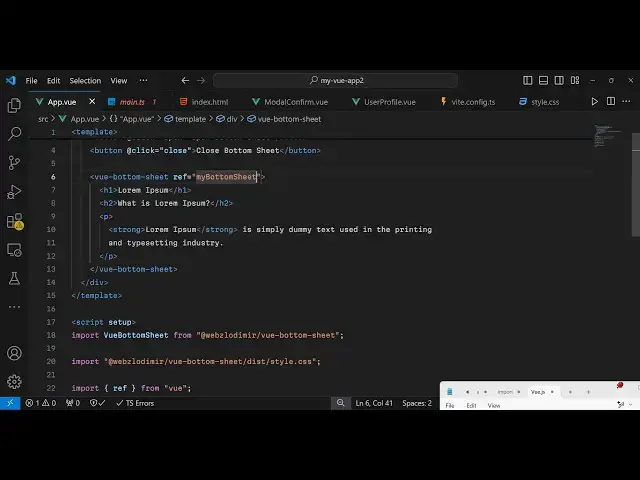
we use this component right here right
4:00
in the div itself just after the
4:03
buttons so we use this component view
4:06
bottom
4:12
sheet and inside this you can Define any
4:16
thing that you want to display it can be
4:18
any valid HTML so I will just Define
4:22
this a series of headings and
4:25
paragraph So we have this starting tag
4:29
and the closing tag view bottom sheet
4:30
and in inside this you define your
4:33
actual
4:34
thing and it actually takes this
4:36
reference here that we declared variable
4:39
that we declared if you see reference so
4:42
I just need to pass it my bottom sheet
4:46
so the spading needs to be the same here
4:48
so just cross check that you have
4:51
defined the same variable and you're
4:52
passing it so if you refresh the
4:54
application and you see these two
4:56
buttons appearing and once you click the
4:59
open Button you will see the navigation
5:01
menu will come from the out bottom side
5:03
with this nice little animation and when
5:06
you click the second button it will
5:08
hide so if you want to create this
5:10
effect on user when the user interacts
5:14
with the page if you want to show this
5:18
footer simple footer bottom sheet menu
5:21
you can use this package in
5:24
view3 it's a very
5:27
minimalistic package can use it so thank
5:31
you very much for watching this video
5:33
and do check out my website as well free
5:36
mediat tools.com uh which contains
5:39
thousands of tools regarding audio video
5:41
and image and I will be seeing you in
5:44
the next video
#Software
#Other
#Other