Up next in 10

Vue.js 3 Tutorial to Show Popup Alert Dialogs in Browser Using vuejs-dialog in TypeScript
Jan 9, 2025

Get the full source code of application here:
https://gist.github.com/gauti123456/82f13b4dfd637e754b85b25e85974ad7
Show More Show Less View Video Transcript
0:00
uh hello guys welcome to this video so
0:02
in this video I will show you a vuejs 3
0:06
package which allows you to embed the
0:08
popup alert dialogue boxes of various
0:12
types if you want to show a simple alert
0:14
message something like this you can show
0:17
it and then if you want to show a
0:19
confirm dialogue box pop of alert box we
0:23
have two buttons close and continue you
0:25
can show this and if you want to take
0:27
user input you can take the user input
0:31
the user writes it the enter name you
0:33
can ask any question provide this input
0:36
field when they click on continue you
0:38
captured it and show it you have entered
0:41
this so This is actually a package here
0:44
uh in vue.js 3 and if you just search
0:46
for it in npmjs.com
0:49
vew js- dialogue this is actually the
0:53
package name uh it's a very
0:56
lightweight plugin uh which contains all
0:59
these dialog box boxes the command is
1:01
simple uh I've already installed
1:04
it and it's almost having 4,000 weekly
1:07
downloads so it's compatible with the
1:10
latest version uh so now to get started
1:13
come to your main.ts
1:17
file so this is the file here uh we need
1:20
to register it first of all so we import
1:23
the actual module so we say import
1:27
vuejs dialogue and it will be coming
1:29
from this this Library vuejs dialog and
1:33
also we will import the CSS file as well
1:37
vuejs dialogue and inside the dis folder
1:41
we have UJS dialog m. CSS we also import
1:45
the CSS files as
1:53
well so you can see 4.38 kiloby and
1:58
14.69% we just need to register it so
2:01
app.use vuejs dialogue so we simply pass
2:06
it so after registering it you can close
2:09
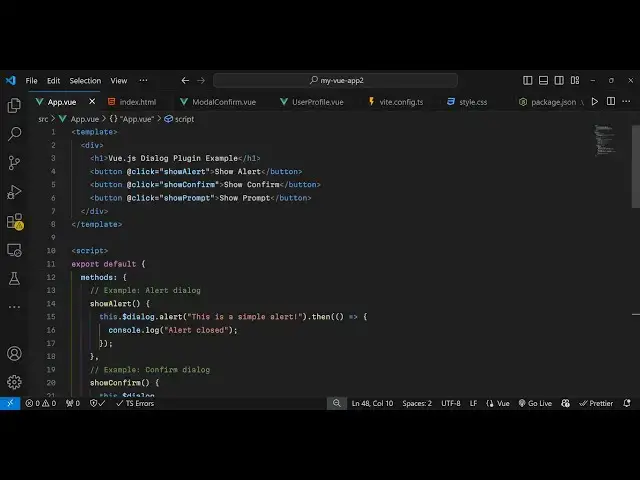
this file come to app. view and now
2:12
inside the
2:13
template we will have a three
2:19
buttons so this is for showing a basic
2:22
alert box then the second button will be
2:25
for showing confirm
2:30
and then the third button will be for
2:33
showing the
2:34
prompt just B an on click listener to
2:37
this buttons so when we click it we will
2:39
execute this show alert function
2:44
so now we just need to Define this so
2:47
inside the typescript code
2:49
we export
2:55
default so here we Define all the
2:58
methods so show alert
3:04
so this
3:05
Dot and we access it
3:08
by add this dollar sign we say dialog
3:14
dot this is accessible through this
3:16
because we globally registered it inside
3:19
main.ts that's why we can easily access
3:23
it by this keyword so this. dialogue and
3:26
here you can pass a simple alert
3:30
statement and then inside the promise we
3:33
can handle dot
3:37
then console log alert
3:40
closed so if you refresh now uh you have
3:44
the button and you will see this simple
3:47
alert box it has nice little box Shadow
3:50
as well so this is a continue button
3:54
so and if the user clicks outside the
3:57
alert box the US the dialogue doesn't
3:59
close
4:00
so the user must interact with this so
4:02
that the dialog box will close and same
4:06
we have uh confirm as well so you bind
4:09
this
4:12
another method this one for showing the
4:15
confirm
4:22
box and again we have a function here
4:27
confirm here dialog box so are you sure
4:31
you want to
4:34
proceed so here we show two buttons
4:38
depending upon the user
4:41
Choice user confirmed if they click the
4:44
okay
4:48
button but if if if the user clicks the
4:51
cancel button then this function this
4:53
will execute
4:55
that user
4:57
cancelled so now we have two
5:00
choices okay and close continue close so
5:04
if I click close you will
5:08
see user
5:20
confirmed so then lastly if you want to
5:24
take user
5:27
input we can bind and on click
5:43
here and for this also uh we contain
5:47
this prompt
5:54
function this takes an object here here
5:57
you can ask your question that enter
5:59
your name and then the body of the
6:02
dialogue please provide your
6:06
name you can even provide a instruction
6:09
prompt
6:10
help placeholder text type your name and
6:14
click
6:16
proceed so this again returns a promise
6:20
we can handle this using a DOT
6:27
then so we have this the user can input
6:31
anything and as I click the continue
6:34
button we can simply show a simple
6:37
dialog box holding whatever the user has
6:40
written alert
6:48
window so in this way guys you can
6:51
integrate this package view JS Stog
6:53
plugin
6:54
[Applause]
6:56
uh and use it so thank you very much for
6:59
watching this video and do check out my
7:01
website as well free mediat tools.com uh
7:05
which contains thousands of tools
7:06
regarding audio video and MH and I will
7:09
be seeing you guys in the next video
#Other
#Educational Software
#Computer Education