Up next in 10

Vue.js 3 Tutorial to Show FontAwesome Solid SVG Icons in Browser Using TypeScript
Jan 9, 2025

Get the full source code of application here:
https://gist.github.com/gauti123456/8ff0886efdac8004dcf102936328d04e
Show More Show Less View Video Transcript
0:00
uh hello guys welcome to this video so
0:02
in this video I will show you how to
0:04
integrate the font
0:07
awesome icons to appear inside your
0:10
view3 application so there is a package
0:12
inside view3 which you can use it if you
0:16
do want to use phont awesome icons phont
0:18
awesome if you don't know it's a popular
0:20
website providing open-source icons for
0:24
your web applications so this this is
0:26
their official website phont awesome.com
0:29
so
0:30
if you visit
0:31
this there are actually two ways either
0:34
you can include it directly by CDN or
0:37
there is a specific package for vuejs if
0:40
you just go to npmjs.com and just search
0:44
for this package which
0:46
is font for awesome view font awesome so
0:51
this is actually the
0:55
package it's the official view component
0:58
for phont aome it's a official plug-in
1:02
specifically works with the latest
1:04
version which is V3 and this is actually
1:07
the command
1:09
uh just in execute this command to
1:12
install it it's almost having 110,000
1:15
weekly
1:16
downloads they have their instructions
1:19
given on their official
1:22
documentation so these are SVG icons
1:25
that you see uh available for all sort
1:28
of
1:31
you can change the color and as well so
1:33
now to get
1:34
started I have given all the source code
1:37
in the description of this video so you
1:40
can directly go to it and get the source
1:42
code so I will now step by step tell you
1:47
so first of all just create a simple
1:49
view3 app uh project go to your main.ts
1:53
file so configuration file so right here
1:57
uh we need to add some import statement
2:00
so right here in
2:02
this we first of all
2:05
import this Library coming from for
2:17
awesome phone awesome SVG
2:20
core and then we need to also
2:27
import font orome free
2:35
solid SVG
2:36
icons and then we also need to import
2:40
phont
2:42
awesome icon which will be directly be
2:45
coming from
2:46
font awesome view font aome these are
2:50
the three packages we
2:53
are importing it and then we need to add
2:56
this to the library so we say library.
2:58
add
3:00
and then we pass this FAS reference and
3:04
D lastly we need to create this
3:06
component register this component so
3:08
app. component and then font
3:12
awesome icon and then we pass this
3:15
reference font aome
3:17
icon this is a little bit of
3:19
configuration that you need to do before
3:21
using it so just I have given this file
3:25
in the description so you can get this
3:27
and now close this come to your app.
3:30
view wherever you need to use these
3:32
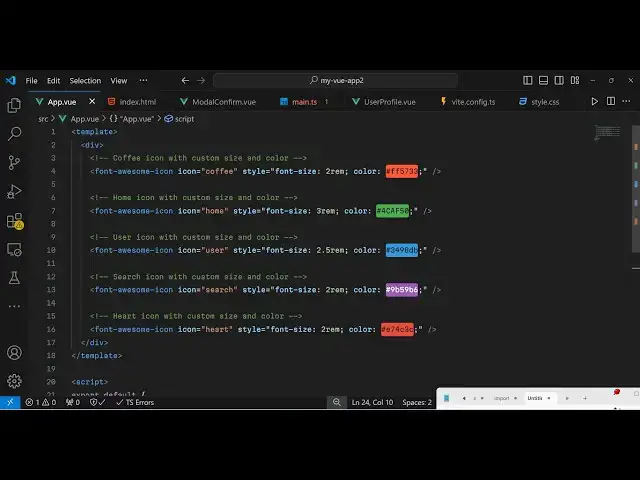
icons so just create a simple template
3:35
tag and inside
3:38
this in order to use it now so we just
3:41
use this phont awesome
3:44
icon and then it takes some options
3:46
first of all which icon that you want to
3:48
show let me say
3:50
coffee and you can even provide a style
3:53
here to the icon I can control the phont
3:56
size to RM
4:00
and then you can even control the color
4:02
as well
4:06
so providing a hexa decimal
4:12
code so once you initialize the icon uh
4:15
you can directly see the result in the
4:17
browser it will look something like this
4:20
uh if you want some change the size here
4:24
let's suppose
4:26
12 so you can see the quality of the ion
4:29
it looks something like
4:32
this and in the similar way we can show
4:35
all the
4:37
icons this is the coffee icon so in font
4:41
awesome you can check the documentation
4:43
it has all the icons which is home user
4:46
search and H
5:01
so in this way uh you can integrate this
5:04
phont awesome icons inside your view3
5:07
application with this package can
5:09
directly use it it's an official package
5:12
provided by phont awesome specifically
5:14
for view3 apps so we go to main.ts we
5:19
import these and then we can directly
5:20
use it so thank you very much for
5:23
watching this video and do check out my
5:25
website as well uh free mediat tools.com
5:28
uh which which contains thousands of
5:31
tools regarding audio video and image
5:34
and I will be seeing you guys in the
5:35
next video
#Programming