Up next in 10

Vue.js 3 Tutorial to Fetch Data From API Using AJAX With Loading Spinner Overlay in TypeScript
Jan 9, 2025

Get the full source code of application here:
https://gist.github.com/gauti123456/9245548d509de3ccf79b3132c5f43681
Show More Show Less View Video Transcript
0:00
uh hello guys welcome to this video so
0:02
in this video I will show you a example
0:05
in view3 where you will fetch data from
0:07
an API and we will show this loading
0:10
spinner overlay so we have this nice
0:12
little button out there fetch data and
0:14
as I click the button you will see this
0:16
nice little progress bar or spinner and
0:19
then the data is fetched from an API
0:21
which we are using Json placeholder API
0:23
to fetch the data and displaying it but
0:26
the tutorial is about that loading
0:28
spinner that appears for
0:30
3 seconds and then 3 4 seconds and then
0:33
the data comes so I will show you this
0:36
example how to make this real life
0:39
example right in view three so there is
0:43
we have using a package here for doing
0:45
this and uh the package name is if you
0:48
go to npmjs.com just search for this
0:51
package which is view loading
0:56
overlay so this is essentially this
0:58
package we are using it and I've already
1:01
installed it this is actually the
1:03
command and it's almost having 24,000
1:06
weekly downloads so it's compatible with
1:09
the latest version which is
1:11
three so now to get started inside your
1:15
app. view file we will start writing the
1:17
code so
1:20
for first of all we will Define our
1:23
typescript code and right here we'll be
1:27
importing this module from this view
1:30
loading overlay this is actually your
1:33
package and also we need to import the
1:37
CSS file as well which is located inside
1:41
dis CSS index. CSS so we import the
1:45
actual module and then we also import
1:47
the CSS
1:49
file just changed the spelling here and
1:52
then we export default the actual module
1:56
and inside this we will actually have a
1:59
data right here and for this we
2:01
return three variables is loading will
2:04
be false it actually controls the
2:07
spinner visibility and second parameter
2:10
will be full page so you need to show
2:13
full page spinner and whatever is your
2:16
fetch data so initially it will be empty
2:19
so we have these three variables which
2:21
we will be using it inside our vuejs
2:23
application apart from that our
2:25
components will be this loading
2:28
component we will be using using it and
2:31
then our methods so methods will be we
2:34
will be using Ajax here for fetching
2:37
data so we simply write this function
2:40
ajac it's a Asing function and here we
2:45
will make this is loading to true so now
2:49
it will show the
2:50
spinner and then we will show
2:54
data this variable to be false so this
2:58
variable uh show data will become false
3:04
because we will hide the data until the
3:07
spinner is hidden so when the spinner is
3:10
shown we will not uh display the data
3:14
and now
3:16
for fetching the data we will first of
3:19
all make this date dot now to start
3:22
measuring the time so now inside your TR
3:25
catch block we will fetch the data from
3:28
the Json placeholder
3:31
API so inside this try catch block if
3:35
any sort of error take place we are
3:36
catching this error and right here we
3:40
will make use of await and we'll use the
3:43
fetch API to fetch the data from this
3:46
API so you can use any API for this
3:49
example I'm just using Jason placeholder
3:52
API to fetch
3:56
post like this and
4:00
now this. fetch data will be equal to
4:03
response we need to convert this
4:05
response to Json so response. Json so
4:08
now that data will be deciding in this
4:11
variable
4:13
so now we also have this finally block
4:16
as well after this catch block finally
4:19
block executes whenever all the code is
4:22
executed now inside this block we need
4:25
to hide the spinner for hiding the
4:27
spinner we need to
4:32
minus
4:34
this we'll calculate the remaining time
4:38
so so ensure we ensure that the spinner
4:42
shows for at least 3 seconds so we are
4:45
using 3,000 millisecond so it is showing
4:49
for at least 3 seconds then we use the
4:51
set timeout function so after these
4:54
remaining
4:56
time we basically hide the spinner so we
4:59
say this dot is loading to be false and
5:03
then this do show data to be
5:08
true that's
5:10
all
5:17
so
5:20
apart from that we will also Define one
5:23
more method on cancel this method
5:27
executes when the user cancel
5:30
they don't want to fetch data again will
5:33
be is loading I will make it false so
5:37
that's
5:38
all and I have given all the source code
5:41
in the description and just for
5:43
the uh loading overlay I've just added
5:47
some CSS Styles just add these Styles as
5:49
well so now to show this progress part
5:53
we come to the template part where we
5:56
need to show it so inside vuejs we
5:58
provide your HTML inside the template
6:00
tags so right
6:03
here we will have the div tag and we
6:06
will attach this class which we have
6:08
inside
6:10
our
6:12
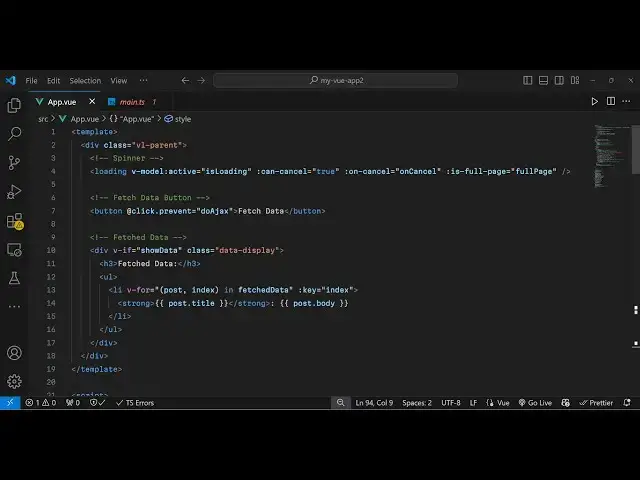
CSS so inside this we have the loading
6:15
spinner and we embed this component
6:18
loading and then it takes some
6:20
parameters so the very first parameter
6:23
is take is V
6:24
model
6:27
active and here we will attach is
6:30
loading it's either true or false can
6:33
cancel is true the user can cancel
6:37
fetching data and on cancel we will
6:40
attach this function on
6:42
cancel and then is full
6:46
page so we need to show full page
6:48
spinner so we'll say full
6:52
page and now we will have a simple
6:56
button so when the user clicks the
6:57
button so you have this button here
6:59
fetch data so we will attach this on
7:02
click
7:03
listener so when we click the
7:06
button so we will prevent the auto
7:08
submission of the form like this and
7:11
then we execute this function do ax so
7:14
we Define this function if you see do ax
7:17
so we just calling this function on on
7:22
click so if you refresh now you have
7:24
this button and now we see the spinner
7:27
for 3 seconds and after that it will go
7:30
away now for showing the data we
7:35
display a div tag right here in the
7:38
template and we will attach this
7:40
condition that V if it's a v if is a
7:43
directive in vuejs
7:45
it takes a Boolean parameter so show
7:48
data if it becomes true then we will
7:51
show
7:52
this
7:54
data so it is a conditional operator in
7:57
vuejs so now our dat data we will show
8:00
it so let me paste it so we showing it
8:04
in an unordered list simple we are using
8:08
V for for looping through the post which
8:11
we
8:13
got so essentially you can see if I
8:16
click it the spinner will show for 3
8:18
seconds and after that the data will
8:19
show so from the API so very simple
8:23
example but effective because in
8:25
Practical situations whenever you're
8:27
developing applications you need to show
8:28
the spinner
8:30
so that the user can actually interact
8:33
with the page so it's a nice practice
8:37
so all the source code that I have used
8:39
in this video is given in the
8:41
description and you can use this package
8:43
view loading overlay to show this
8:45
overlay loading spinner so thank you
8:47
very much for watching this video and do
8:50
check out my website as well free mediat
8:52
tools.com uh which contains thousands of
8:55
tools regarding audio video and image
8:58
and I will be seeing you guys guys in
8:59
the next video
#Other
#Computer Education