Up next in 10

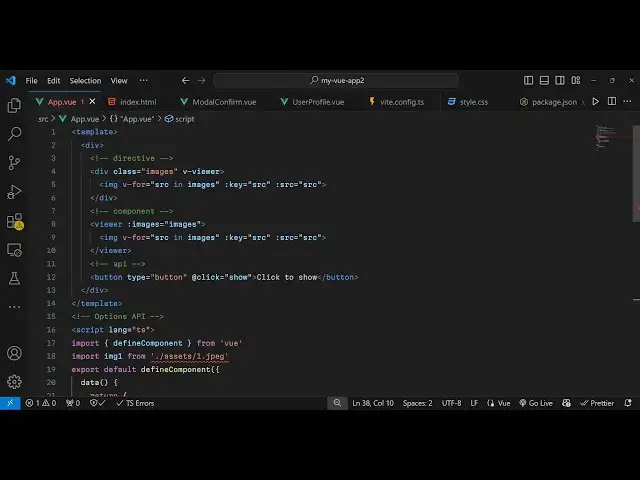
Vue.js 3 Tutorial to Build Image Viewer & Editor Using v-viewer Library in Browser Using TypeScript
Jan 9, 2025

Get the full source code of application here:
https://gist.github.com/gauti123456/586b4e5693dc7b8a2bfcce070d06fe7b
Show More Show Less View Video Transcript
0:00
uh hello guys welcome to this video uh
0:03
so in this video I will show you a
0:04
package in vuejs where you can see your
0:08
images right in the viewer itself it's
0:11
Advanced image editor and viewer you
0:13
have all these controls to zoom in zoom
0:16
out you can flip the image you can go to
0:21
the previous image you can view the
0:24
image in full screen you can go to the
0:26
next image then you can rotate this
0:29
image as well
0:30
in anticlockwise clockwise Direction
0:33
then you can even flip this image as
0:37
well flip it vertically horizontally as
0:40
well so all these controls are there uh
0:43
the name of the package specifically
0:45
it's designed for vuejs applications so
0:49
if you just write
0:50
view this is the name of the
0:53
package v- viewer the command is simple
0:58
I've already installed it it's having
1:00
almost 177,000 weekly downloads so they
1:04
do offer a live demo as well you can
1:06
check out their official website this is
1:08
the website here
1:12
and it's a advanced plugin uh show you
1:15
step by-step instruction to integrate
1:16
this so first of all you need to open
1:19
your main.ts file inside your VJs
1:22
project so for registering this
1:25
plugin so after installing it come to
1:29
this file and just require this plug-in
1:31
so
1:33
import
1:35
and we just write view viewer and coming
1:39
from this package V viewer and also we
1:44
need to import the CSS file as
1:47
well like
1:51
this so just 11 46 kiloby and 7.28
1:56
kiloby and then we just need to register
1:59
it so app. use view
2:02
viewer so we just registered this by
2:05
using this line so now you can close
2:07
this file and just come to app. view so
2:11
right here inside template
2:15
we inside the div
2:19
tag we will initialize this
2:23
viewer like this and here you need to
2:26
pass the images so we will pass this
2:29
directive
2:30
so it will hold these images in Array so
2:33
now need to Define these images array so
2:36
what we will do we will Loop through all
2:38
the images using this V for
2:42
directive
2:44
Source in images array and it would make
2:47
the width of each image to be
2:49
300 and height to be 200 and key
2:53
parameter will be the
2:58
source and the source will will be equal
3:00
to the actual source which is there so
3:03
just close the image
3:05
tag now we need these images array we
3:08
just need to Define this so right in our
3:12
typescript code right
3:15
here so I will just make the language as
3:20
typescript so first of all we
3:24
import the defined
3:27
component which will be coming from V
3:30
VI and here you'll be importing all
3:33
these local images which are stored in
3:35
my assets directory by simply using the
3:38
import
3:40
statement so these images are present in
3:43
my assets directory if you see in the
3:45
source so you're just requiring these
3:49
images you can use your own images as
3:52
well
3:53
so export default Define
3:57
component and here we Define the actual
4:02
data and we return all these images and
4:05
we create an images array and we include
4:08
all these images so this is a very
4:10
simple way by which can view
4:16
JS so we create this array and include
4:19
all these
4:21
images so now what happens if you see
4:24
refresh it you will see all these images
4:27
will
4:28
display and if I click any of these
4:30
individual image the image will show in
4:34
this nice little editor where you can
4:36
perform all these zoom in operations
4:38
flip it
4:39
rotate view in full
4:42
screen in this easy way you can use the
4:45
plug-in
4:49
so so just need to attach it in the
4:52
viewer component provide the images and
4:55
loop through
4:57
it and uh
5:01
so in this easy way uh you can do this
5:04
so I have given all the source code in
5:06
the description as well so if you need
5:07
the full source code how to use this you
5:09
can go to the description so thank you
5:12
very much guys for watching this video
5:14
and do check out my website as well free
5:17
mediat tools.com uh which contains
5:20
thousands of tools regarding audio video
5:22
and image and I will be seeing you guys
5:24
in the next video
#Online Image Galleries
#Multimedia Software
#Virtual Tours