Up next in 10

Vue.js 3 NotiVue Tutorial to Show Toast & Notification Alert Messages in Browser Using TypeScript
Jan 9, 2025

Get the full source code of application here:
https://gist.github.com/gauti123456/070ffe23d13ececc13e36344e3ada710
Show More Show Less View Video Transcript
0:00
uh hello guys welcome to this video so
0:03
in this video I will show you a
0:05
notification library inside toast
0:07
notification library for view3 and you
0:10
can see you can just show success error
0:13
notifications info warning with
0:17
icons so you can see the icon will
0:19
display alongside with your error
0:21
message and a cross icon it will display
0:25
for 2 3 seconds and then it will
0:27
automatically go away or you can close
0:29
it by clicking these cross buttons this
0:32
is actually the package guys uh you can
0:35
use this the name of the package is
0:38
naughty
0:41
view it's an open source toast
0:45
notification library for view3 and they
0:48
do have a
0:52
website so they have a great little demo
0:56
website you can try out all their
1:02
demo you can see
1:06
that these are different actions that it
1:08
supports someone let's suppose they've
1:10
sent you a request then they will show
1:12
you this message nice
1:15
little so your f is being uploaded if
1:19
you want to show this as well you can
1:22
like this one minute ago so in this way
1:26
you can show this so it's a pretty good
1:31
Library so I will show you a very simple
1:34
package example here so once you install
1:37
this you first of
1:39
all register it by going to main.ts
1:44
file and uh
1:47
just we will require
1:51
it by using the import statement so
1:55
import and
1:57
then we will
2:00
notification CSS we will import this and
2:03
then the animations as well so you can
2:06
see it has various CSS files for the
2:09
progress Parts notification animations
2:11
as well and now we need to include the
2:14
animations as well and then initialize
2:18
this it contains this create nauy view
2:22
which will contain
2:24
automatically import it so now we need
2:27
to pass it as a middleware app.use
2:30
that's all so this is all the
2:32
configuration which is needed if we
2:34
import the CSS then we import this and
2:37
then we pass it as a middle we so now
2:40
you can close this file come to your
2:42
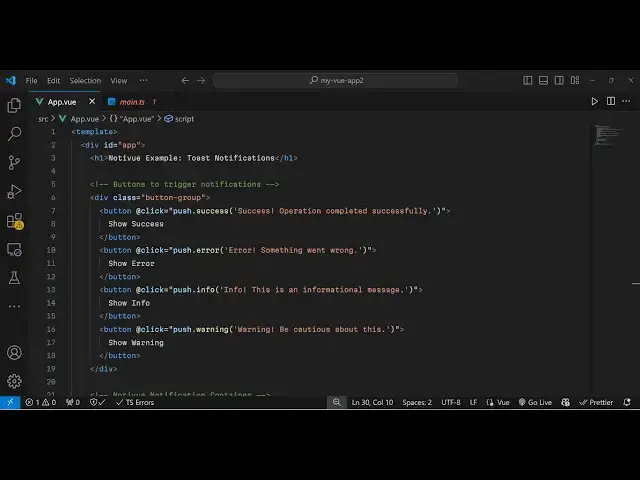
view file and now wherever you need to
2:44
display this we have the template
2:47
tag and just give it an ID
2:51
here and uh just
2:55
say and now we'll be
2:58
having a series of
3:00
buttons and for showing the success
3:06
notification we
3:07
will bind and on click so when you click
3:11
this
3:12
button we will simply call this by push.
3:15
success and
3:20
success operation
3:22
completed you just need to put single
3:25
codes
3:28
here so this this is your one button and
3:31
if you refresh it click on
3:33
that the message will not show because
3:36
we do need to
3:38
initialize by writing the typescript
3:40
code so right in the script tag we
3:43
import noty view this one
3:47
notification and also the push all will
3:52
be coming from this package so just add
3:55
this Imports line here and hopefully
4:02
so just add the setup type so setup just
4:06
add
4:14
this uh let me see what is there
4:21
U uh just I think I made some kind of
4:25
typo
4:26
mistake just wait if you refresh
4:31
now you can see that the success call
4:34
back shows I have given the full source
4:36
code guys in the description of this
4:38
video so one thing I I was missing guys
4:41
this that was a problem we do need to
4:43
after defining all these buttons for
4:46
showing this notification we need to
4:48
embed this component so naughty View and
4:51
it has a closing and opening tag and
4:54
then here we specify v slot directive
4:58
which is an item
5:00
and here we provide our
5:04
notification and it actually takes this
5:06
item which is the actual
5:10
item so we are using this not view
5:13
component notification we are showing it
5:15
so depending upon you will
5:20
see in this easy way you can show these
5:23
toast notification messages using this
5:26
uh package noty view so apart from that
5:30
I just showed you this they do
5:33
offer all sort of notification messages
5:37
you can change the background color
5:39
change the positioning as well at any
5:41
position you can check out their uh
5:43
official documentation and check out
5:47
more options as well so thank you very
5:49
much for watching this video and do
5:52
check out my website as well free mediat
5:54
tools.com uh which contains thousands of
5:57
tools regarding audio video an image
6:00
and I will be seeing you guys in the
6:02
next video
#Programming
#Internet Software
#Open Source