Up next in 10

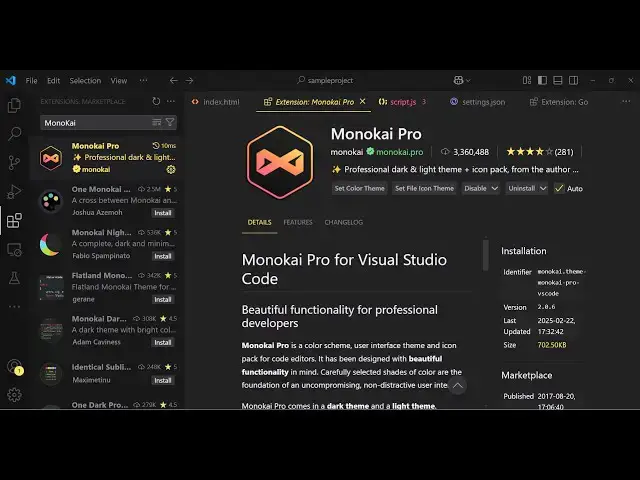
VSCode Monokai Pro Premium Theme With MonoLisa Font in Coding With Syntax Highlighting Tutorial
Feb 23, 2025

Watch My Visual Studio Code IDE Setup Video For Fonts,Themes & Extensions
https://youtu.be/Bon8Pm1gbX8
Hi Join the official discord server to resolve doubts here:
https://discord.gg/cRnjhk6nzW
Visit my Online Free Media Tool Website
https://freemediatools.com/
Buy Premium Scripts and Apps Here:
https://procodestore.com/
Show More Show Less View Video Transcript
0:00
uh hello guys welcome to this video so
0:02
in this video I will show you a vs code
0:05
extension for theme which is a very
0:07
popular theme monokai Pro and uh this is
0:11
actually the theme that I'm using right
0:13
here uh if you go to the extensions just
0:15
have type here monokai
0:19
Pro so this is the name of the extension
0:21
of the theme right here they do offer a
0:24
free trial as well you can use it for I
0:26
think 10 to 15 days just try this theme
0:30
and let me just uninstall
0:34
this so This is actually the monokai pro
0:37
you will see that this they have their
0:39
own website as well so if you try to
0:41
open
0:42
this you'll see it's available for
0:45
Sublime Text vs code and Jet brains as
0:48
well
0:52
so so the color scheme of this theme is
0:55
quite good you will see this is actually
0:56
the Dark theme which looks something
0:58
like this
1:02
and if you just click the install button
1:04
you'll see the theme will
1:08
install and they do offer this as soon
1:11
as you activate this you will see it has
1:13
various themes right there this is the
1:15
classic one this is a pro
1:18
one can see that various themes are
1:21
there and this is a dark theme that you
1:24
should
1:30
but the main theme this is monokai
1:32
Classic this is a classic theme so you
1:34
will see
1:35
that and they do
1:37
offer to customize the icons as well so
1:40
if you just see they do offer the set f
1:44
file icon theme as well
1:47
so so you can select any of the icons
1:51
that they support
1:58
here so so you can select any of this
2:01
whichever you like right
2:03
here you can see the highlighting is
2:06
quite good this is the Java Script this
2:09
is the Json this is HTML this is C++ so
2:13
every icon is highlighted with a
2:15
different icon based upon the extension
2:18
of the file
2:21
so so this is the actual color scheme
2:24
and the highlighting
2:28
here and you can basically check out all
2:31
the themes are not there in the free
2:34
version but if you activate it if you
2:36
purchase it you will actually see all
2:38
the themes which are supported
2:41
by and they
2:44
do basically use
2:48
this the font which is used inside this
2:51
is not this font I'm using Vera code but
2:55
uh there is a font which is monolisa
3:00
you will
3:01
see this is
3:03
actually the font here which is used
3:06
right here it's a premium font and if
3:08
you go to the website right
3:10
here so it basically comes bundle with
3:13
whenever you purchase monokai Pro it
3:15
comes bundle with but this is actually
3:17
the font which is used here in this
3:20
theme and uh you can try this for free
3:24
in the playground so can actually see
3:27
how it looks like so
3:30
basically it looks like this in every
3:35
language you'll
3:37
see I have already purchased it so I can
3:40
actually Show You by activating
3:44
that in my user settings file so what I
3:47
will do I'm using this phone F code so I
3:50
can change this
3:53
to
3:55
Mono Lisa so as soon as I change it it
3:59
will change this phone to this and now
4:01
you'll see that so this phone looks like
4:04
this
4:23
and personally I've used this phone
4:25
which is a free phone which is called
4:28
FEA code and and you can just use this
4:30
tee monokai
4:32
Pro and
4:38
uh so this is actually the pro theme
4:41
right
4:46
here so this is another theme right here
4:49
you'll see that so it supports multiple
4:54
themes so the highlighting also you can
4:57
see have different colors so if you
4:59
highlight your code it has a different
5:01
background color a different
5:04
themes so you can see that
5:12
so so it's a great theme uh but the only
5:16
downside it's that a paid theme so after
5:18
some time it will give you a notice that
5:20
you should purchase it so you'll see the
5:23
highlighting is quite good the color
5:25
combination is quite good and as you
5:28
type your code you see the difference
5:31
let me zoom in and just show you so you
5:34
can just
5:37
see the theme is quite good on the eyes
5:40
as well so there is no pressure in
5:43
seeing whatever thing that you want to
5:48
see so this is a light version of the
5:50
theme if you see it has a white
5:52
background so if you are working in
5:54
night then it will be helpful but
5:58
personally I don't like the the light
6:00
theme but I'm just showing you all the
6:02
themes which are supported by this so
6:05
this is another
6:07
theme personally I like this one quite
6:10
better you will see that this is we
6:13
using this one monoy pro filter Spectrum
6:18
so this is actually a nice theme
6:27
so so you can check out this theme guys
6:30
mono Kai Pro and this is their
6:34
website it's available for Sublime Text
6:37
also vs code jet brain so quite a number
6:39
of IDs if you click on the purchase
6:42
button you will see that it's a onetime
6:45
payment of around
6:48
12 you can pay with PayPal or debit card
6:51
or credit card and fill out the
6:53
information and then it will give you
6:54
the code and installation is quite easy
6:57
you basically will get this uh theme as
7:02
zip file you just need to install it by
7:05
going to the
7:07
extensions
7:09
and you can add the extension right here
7:12
and then install
7:17
it so thank you very much guys for
7:20
watching this
7:23
video and I will be seeing you in the
7:26
next video
#Skins, Themes & Wallpapers
#Development Tools