live_tv
Livestream Starting Soon
00
Hours
:
00
Minutes
:
00
Seconds
Up next in 10


Watch My Visual Studio Code IDE Setup Video For Fonts,Themes & Extensions
https://youtu.be/Bon8Pm1gbX8
Hi Join the official discord server to resolve doubts here:
https://discord.gg/cRnjhk6nzW
Visit my Online Free Media Tool Website
https://freemediatools.com/
Buy Premium Scripts and Apps Here:
https://procodestore.com/
Show More Show Less View Video Transcript
0:00
uh hello guys welcome to this video so
0:02
in this video I will show you one
0:03
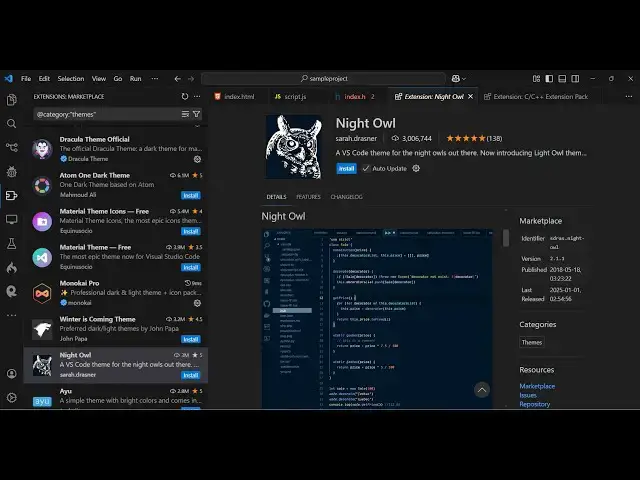
another famous theme inside vs code if
0:06
you go to settings and extensions uh
0:09
just type here Night Owl this is
0:11
actually the extension name night o WL
0:17
owl so if you search it this is actually
0:20
the extension which comes it is having
0:23
almost 3 million installs and a good
0:26
rating as well you'll see that so simply
0:30
install and activate this theme and as
0:32
soon as you do
0:34
this you will now see it provides you
0:37
with four
0:38
themes first second it also have the
0:42
light theme as well two light themes and
0:44
two dark themes so this is actually the
0:46
main theme of night hour it looks
0:48
something like this the color
0:49
combination and this syntax so the
0:53
background color is somewhat dark here
0:55
in the bluish dark blue and we have this
0:58
nice little
1:01
blue color we also have the uh green
1:05
color and also this yellow color as well
1:08
so it looks good on the eyes and if you
1:10
are coding it so it's very good can see
1:14
that so the color which is this is a
1:17
greenish color this is a bluish color
1:20
and same goes you can toggle
1:25
this one thing you will notice you will
1:28
know it Alex but by default it comes
1:31
with
1:34
the the default theme you can just
1:37
choose here the default night all you
1:40
will see
1:42
the this text has been changed to
1:44
italics so this is a nice feature of
1:48
this theme is that it actually changes
1:50
the text to italic so if you like to
1:53
have your text inside italic you can
1:57
actually all the text can see that so
2:01
it's a great theme which also
2:03
manipulates the text as well so all the
2:06
text will be converted to italics this
2:09
nice little handwriting font
2:12
so there is also the theme which doesn't
2:14
allow italic
2:17
so there are two types of can see that
2:21
so
2:26
night this is a light version here which
2:28
contains the back color to be
2:32
white so you can see that
2:36
so in this way you
2:44
can so some there are some more
2:46
extensions are also
2:49
available if you just type
2:52
here night
2:54
ow you will also see some more
2:56
extensions developed by developers out
2:58
there on top of this base
3:01
theme so this is actually the pinkish
3:04
version of this theme right here the
3:06
color combination that you are seeing
3:08
right
3:09
here and then we also have the Night Owl
3:12
Black which is the Black version of this
3:15
theme so just install this and activate
3:18
this so This corresponds to the Black
3:21
Version so if you need the Black Version
3:23
black the background color to be black
3:25
you can use this
3:26
theme the color combination is the same
3:29
right right here for the quote right
3:32
here so this is night
3:36
all this one also
3:38
is so you can see uh if you type now all
3:42
is a very popular theme so that's why
3:44
any developers
3:46
have can see this is another version of
3:50
it so you can pick your favorite version
3:52
whichever theme that you like you can
3:54
activate and use it uh so I just wanted
3:57
to make a video on this night I'll it's
4:00
a very famous theme so thank you very
4:02
much for watching this video and also
4:04
check out my website as well free mediat
4:06
tools.com uh which contains thousands of
4:10
tools regarding audio video and image
4:12
and I will be seeing you in the next
4:14
video
#Programming
#Software
#Online Goodies
#Skins, Themes & Wallpapers