0:00
uh hello guys welcome to this video so
0:02
in this video I will show you a vs code
0:04
extension uh for old school OS Ms do
0:08
themes for C++ so if you're looking
0:12
forward to code in a turbo C++ Ms do
0:15
environment such as 1995 operating
0:18
system there is a theme which is
0:19
available in vs code go to the
0:21
extensions and just type here Ms
0:24
do and quite a number of third party
0:27
teams will come in here and and uh you
0:31
can use any of these what the one and
0:33
the one I like is this theme which is
0:36
Old School theme it is got almost 29,000
0:40
installs it's developed by this person
0:42
Eric rxs Williams and just you can see
0:45
it has almost these 10 themes available
0:49
so just click the install button and it
0:51
will install these themes so now you
0:53
will see that if I open this C++ file
0:59
here you will see that so it has a quite
1:01
a number of themes you
1:05
can just see so it will
1:11
basically make this you can see it has
1:15
quite a number of themes with the
1:17
different color combinations you'll see
1:20
that this is the grayish one maroon
1:27
gray the background color is blue
1:30
because for msos operating system turbo
1:32
C++ the color the background color is
1:35
blue and you can see the text
1:38
highlighting these are 10 Old School
1:42
Ms specifically for C++ highlighting so
1:46
if you want to code this in this
1:47
environment you can install this
1:50
popular and uh then we have got this one
1:54
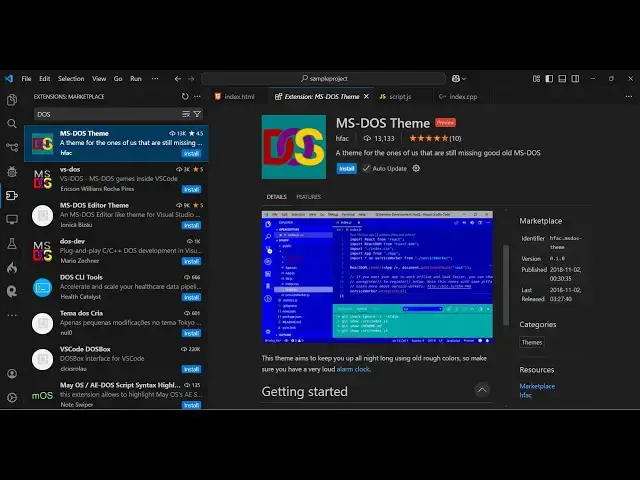
which is Ms do theme this is uh one
1:57
theme which is used in 1995 you can see
2:01
that so this is the MS do theme all the
2:04
background color is blue so if you need
2:07
this theme you can install this
2:08
extension as well so this is
2:11
a all the background is blue here and on
2:15
top of that you actually code right here
2:20
so personally I don't like this but if
2:23
you do need to use MSR for some kind of
2:26
school project in vs code you can
2:28
install this team so it's got almost
2:32
13,000 downloads developed by this
2:34
person so if you are missing the old MSS
2:38
theme you can install
2:40
this and now we have also this extension
2:43
as well which has got 10,000 so this one
2:49
so you can see now this is actually the
2:54
actually uh changes the background color
2:56
of the status bar this looks something
2:59
to turbo C++ if you have used turbo C++
3:04
um in the school's environment so
3:07
specifically in school colleges turbo
3:10
C++ is used specifically so if you need
3:15
to use turbo C++ in vs code this is a
3:17
great extension just install this MSS
3:20
editor theme and set the color theme and
3:23
now you will see that so this is
3:25
actually the index C++ file here and
3:30
it's exact turbo C++ you'll see that so
3:35
way you can use these third parties
3:38
extensions in vs code to actually enjoy
3:41
the old Ms theme and turbo C++ features
3:45
in uh vs code so these are the
3:49
extensions so thank you very much for
3:51
watching this video and also check out
3:52
my website as well free mediat tools.com
3:55
uh which contains thousands of tools
3:58
regarding audio video and MH and I will
4:00
be seeing you in the next video