0:00
uh hello guys welcome to this video so
0:02
in this video I will show you a Mac
0:05
operating system theme inside your vs
0:09
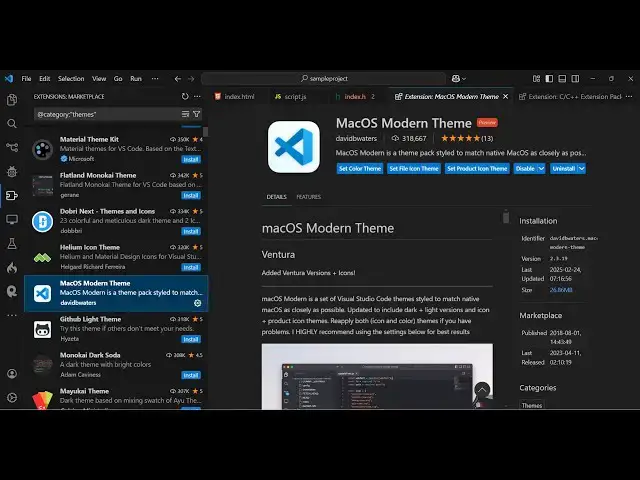
code so if you want to Inc incorporate
0:12
the Mac operating system in theme in vs
0:16
code just type go to extensions and just
0:19
type Mac operating system and this theme
0:24
here you will see that so let me just
0:27
show you it's almost having 300 18,000
0:31
weekly downloads it's a very popular
0:33
theme and just install this and activate
0:37
this so as soon as you activate this you
0:39
will see it comes with various flavors
0:42
let me just show you each theme so
0:48
shortcut so max xcode xcode as you all
0:52
know it's a very popular editor
0:54
specifically for Apple devices so you
0:57
can see that you can toggle between
0:58
multiple themes it also comes with the
1:01
light version as well the darker
1:04
version so various color combinations
1:06
are there so it almost have 3 4 5 6 7 8
1:11
9 10 11 themes are there in this
1:13
extension in a single extension so you
1:16
can pick your favorite theme from
1:18
here this is the default theme xcode if
1:22
you don't know is a code editor
1:26
specifically for Mac operating system so
1:29
it does does have the same theme that is
1:38
to it also have the light version as
1:48
well yeah so this is actually the xcode
1:51
default theme which is the light theme
1:53
that you can see right here so if you
1:56
want to activate this you can easily do
1:58
that personally I like the darker
2:01
version which is slightly good to the
2:04
ice this is the dark version the default
2:07
theme so you can activate it some more
2:10
third party extensions are also there
2:15
classic can even activate this as well
2:27
so so we have different themes right
2:35
here this is a classic theme of Mac
2:38
operating system and you can see that
2:40
so we have more extensions right here
2:43
and title bar less vs
2:49
code so all these themes are
2:58
so you can just install this one by one
3:03
see whichever theme that you prefer you
3:05
can install and use it and thank you
3:07
very much for watching this video and
3:10
also check out my website as well free
3:12
mediat tools.com uh which contains
3:15
thousands of tools regarding audio video
3:17
and image and I will be seeing you in