0:00
uh Hello friends welcome to this video
0:02
so in this video I will show you yet
0:04
another popular theme of V code Visual
0:07
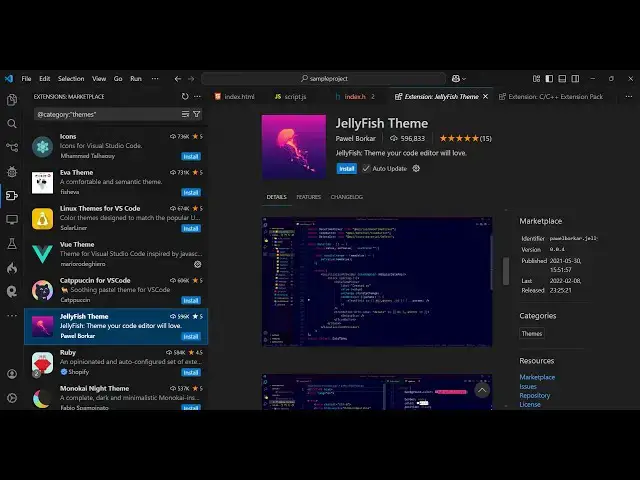
Studio code so if you go to settings and
0:10
uh search for this extension jellyfish
0:13
this is actually the name of the theme
0:15
jellyfish the second extension which
0:18
comes this is actually the theme right
0:21
here it's almost called six 600,000
0:25
downloads and simply just activate this
0:30
install and then activate
0:32
this so as soon as you activate this so
0:36
this looks something like this so it
0:38
have a nice little bright theme having a
0:42
dark background color so you can see
0:45
having this nice little magenta color
0:48
and uh for the text it has yellow blue
0:53
color so it looks something like this
0:58
so so it's only having a single theme
1:02
but uh this looks quite good it's
1:04
completely free and you can use it
1:06
activate this and then you can use it so
1:08
here this is your JavaScript this is the
1:11
Json code here so it comes with all the
1:14
syntax highlighting color combination so
1:16
in the inside the Json file it is now
1:19
highlighting it with purple color we
1:21
have yellow color as well so for the
1:23
JavaScript it uses different colors and
1:26
this is the HTML it uses different
1:28
colors so this is uh the jellyfish theme
1:34
you also see some more extensions which
1:37
uses these jellyfish again this is a
1:41
retro theme so you can check out this as
1:48
so this one is a retro theme so it's
1:51
very similar but still it just
1:54
customizes a little bit
1:56
more so this is jellyfish Pro this also
2:01
just modifies it using the base
2:05
theme and this is jellyfish
2:08
Pro so it has a nice little dark
2:13
color the highlighting Remains the Same
2:17
uh but this is actually the main theme
2:22
600,000 developers so you can use this
2:26
theme so you can see that
2:32
good the main thing is that it
2:34
highlighted this magenta color which
2:36
differentiate with with different other
2:39
themes this magenta color that you see
2:41
whenever you highlight your code it
2:42
looks something like this this gives
2:45
it's a good cool effect so whenever
2:47
you're coding it so you have these nice
2:50
little bright colors appearing so this
2:52
will highly enhance the readability of
2:56
the code as well so whenever someone is
3:01
so so this is actually a nice little
3:03
theme you can install it activate this
3:05
and use it for completely free so thank
3:08
you very much for watching this video
3:10
and also check out my website as well
3:12
free mediat tools.com which contains a
3:15
thousands of tools regarding audio video
3:17
and image and I will be seeing you in