Up next in 10

This VS Code Extension Will Highlight Your Code Blocks With Different Colors and Prevent Errors
Jan 9, 2025

Hi Join the official discord server to resolve doubts here:
https://discord.gg/cRnjhk6nzW
Visit my Online Free Media Tool Website
https://freemediatools.com/
Buy Premium Scripts and Apps Here:
https://procodestore.com/
Show More Show Less View Video Transcript
0:00
uh hello guys uh welcome to this short
0:02
little tutorial so in this tutorial I
0:05
just want to show you extension vs code
0:07
Visual Studio code setting youa which
0:10
will actually make your programming
0:12
generally very easy let's suppose if you
0:14
have a large code if you want to
0:16
highlight the brackets of
0:19
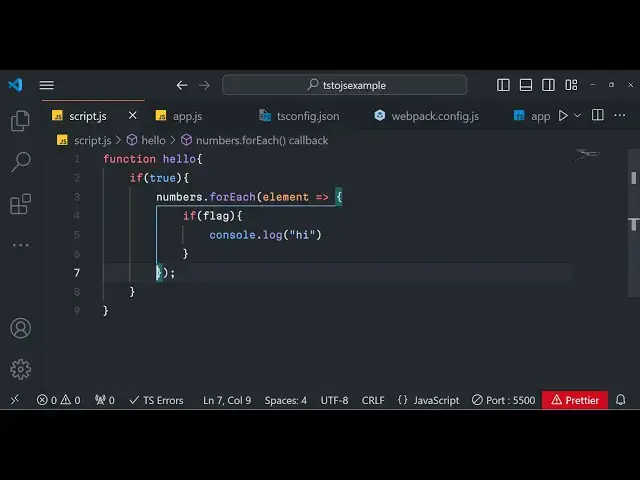
each uh you can see that so this is the
0:22
highlighting you will get in the vs code
0:24
if you enable this setting I will tell
0:26
you in this video so if you have a very
0:29
large Cod code if you are writing a code
0:31
let's suppose JavaScript code we have a
0:33
set of curly bracket right here it will
0:35
actually show you the highlighting as
0:37
you type this code right here
0:39
automatically it will show this
0:41
highlighting to you so whenever at the
0:44
end of the tutorial at the end of the
0:46
building the tutorial if you have any
0:48
sort of error you will not be able to if
0:51
you have a lot of brackets inside your
0:53
application so this will actually make
0:56
your job very much easy so whenever you
0:58
navigate into any control it will
1:01
highlight which bracket you are
1:03
currently on you will see so this is the
1:05
if bracket this is the function bracket
1:07
let's Suppose there is a for each Loop
1:10
right here there is another bracket
1:12
right out there so whenever you you will
1:15
move in the control it will actually
1:17
highlight which is the starting bracket
1:19
which is the ending bracket you can see
1:21
that so you can simply very much
1:24
highlight here so the name of the
1:26
extension is uh bracket
1:28
color maybe just go to this extensions
1:31
tab right here just you need to search
1:34
for this extension it's very popular
1:36
extension uh I recently just uh explored
1:41
this the name of the extension is
1:42
bracket
1:46
color bracket
1:48
pair p a i r
1:51
colorizer this is actually the name of
1:54
the extension guys and if you see it's
1:57
depreciated because already the Visual
2:00
Studio code if you just click on that it
2:03
will exactly tell you that this
2:05
extension is depreciated as the
2:07
functionality is now built in in vs code
2:10
so already this functionality is built
2:12
in you just need to enable that so if
2:14
you just drop down just click on the
2:16
settings option and right here by
2:19
default this is set to false by default
2:22
it will set to false if you now uh
2:25
refresh now you will not get these
2:27
highlight if I now you will not get the
2:30
highlighting you will see that I am just
2:32
clicking on the bracket so you will not
2:34
get the highlighting by default it will
2:36
set it to false so what you do need to
2:38
do you need to actually enable this
2:42
setting so just change go to the
2:44
settings option first of all search for
2:46
bracket pair colorizer go to the
2:49
extensions right here and just for the
2:52
just search for this bracket pair
2:54
colorizer and this simply click on the
2:56
very first it has got 6.1 million
2:59
downloads simply click on that and uh it
3:02
will actually tell you to click on the
3:04
settings option click on that and then
3:07
by default it will set it to false you
3:09
need to Simply click on
3:13
true so just simply click true so this
3:17
will globally basically enable that
3:19
setting inside your vs code environment
3:22
now you can actually work with any code
3:25
right here you can have as many brackets
3:28
as many indentation it will exactly tell
3:30
you again if you have a
3:33
condition you can see that so how easy
3:36
it is guys if you have a lot of brackets
3:38
inside your application if you have a
3:40
lot of Co brackets exactly it will tell
3:43
you in which bracket you have suppose
3:46
you have right written thousand lines of
3:47
code you are confused in which bracket
3:50
you are on so this will highlighting
3:52
that you will do in different colors it
3:54
will be beneficial to you guys in
3:56
different colors you will see that this
3:58
is in orange color this this is in blue
4:00
color this is orange this is exactly it
4:03
will tell you so it can span multiple
4:07
lines as well you will see that so now
4:09
you can exactly it will tell you where
4:11
the bracket is starting where the
4:13
bracket is ending so it's a very uh
4:15
important setting guys just do it go to
4:18
the extensions I already told you this
4:20
is bracket color simply turn this
4:22
setting to True right here and you will
4:25
get this amazing little uh setting
4:29
experience in writing the code in vs
4:31
code so it will work with multiple
4:33
languages JavaScript is one of the
4:35
languages you have react view any
4:37
framework that you work
4:40
on
4:41
uh let suppose you are building a
4:44
functional component right
4:47
here this also works with react also you
4:49
can see any language if you if it
4:52
contains curly bracket it helps in
4:55
highlighting the code it works with
4:57
parenthesis as well if you see we have
4:59
parenthesis curly bracket any functional
5:02
code any content that you have in the
5:06
bracket it will help you to highlight
5:08
dot bracket so this is the thing guys uh
5:12
thank you very much for watching this
5:13
video enable the setting in vs Cod so
5:15
actually achieve this so I will be
5:18
seeing you guys in the next video Until
5:20
then thank you very much
#Development Tools
#Scripting Languages
#Other