live_tv
Livestream Starting Soon
00
Hours
:
00
Minutes
:
00
Seconds
Up next in 10

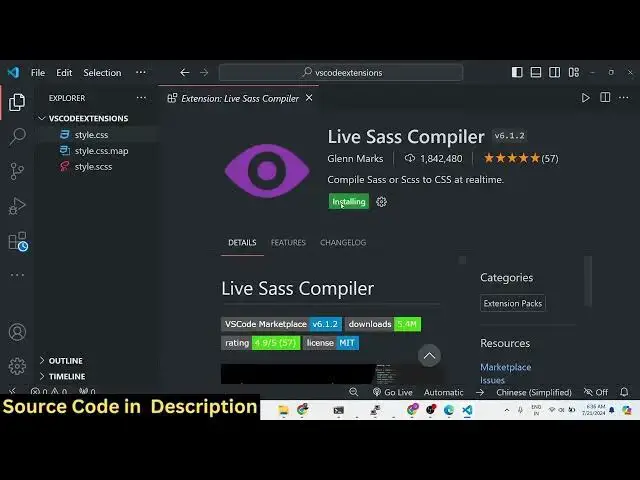
This VS Code Extension Will Compile Your SCSS or SASS to CSS in Realtime Full Setup
Jan 9, 2025

Hi Join the official discord server to resolve doubts here:
https://discord.gg/cRnjhk6nzW
Visit my Online Free Media Tool Website
https://freemediatools.com/
Buy Premium Scripts and Apps Here:
https://procodestore.com/
Show More Show Less View Video Transcript
0:00
uh hello guys in this video I will be
0:02
introducing a new vs code extension
0:05
which allows you to compile your SAS
0:08
files into CSS
0:10
instantly right inside your vs code so
0:14
it makes it very much easy so this is
0:16
you can see this is my SAS right here
0:18
and you can see that it is completely
0:20
watching right here and if I make any
0:22
sort of change it will automatically the
0:25
CSS files are pregenerated you will see
0:28
style. CSS Style css. map so if you make
0:32
any sort of change here if I
0:34
change any of the colors right
0:38
here so automatically this will run and
0:42
automatically changes will take place
0:44
let me just show you which extension I'm
0:46
using right here so we using this this
0:49
live SAS compiler
0:51
extension which lets you do this process
0:54
instantly so I will first of all disable
0:58
this uninstall this extension and show
1:00
you from scratch so the very first thing
1:03
you will
1:04
do uh let me just close this file so
1:08
just go to the extensions tab right here
1:11
just select extensions and right here
1:13
you need to type and search for this
1:15
extension which is live
1:18
SAS
1:20
compiler so this extension uh basically
1:23
the first extension is depreciated it
1:26
was originally created by riic day and
1:29
it was having two 2.5 million downloads
1:32
but this extension is depreciated and
1:35
they again uh saying that you need to
1:38
use the new size compiler this is the
1:40
second one which is developed by Glenn
1:42
marks you need to use this one and it
1:45
actually gives you the compile to CSS at
1:48
real time so as you write the SAS uh
1:51
your CSS will be compiled so you just
1:53
need to select this extension and then
1:56
you need to click on the install button
1:58
so your exension will be enabled
2:01
globally so
2:03
now let me just uh delete these files so
2:08
now if you create a SAS file s CS this
2:12
is the extension of the SAS file so you
2:15
will actually see there will be this
2:19
uh Arrow which will be added watch SAS
2:23
this is basically the button right here
2:26
which is there at the bottom side so if
2:29
you write any SAS right here let me put
2:31
a variable of color and I put here
2:39
red and I inside the body let me put the
2:43
background color to be
2:45
this so this is a SAS uh file that we
2:50
written now if you want to compile it
2:52
you just need to click this
2:54
button which lets you live compilation
2:56
of SAS or SAS to so simply click this
3:00
button so it will tell you either if any
3:03
sort of error take place so it will
3:05
exactly tell you undefined variable
3:08
error will exactly tell you compilation
3:10
error this variable doesn't exist so you
3:14
in this way you can easily identify your
3:16
error as well so now I need to replace
3:18
your color here so as you do this you
3:21
will see your files will automatically
3:23
get created instantly as you make the
3:25
change you will see that style CSS style
3:27
CSS map so inside your style CSS your
3:31
CSS code will be generated if you make
3:34
any sort of change here if you introduce
3:36
a different variable color two and right
3:39
here if you make another change in the
3:42
paragraph I need to have the color is
3:45
equal
3:46
to color two and let me make this color
3:49
value as
3:51
green so if you see automatically as we
3:54
make changes it will put a
3:58
semicolon it will again generate it and
4:00
now you can see that your CSS is
4:02
automatically updated so as you make
4:04
changes inside your SAS files it
4:06
automatically runs it you just need to
4:09
run it for the very first time by
4:10
clicking that button or you can simply
4:12
type control shift V and just type here
4:16
live SAS compiler so just select
4:20
it or you can use this file as well live
4:23
SAS compile current SAS file you can
4:25
select this or without watch mode is
4:27
also supported so you can simply
4:30
click
4:34
this compile current SAS file so this
4:37
will also work so either you can click
4:40
that this button at the bottom or you
4:41
can simply type control shift p on
4:44
Windows to actually compile it by
4:46
clicking this option as well
4:48
so if I have a lot of SAS right here
4:51
you'll see 100 one lines of code of SAS
4:53
is there so you can see automatically it
4:56
has you'll see 101 lines of code of SAS
4:59
is was here so it has successfully
5:01
compiled it into vanilla CSS you will
5:04
see that instantly without leaving our
5:07
vs code so it is
5:09
already compiled it so as you write your
5:12
SAS guys your CSS will be compiled and
5:14
generated instantly so this was a very
5:16
useful extension if you are working with
5:19
SAS in order to style your documents you
5:21
can see the live preview as well as you
5:24
write SAS you your CSS will be generated
5:27
you can simply see the CSS so this is
5:30
really useful if you are developing a
5:32
project in SAS and if you want to
5:34
compile it so no need to actually use
5:37
any third party package you can use this
5:39
extension in vs code which is the live
5:41
SAS compiler and simply write your SAS
5:44
files and your CSS will be generated so
5:47
this was a tutorial guys of using this
5:49
extension and thank you very much please
5:52
hit that like button subscribe the
5:53
channel as well and I will be seeing you
5:55
in the next video
#Programming
#Software
#Development Tools