live_tv
Livestream Starting Soon
00
Hours
:
00
Minutes
:
00
Seconds
Up next in 10


Buy the full source code of application here:
Show More Show Less View Video Transcript
0:00
uh hello guys welcome to this video so
0:02
in this video I will actually show you a
0:04
vs code extension which you can use to
0:07
actually preview your scalable vector
0:09
graphics which is SVG files you can
0:12
Minify them you can convert them into
0:14
Bas 64 code you can actually see the
0:16
live preview without leaving vs code it
0:19
will save you a lot of time it's a
0:21
all-in-one extension which is SVG so if
0:23
you just go to extension just type SVG
0:26
the very first result which comes this
0:28
is actually the uh extension right here
0:31
I have already installed it let me just
0:34
show
0:35
you this is actually the extension SVG
0:39
it is developed by this person which is
0:42
jock let me uninstall this and install
0:44
it once again so you will see 1.6
0:47
million downloads so very first result
0:49
4.5 rating click on the install button
0:53
and now you can see the extension has
0:55
been globally installed so now you need
0:57
to first of all what you need to do you
1:00
will have a simple SVG file you can
1:02
create it as well so we have the sample
1:05
SVG file which is actually a circle it
1:09
is having some radius so you will see
1:13
either you can right click and you will
1:15
actually see these options Minify SVG
1:17
copy image data URI if you want to see
1:21
the live preview you can see this
1:24
option preview SVG this is actually the
1:27
option which will get added once you
1:29
install this extension at the right hand
1:31
corner of the screen click on that and
1:33
now you will actually see the
1:35
preview you will actually see the
1:37
preview of this s Fiji if you make some
1:40
changes right here you will see the
1:42
preview will
1:44
change you can just see so if I make it
1:47
100 so it's a circle right here you will
1:50
see that so I can basically change the
1:52
background color as well so instantly
1:55
you can preview your SVG so if you are
1:57
developing SVG right in the vs code so
2:01
it's a complete kind of an editor which
2:03
lets you preview SVG while you code and
2:07
uh it's really good extension you don't
2:09
need any third party software to
2:11
actually preview your SVG you can be
2:14
doing it right in the vs code if you
2:16
want a transparent background you can
2:18
just do click this option transparent or
2:20
you have a black background you can
2:22
select different backgrounds from here
2:25
and the nice thing is that you can
2:27
Minify them as well by clicking this
2:29
option if you want to Minify this you
2:31
will see now SVG has been minified it
2:34
will save you a lot of space as
2:37
well so if you don't want to Minify let
2:40
me control Z I don't want to Minify the
2:43
second option is that copy as image data
2:46
URL this will actually convert this into
2:49
base 64 code so that you will see now
2:52
this SVG has been converted to Bas 64
2:56
code so your as base 64 code if you
3:00
select this option will be copied to
3:01
clipboard automatically so these two
3:04
options are also there it's an all
3:06
allinone extension so let's suppose I
3:09
downloaded SVG from an internet so this
3:12
is actually the SVG I save this
3:15
SVG so let me just take an example
3:19
sample
3:24
SVG so we have a set of SVG files right
3:28
here uh you will see if you download
3:31
from
3:35
internet so it's a scalable vector
3:37
graphics you will actually
3:43
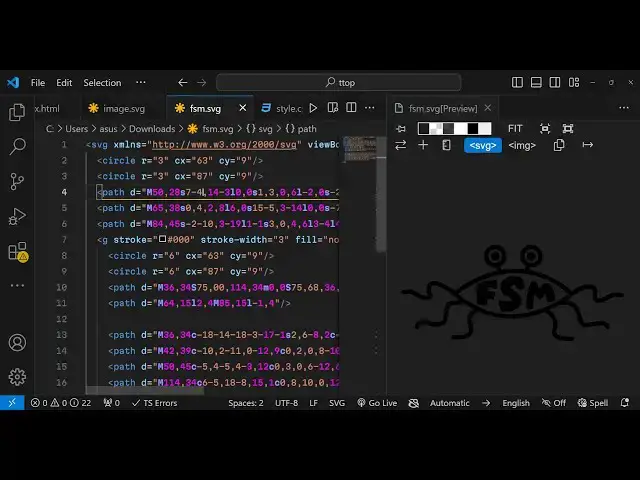
see so you can open with uh vs code
3:50
so you can open
3:53
this so you will see that now if you
3:56
want to preview it you will see this
3:58
option you will now see so in this way
4:01
you can make any sort of changes I don't
4:04
have knowledge about SVG programming but
4:07
if you do have knowledge you can edit
4:09
this code and as you change any sort of
4:11
code right here you will see
4:15
automatically the live preview will be
4:17
there so this is actually the extension
4:20
that I wanted to show you thank you very
4:22
much for watching this video and do
4:23
check out my website as well guys free
4:25
mediat tools.com which is my own website
4:28
which contains free thousands of free
4:30
tools related to audio video and image
4:33
and uh thank you very much please hit
4:35
that like buttons and I will be seeing
4:37
you in the next video
#Programming
#Software