Up next in 10

Readable AI Tutorial to Generate Comments Automatically For Source Code in VS Code
Feb 23, 2025

Watch My Visual Studio Code IDE Setup Video For Fonts,Themes & Extensions
https://youtu.be/Bon8Pm1gbX8
Hi Join the official discord server to resolve doubts here:
https://discord.gg/cRnjhk6nzW
Visit my Online Free Media Tool Website
https://freemediatools.com/
Buy Premium Scripts and Apps Here:
https://procodestore.com/
Show More Show Less View Video Transcript
0:00
uh hello guys welcome to this video so
0:02
in this video I will show you a vs code
0:05
extension which automatically comments
0:07
your code so just select whatever source
0:11
code that you want to generate the
0:13
comment it will automatically generate
0:15
the comment using artificial
0:16
intelligence so this is actually the
0:18
name of the plugin readable it is
0:21
actually this website readable. Soo and
0:24
they have this landing page and it's a
0:28
paid extension but they do off for a 10
0:31
days free trial and uh it supports 10
0:34
languages and if you want to purchase it
0:38
is $19 onetime payment it can generate
0:41
unlimited comments but in the free
0:44
version it only generate 50 comment so
0:46
let me show you a simple demo of this so
0:49
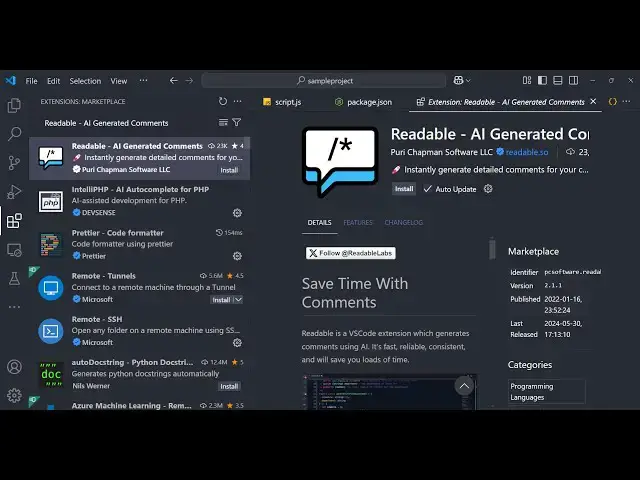
if you just go to the extensions tab
0:53
just write here
0:54
readable and then just enter it this
0:59
will come right here you will see
1:01
readable AI generated comments and it
1:05
will save you a lot of time if you want
1:07
to comment your code it will do it
1:09
automatically so simply click the
1:11
install button so this will install the
1:13
plug-in inside your vs code so as you
1:15
can see it offers 8 days of uh trial you
1:20
can just try it the pro version and then
1:23
if you are interested you can purchase
1:25
it by putting onetime payment so now to
1:29
generate the comment you go to the
1:31
source code whichever source code you
1:33
want to generate so this is why our
1:36
simple nodejs application which converts
1:39
the image to PDF file so you can just
1:44
select the code and then right click and
1:46
this option will come readable
1:50
generate so now it is generating
1:53
this comment right here you'll see
1:56
requires the necessary modules for
1:58
working with files and creating PDF
2:01
documents and then you
2:03
can just copy this whole
2:06
function and just generate the comment
2:09
right here right click and then you will
2:12
find out readable
2:17
generate and now it is generating the
2:19
comment right here you will see that it
2:22
converts an image to a PDF file and then
2:25
it takes two arguments first is the
2:28
image path and then the output PD PF so
2:31
you can see the comments are really
2:33
concise it actually uses artificial
2:36
intelligence the AI to generate these
2:39
comments looking at the code it
2:41
automatically generates the
2:43
comments and it's very useful because
2:47
introduction applications you do need to
2:50
comment your code so it will save you a
2:52
lot of time you can see just select the
2:55
code right click and then you all the
2:57
comment will be commented all the code
3:01
so now this looks good because if you
3:04
share this source code with other
3:06
developers they can
3:08
easily find out what code is doing what
3:12
by reading these comments which are
3:14
generated by this extension so in my
3:16
personal opinion it's a very good
3:18
extension it will save you a lot of time
3:20
which generates AI generated comments
3:24
and it's a trusted
3:26
plugin if you are interested you can
3:29
purchase Chase it by one time payment so
3:32
thank you very much guys for watching
3:34
this video and you can do this with any
3:37
language it mentions right here it
3:40
supposed uh 10 languages which are
3:44
famous so you can go to the website and
3:48
you
3:49
need I think it's a Javascript file so
3:53
same goes with the any language it can
3:56
be C++ it can be HTML file as well so
4:00
now let's suppose I want to generate a
4:02
comment for this HTML
4:05
so I will select this
4:11
all and then it will
4:13
generate the comment right
4:19
here so it depends upon the code as well
4:22
so how much
4:23
code and see in the free version it only
4:28
supports certain languages
4:32
so yeah and the free version you just
4:35
need to make sure that you only try
4:37
JavaScript code which is more than
4:44
useful so this was the extension guys if
4:48
you are interested you can purchase it
4:51
and also check out my website as well
4:52
free media tools.com uh which contains
4:56
thousands of tools regarding audio video
4:58
and image and I will will be seeing you
5:00
in the next video
#Software
#Development Tools
#Scripting Languages
#Freeware & Shareware