Up next in 10

React.js Tutorial to Make Sticky Header on Scroll Using react-stickynode Library in JSX
Jan 9, 2025

Buy the full source code of application here:
Show More Show Less View Video Transcript
0:00
uh hello guys welcome to this video so
0:02
in this video I will show you how to
0:04
make sticky elements inside react
0:06
application so inside your website if
0:08
you want to stick your
0:11
header as a fixed element you can use
0:13
this package let's you can see the demo
0:16
as I'm scrolling the header portion is
0:18
sticker sticker it is not moving so all
0:22
the time the user will see the section
0:24
as this scroll the website so it's very
0:27
perfect for let's suppose if you want to
0:29
display some kind of of message that you
0:30
want to display all the time so as the
0:33
user Scrolls down they will all the time
0:36
see that content appear on the sticky so
0:40
as we scroll you will see the element is
0:43
stick it is fixed at the top it is not
0:45
moving so the user will see all the time
0:48
this content so the package which is
0:51
responsible for this if you go to
0:53
npmjs.com and just search for this
0:56
package react sticky node
1:00
so this is essentially this package
1:03
which you can
1:04
use the command is very simple you have
1:07
this command I've already installed it
1:10
so I will just show you a very simple
1:12
example it is having almost 62,000
1:14
weekly
1:16
downloads so now to get
1:19
started first of all just make a simple
1:22
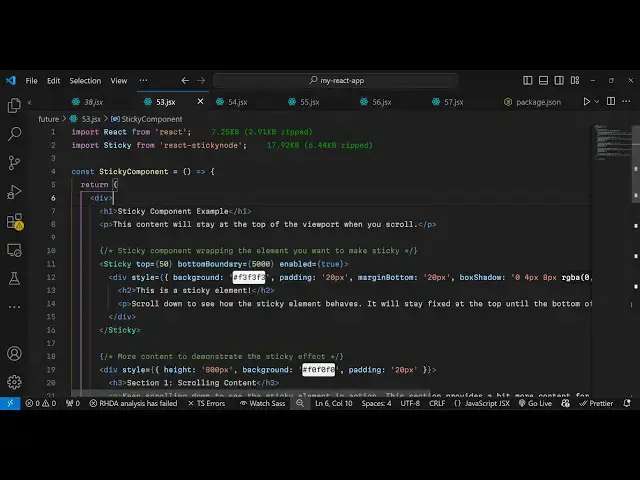
functional component and then we need to
1:24
import this package by using the import
1:27
statement and it contains this sticky
1:29
component which will be coming from this
1:32
package and it's almost 18 kiloby it's
1:35
very minimalistic package so once you
1:37
require it you need to go to jsx and
1:40
wherever you need to put your sticky
1:44
element you need to gives some
1:46
attributes so we have this H1
1:50
heading so now whichever element that
1:53
you want to make sticky you surround
1:55
this using this component
1:56
sticky section so it can hold any valid
2:00
HTML it can hold heading images anything
2:04
so now let's suppose I import a simple
2:07
image that I want it to be sticky so it
2:11
image is present in my assets
2:15
directory I'm just loading this image if
2:17
you see this image
2:20
so now inside this we will have this
2:24
image source and I will just make the
2:27
width to be 50 and the height to be 50
2:32
so this image I will make this image
2:35
sticky so there we to pass two options
2:37
first is the stop position so whatever
2:40
is your top position I will say zero so
2:43
now it will be appearing right at the
2:46
top and now to make it fixed we need to
2:49
provide a bottom boundary
2:53
option it's a prop that we need to pass
2:57
it's essentially the
2:59
it's this component is asking how much
3:02
space you want as the user Scrolls down
3:05
the page so what is the maximum amount
3:07
of space up till that you want this
3:10
element to be fixed so here you can
3:12
provide any uh let me provide 5,000 it
3:16
is a very large value so essentially I'm
3:19
saying that as the user Scrolls down you
3:21
need to make this element fixed so now
3:25
there is a third option you need to pass
3:26
which is enabled it's again a Boolean
3:29
parameter so I will just set it to true
3:31
so if you now refresh now uh and after
3:35
that you can have your
3:37
website content let me paste
3:43
some test
3:47
content so if you refresh now so what
3:50
happens now if you
3:52
see there is this image which is fixed
3:55
right at the top you can put your logo
3:58
of the website according to so that that
4:00
logo appears all the time when the user
4:02
Scrolls down your website it can be
4:04
anything you can make this a heading or
4:07
image so I'm just having this simple
4:09
image appearing so as we scroll down
4:12
scroll down if you see the image is
4:15
fixed at that location it is not
4:18
moving so in this way you can make any
4:20
element
4:22
sticky sticky header you can create it
4:26
can be image text anything
4:30
and I can even change uh let's
4:34
suppose the width to be
4:43
200 so you can
4:53
see so we have this component now so we
4:58
make whichever HTML element we want to
5:01
make it sticky we pass these three
5:02
options the top position the bottom
5:05
boundary and
5:07
enabled
5:09
so this was a package so thank you very
5:13
much for watching this
5:15
video and do check out my website as
5:17
well uh free mediat tools.com uh which
5:21
contains thousands of tools regarding
5:23
audio video and image and I will be
5:26
seeing you in the next video