Up next in 10

React.js Tutorial to Display Input,Pin & OTP Codes User Input Fields Using react-pin-field in JSX
Jan 9, 2025

Buy the full source code of application here:
Show More Show Less View Video Transcript
0:00
uh hello guys welcome to this video so
0:02
in this video I will show you a package
0:04
in react GS which can be used to allow
0:07
user to input input uh sorry OTP codes
0:12
or PIN
0:14
codes so some sensitive information
0:16
which actually you can have this UI uh
0:20
this is actually the demo application
0:22
that I'm showing you and this is a
0:24
three-letter digit PIN code the user can
0:27
write
0:30
so as soon as they write it you will see
0:32
whatever that they enter will show it 4
0:35
56 we can even reset this it can be
0:39
numbers it can be digits as well so you
0:42
can also have some validations as
0:45
well you you can only allow numbers to
0:48
be
0:49
entered you can have as many digits of
0:52
PIN codes so here you can control the
0:54
length of the pin so here we have three
0:57
I can change it to five so now it has
1:00
five places to fill out so five uh digit
1:04
letter pin code or OTP code that is
1:07
coming
1:08
so so the package is really simple uh if
1:12
you just go to npmjs.com
1:16
and the package name is react
1:20
pinfield p i n
1:23
field so it's a component for entering
1:26
pin code specifically or you it can even
1:28
be used for OTP codes which are coming
1:31
to the user for
1:33
authentication so the command is really
1:35
simple I've already installed it it's
1:38
popular package almost having 15,000
1:41
weekly downloads so now to include this
1:45
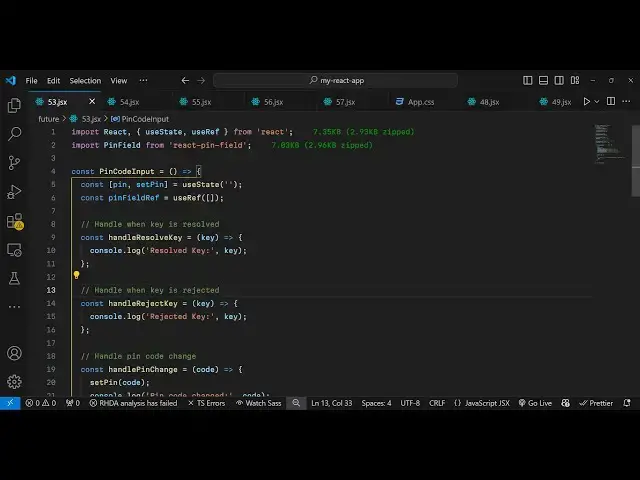
I will just show you a basic example
1:47
just make a simple functional component
1:50
and then use the import statement pin
1:52
field and it will be coming from this
1:55
package it's almost 8 kilobytes of size
1:59
and now we will be declaring a state
2:01
variable which will be pin uh it will be
2:05
used for keeping track of which pin code
2:08
the user will write or OTP using the UST
2:11
State hook and also you'll be declaring
2:14
a reference and for this we'll be using
2:17
the US ref
2:19
hook initial value will be empty so
2:23
empty
2:25
array so now whichever location you want
2:28
to embed this
2:31
whatever we will simply use this
2:33
component pin
2:35
field and I will align it in the center
2:37
positions so I will align it text align
2:41
to Center and give it a padding of 20
2:45
pixel so this is your you will attach
2:48
the reference so I declared this
2:50
reference pin field reference and then
2:54
you can even control the length here uh
2:56
let me say four
2:58
digit uh pin code or OTP code and you
3:01
can also format as well so whatever is
3:05
the key entered it will be there in this
3:08
variable if you want to format this you
3:11
can even do that as well in this
3:14
function and then we have some call back
3:16
function on resolve key so what happens
3:20
when the user finished entering the
3:23
digit or OTP code so you can trigger a
3:27
call back function so when the user is
3:29
finished and ing the key this function
3:31
will automatically execute so you can
3:33
Define this
3:34
function you can call this anything so
3:38
here the key will be passed so whatever
3:40
is the key entered by the user you can
3:42
get this information you can use it
3:46
accordingly to your
3:50
application and also similarly on change
3:54
so when the user is
3:56
writing the input field we can and bind
4:00
and on change event handler to this so
4:04
all similarly on complete happens when
4:07
the unit user is finished entering the
4:09
key can also bind this function as well
4:13
and you can even style this as well
4:15
custom Styles you can give it a margin
4:18
bottom 20
4:19
pixel so you can even Define all these
4:22
methods when
4:24
the process is complete this function
4:27
will execute holding the code here
4:30
and when the key is changed pin code is
4:33
changed you can have this function
4:35
handle pin change you can simply set the
4:38
pin right here to
4:40
code and we can display this whatever
4:44
the user has entered in the
4:49
paragraph entered pin and then here we
4:52
can show this is the PIN
4:55
code so now what happens if you check
4:57
now you will have four digigit
5:00
whatever you
5:02
write you have seen these uis inside
5:06
applications which requires us to fill
5:08
out OTP codes or some kind of security
5:10
code this will be a nice little react
5:13
component if you are building an
5:15
application which
5:16
involves allowing the user to enter PIN
5:19
codes or OTP codes this component is
5:23
more than enough you can install it and
5:24
use
5:26
it so thank you very much for watching
5:29
this video video and do check out my
5:31
website as well uh free mediat tools.com
5:35
uh which contains thousands of tools
5:38
regarding audio video and image and I
5:40
will be seeing you in the next video
#Programming
#Software
#Web Services