live_tv
Livestream Starting Soon
00
Hours
:
00
Minutes
:
00
Seconds
Up next in 10

React.js react-syntax-highlighter Example to Highlight & Beautify Source Code in Browser Using JSX
Jan 21, 2025

Get the full source code of application here:
https://codingshiksha.com/react/react-js-react-syntax-highlighter-example-to-highlight-beautify-code-using-js-beautify-in-jsx/
Hi Join the official discord server to resolve doubts here:
https://discord.gg/cRnjhk6nzW
Visit my Online Free Media Tool Website
https://freemediatools.com/
Buy Premium Scripts and Apps Here:
https://procodestore.com/
Show More Show Less View Video Transcript
0:00
uh hello guys welcome to this video so
0:02
in this video we will look at a reactjs
0:05
package which allows you to format your
0:08
beautify your code in different themes
0:11
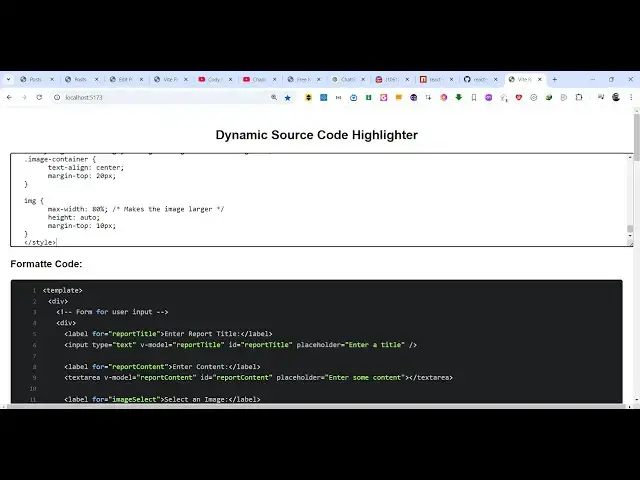
languages so we have a simple example
0:15
where you paste your source code and
0:16
text area and then the source code will
0:19
be highlighted in
0:23
the with live preview you will see in
0:26
the bottom side we have this live
0:28
preview as soon as you paste the code
0:31
right here you will see this code will
0:33
be highlighted syntax highlighted in
0:36
JavaScript language with line numbers as
0:38
well you will see line numbers as well
0:40
so it's a prism syntax highlighter prism
0:44
as you all know it's an open source
0:45
syntax highlighting library for
0:47
highlighting source code in the browser
0:50
so there is a package here specifically
0:52
built for react CHS which is called as
0:55
react syntax highlighter so if you just
0:59
search on Google
1:01
this npmjs.com just search for it and
1:05
it's almost this is actually the command
1:07
I've already installed it and it's
1:09
almost got 2 million weekly downloads
1:12
it's a very popular package so I have
1:15
given all the source code in the
1:16
description of this video so you can
1:18
follow along by going to the description
1:21
link so now to get started just make a
1:24
simple functional
1:25
component and first of all we need to
1:28
import this package so we we simply
1:30
write the import
1:32
statement and then we need to import the
1:36
theme one such theme
1:39
is atom Dark
1:43
theme so which will be coming from this
1:45
react syntax highlighter dis Styles
1:48
prism so automatically the vs code will
1:52
automatically import
1:54
that and I will just be importing this
1:57
as
2:00
the dark
2:02
two just for short
2:04
form and also we need to import the
2:11
prism
2:15
light as syntax
2:19
highlighter and this will be coming from
2:23
the this react syntax highlighter
2:31
so you add both these import
2:33
statements and now we come to the actual
2:36
app and here we just declare a one state
2:40
variable which is required the user will
2:42
paste the source code so we just need
2:45
this variable to Simply store that
2:48
source code so initial value will be
2:50
nothing we using the US state
2:53
hook and then we come actually to the
2:56
jsx where you need to embed this syntax
2:59
highlighter we just give it a tading of
3:01
20 pixel and here we give an H2 heading
3:05
where we say Dynamic source
3:11
code
3:13
highlighter so then we will have in text
3:17
area we give it as some attributes
3:21
placeholder paste your code here
3:30
uh then we'll give it the value we'll
3:32
attach this variable which we declared
3:35
which is code
3:38
text and then we also be binding an
3:40
onchange event handler so as soon as you
3:43
submit
3:46
your source code this call back function
3:49
will execute handle input change so
3:51
right at the top we can Define this
3:53
function
3:55
so handle input change so this e
3:59
parameter will
4:01
come so using this e parameter we able
4:04
to get what text the user has written
4:08
right here but what source code that
4:10
they have printed and then here you can
4:12
control the number of rows so I will say
4:15
it's
4:17
10 and then you can give some styling
4:20
here custom CSS styling so I will just
4:23
paste it
4:32
so if you refresh now you will see this
4:36
uh text area
4:41
added and now at the bottom side we
4:44
embed this
4:47
component where we
4:51
see the formatted codes so right here we
4:54
embed this component which is syntax
4:56
highlighter it takes some options first
4:59
of all if you want to show line numbers
5:02
you will toggle this option show line
5:04
numbers then the line number
5:08
style you can even configure this as
5:10
well change
5:14
the font
5:19
size let's suppose I change to
5:22
12 then you need to specify which
5:25
language you are highlighting so I'm
5:27
highlighting JavaScript language and
5:29
then you can even provide your own
5:31
custom Styles as well so if you do want
5:34
to style this as well by writing custom
5:36
CSS properties you can simply paste
5:39
it I'm just fixing the phone size and
5:43
lastly we need to apply the theme using
5:45
the style attribute so we have
5:47
successfully imported the theme which is
5:49
dark 2 so you can see atom dark as dark
5:52
two so we are applying this theme and in
5:55
between this
6:00
you actually embed your code which is
6:03
the code text that's all that we need to
6:06
do and if you refresh now and try to
6:10
paste any source code it can be in only
6:14
in JavaScript language so as I paste
6:19
it and we haven't written this on change
6:22
function that's why the error was there
6:25
so right here in the on change
6:28
function you see simply call this set
6:30
code text and whatever is the value that
6:33
the user e. Target do value so now
6:37
that's Sol let me highlight this code in
6:40
the browser so as I paste it you will
6:43
see the code will now be syntax
6:46
highlighted with line numbers
6:49
and so this is a very uh simple package
6:52
in react Chas react syntax highlighter
6:55
specifically made for react Chas
6:57
applications if you want to highlight
6:58
your Source Cod
7:00
with different themes and different
7:02
languages as well so thank you very much
7:06
so it's not limited to JavaScript I can
7:10
change this
7:12
to PHP as
7:15
well but for that you do need to mention
7:19
explicitly right here so language you
7:21
need to change to PHP so now it will
7:25
recommend as soon as you type the PHP
7:28
code it will highlight that as as
7:33
well so thank you very much for watching
7:36
this video and do check out my website
7:38
as well free mediat tools.com uh which
7:41
contains thousands of tools regarding
7:43
audio video and MH and I will be seeing
7:46
you guys in the next video
#Programming
#Software