Up next in 10

React.js react-spring Library Example to Animate HTML Elements in Browser Using JSX
Jan 9, 2025

Buy the full source code of application here:
Show More Show Less View Video Transcript
0:00
uh Hello friends welcome to this video
0:02
so in this video I will actually show
0:04
you a
0:06
react animation Library called as
0:09
spring so you can see on your screen
0:11
this is a simple example of animating a
0:14
simple div on Mouse click so if I click
0:17
on this div this div will animate and it
0:21
will actually scale rotate and change
0:24
color and also change the opacity as
0:26
well so you can see it is changing
0:28
multiple properties as as it moves so it
0:32
is also translating in the X and the y
0:34
direction and as I click the box right
0:36
here you will see it is moving in this
0:39
direction and it's changing multiple
0:41
properties so this is actually the
0:43
animation framework this is a command
0:46
here to install this npmi at theate
0:49
react
0:51
dpring SL
0:54
web so they also have their own official
0:56
website you can go to this website react
0:59
d bring so it's an animation framework
1:03
specifically built for react CHS
1:05
application so I will show you a very
1:07
basic example so once you install this
1:10
module just make a simple functional
1:13
react GS
1:15
component and right here at the very top
1:17
we need to import this so you'll say
1:20
import and from this module we need to
1:22
import the US spring and the animated
1:26
methods so this will be coming from this
1:32
react spring web so in this way you can
1:34
import this at the very top by using the
1:36
import statement now to initialize the
1:40
animation inside your
1:44
HTML we will just be
1:47
using this animated that we included
1:51
this is we are simply using it and we
1:54
need to animate a div so we will simply
1:58
say dot div so it can animate any HTML
2:01
element so we are just taking a simple
2:03
example of animating a simple
2:07
diff and here we can some give some
2:10
properties to it so the very first
2:13
property it takes is on click so when we
2:16
click this div we will initialize a
2:18
function right here which is handle
2:20
click so now here we need to Define this
2:23
function
2:30
and the second property it takes is
2:33
basically the you can give some styling
2:34
to it style
2:36
attributes it's an object and here we
2:39
can give it a width of 80 height of also
2:42
80 so it also shows of on the screen and
2:46
we can give it a background background
2:49
color let me give this color
2:54
ff6 D60 it's a hexadecimal
2:58
color and a border radius of
3:03
uh
3:06
8 so if you refresh your browser you
3:09
will see this box appearing right here
3:12
it is not animating it so now to animate
3:15
this box we need to initialize this
3:17
Spring Library for doing this we need to
3:20
declare a state
3:24
variable so we will initialize
3:27
Springs comma API
3:30
and then we'll be using this hook that
3:32
we imported from this react spring
3:34
animation framework U
3:37
spring
3:39
so you just write us spring and then it
3:43
takes a call back function we can simply
3:45
pass this function right as it
3:51
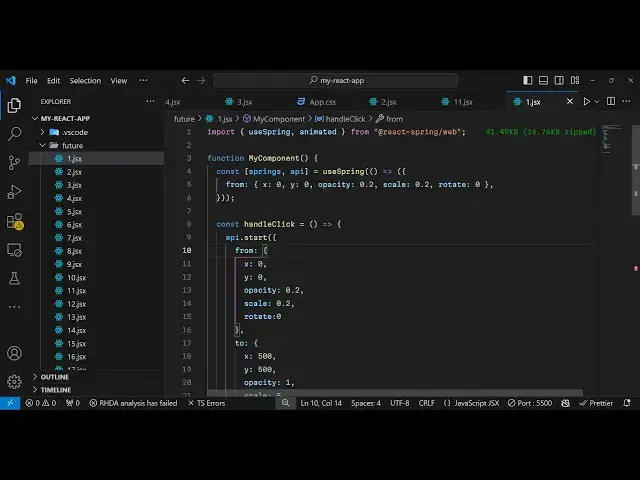
is and this actually takes the from and
3:54
the two position so when you initialize
3:56
your animation your box will be there x
3:59
coordinate will be zero y coordinate
4:01
will be zero and here you just need to
4:03
declare the properties that you want to
4:05
animate I want to animate the XY
4:08
position then we also need to animate
4:11
the opacity so opacity will start from
4:14
zero scaling will also start from zero
4:18
and rotation will also start from
4:21
zero so all these properties will be
4:24
animated x coordinate y coordinate
4:26
opacity scaling and rotation so which is
4:30
just initializing all these to
4:32
zero and now we need to initialize this
4:37
Springs in our HTML element so right
4:40
here we can
4:42
initialize dot dot
4:45
dot Springs so we are just initializing
4:48
this animated property right
4:51
here and if you refresh
4:57
now you will not see the Box because we
5:01
have set this opacity to zero let me
5:04
change this opacity to
5:06
0.3 so that we can see the
5:16
box and also we need to change the scale
5:19
property as well which is
5:22
0.2 so now the box is appearing you can
5:25
see very small because we have set these
5:28
properties opacity 0 3 scaling to
5:33
0.2 so if I need to animate this now
5:36
what we need to do we need to actually
5:38
write this function handle click so
5:40
right in this function we will use this
5:44
API which is available to us in this
5:47
hook this is a function and it actually
5:50
contains the start
5:51
function and this is a very important
5:54
method in this framework so here you
5:56
need to specify the from and the two
5:58
position so so this will move from x
6:01
coordinate 0 y coordinate
6:04
0 so here you just need to paste all
6:07
these coordinates here opacity will go
6:10
from
6:11
0.3 scaling will go from 0.2 and
6:15
rotation will go from zero and now you
6:19
need to specify the
6:20
two so what is the ending part after the
6:24
animation what the box should look like
6:26
it the it should move up to X should be
6:30
500 y should also be 500 opacity will
6:34
change to 1 scaling will change to five
6:38
and rotation it should rotate to 45° so
6:42
this is the from this is the two so
6:45
after the box is animated it will move x
6:48
coordinate 500 y coordinate 500 opacity
6:51
will change to one scaling will change
6:53
to five and rotation will be 45° so if
6:56
you refresh your application now if I
6:59
click the button you will see all these
7:02
properties will change and you will see
7:04
this animation appearing and the Box
7:07
will now be scaled up to five so as I
7:10
click this box you will see it will
7:13
scale rotate it will move into
7:16
horizontal and by Direction so all these
7:18
properties are
7:19
changing so in this way you can do this
7:23
animation you can even change the
7:25
background color as well I think
7:30
to Red we can even change just specify
7:34
the
7:46
background so it has changed
7:50
to sorry this needs to be background not
7:53
background
7:57
color so the firstly the color of the
7:59
box is blue as I click you this
8:03
animation it changes to Red so you can
8:05
change any property any CSS valid
8:07
property so in this way you can do this
8:10
process very easily using this uh spring
8:15
framework inside react Chas specifically
8:17
built for react Chas application you can
8:19
do the
8:20
animation and you can read more about
8:24
inside this website they have a lot of
8:26
good documentation which is there
8:29
I just shown a very simple example but
8:32
it's a massive
8:33
framework which can be used for
8:36
animating purposes
8:38
so thank you very much for watching this
8:41
video and I will be seeing you in the
8:43
next one and do check out my website as
8:45
well free mediat tools.com which
8:47
contains thousands of tools regarding
8:49
audio video and image and I will be
8:52
seeing you in the next video
#Programming
#Animated Films
#Other