Up next in 10

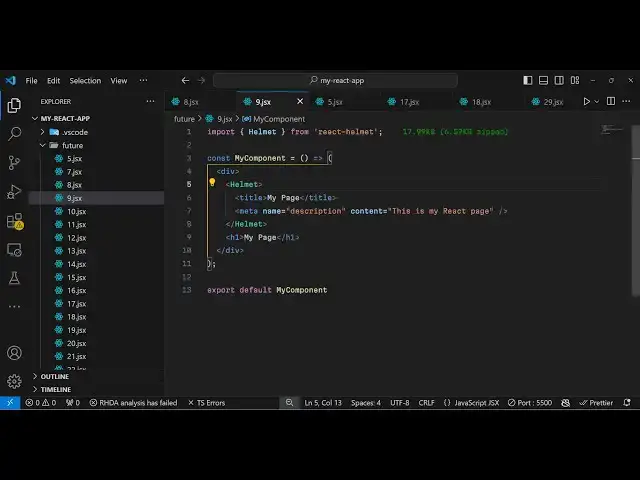
React.js react-helmet Example to Change Title and Meta Description of Component For SEO of Website
Jan 9, 2025

Buy the full source code of application here:
Show More Show Less View Video Transcript
0:00
uh hello guys welcome to this video so
0:02
in this video I will show you how to
0:04
change the title and the description of
0:07
every component inside your react CH
0:09
application using a module called as
0:12
react helmet react helmet is very
0:15
popular an old module of react
0:18
Chas specifically done for SEO purposes
0:22
so in if your website need a particular
0:25
title and description for every
0:28
component then there is a very easy way
0:30
by which you can use it using react
0:32
helmet this is actually the module here
0:35
almost 2 million weekly downloads and
0:37
this is actually the command npmi react
0:40
helmet I've already installed it so I
0:43
will show you how to give your component
0:47
a title and description so first of all
0:49
just make a simple functional component
0:52
and then we need to import this module
0:54
which comes here importing helmet from
0:57
react helmet this is the actual name of
1:00
the package and inside this this is my
1:04
app component right here so now if I
1:06
want to give it a title and description
1:08
but if I open this in right in the
1:11
browser itself without giving any title
1:13
and description if you go to right click
1:17
go to this option view page Source you
1:20
will see the default
1:22
title is given as Ved plus react and
1:26
this is your
1:27
description so if you want to change
1:29
these things what you can do right here
1:32
using this module so whenever you are
1:34
returning your
1:37
jsx inside this we will embed our helmet
1:41
component and inside this you change
1:44
your title
1:45
directly so I will say my custom
1:49
page and then you can even provide a
1:52
description using a meta tag
2:00
so it actually takes attribute of
2:04
descriptions so it's very helpful if you
2:06
are developing your website specifically
2:08
for custom uh search engine of
2:11
optimization so that you can your
2:14
website can rank on Google so it's very
2:17
useful because you need to provide title
2:20
description for each page so that's why
2:23
if you refresh
2:24
now you see your title will get changed
2:27
my custom page and if I show you the
2:33
description uh just refresh the page
2:43
here so in this way you can change
2:47
your you can see the title has been
2:49
changed here in this way you can give
2:52
any title of your
2:57
choice so in this way you can change
3:02
your actual title and
3:05
description and we can give it a H1 tag
3:08
as well so after this you can start
3:11
building your components right here I
3:13
can give any
3:17
HTML so if you click on inspect element
3:32
so this is your app level component and
3:34
you have given this a custom title and
3:37
description so in this way you can
3:39
change your title and description for a
3:42
react CH app for SEO purposes using
3:45
react helmet so thank you very much for
3:47
watching this video and do check out my
3:49
website as well free mediat tools.com
3:52
which contains thousands of tools
3:54
regarding audio video and image and I
3:57
will be seeing you in the next video
#Programming
#Internet & Telecom
#Skins, Themes & Wallpapers
#Search Engines