Up next in 10

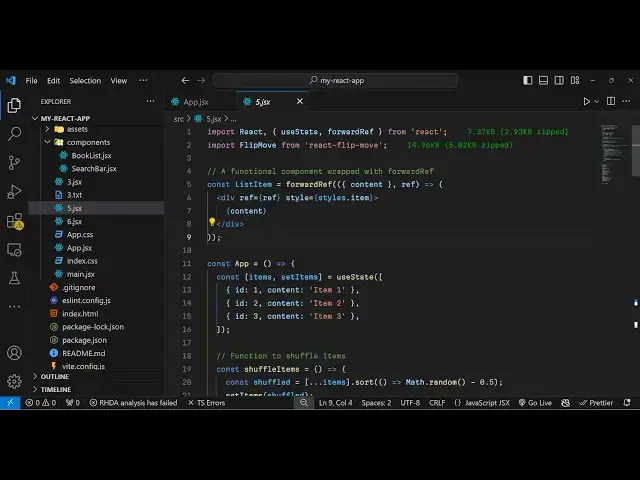
React.js react-flip-move to Animate & Shuffle HTML Elements in Web Page Full Example in JS
Jan 9, 2025

Buy the full source code of application here:
Show More Show Less View Video Transcript
0:00
uh hello guys welcome to this video so
0:02
in this video I will show you a react
0:04
Chas package which is helpful in
0:06
flipping out the items so if you want to
0:09
shuffle your items from one location to
0:11
another you can use this uh package it
0:14
can add a new item as well if you click
0:17
the add button you will see the slight
0:18
little animation which happens when it
0:21
adds the items you can remove the last
0:24
item and you can see the animation
0:25
happening so this is coming from this
0:27
package
0:30
so you can shuffle your items as well
0:32
add remove item add item so all these
0:35
things you can perform using this
0:39
package add remove everything you can
0:43
click the shuffle items
0:48
button so we it is
0:52
actually if you go to npmjs.com the
0:56
search for this package which is react
0:58
flip
1:02
move so this is actually the package I'm
1:05
talking
1:06
about this is a command npmi react flip
1:09
move I've already installed it it is
1:11
almost having
1:13
113,000 weekly
1:15
downloads so in this way you can
1:17
construct these awesome looking
1:19
interfaces so it provides built-in
1:22
animation that you see right
1:24
here it also give you a demo as well you
1:27
can try out on their official website
1:30
which is developed by this person so
1:33
it's completely open
1:35
source you can also see the grid
1:37
structure it also have this
1:40
animation we have inside this if you are
1:45
basically building some block post or
1:48
displaying some data you can do this
1:51
nice little animation shuffling rotating
1:54
animation as sending order you can even
1:56
display data in a grid like structure
1:58
then also it will have this flipping
2:01
kind of this
2:03
animation so you can add a new item
2:05
remove item horizontally as
2:08
well
2:09
[Music]
2:11
so so now to include this package uh
2:15
it's very easy so just make a simple
2:17
functional component and uh just make
2:20
the import statement and it contains
2:23
this flip move component coming from
2:26
this react flip move already imported
2:29
this so
2:32
now we just need to declare some data
2:35
that we need to display on the page so
2:37
it depends upon your application it can
2:40
be any data I'm just taking an example
2:42
which is a list of items and for this
2:45
we'll be using the UST State Hook from
2:47
The Acts it will be a simple
2:50
object sorry not a object array of
2:54
objects each object will contains three
2:57
properties the ID content only two
3:00
properties ID and
3:03
content and similarly we have the ID to
3:19
content so now we have three items right
3:22
here in this items variable
3:26
so now we can easily display this uh
3:29
inside your
3:43
jsx so you can actually declare some
3:46
inline styles for
3:48
this so I've already created some Styles
3:53
which we have for these items so we are
3:57
having some custom CSS so
4:08
all the source code is given in the
4:09
description it's a complete
4:12
example so basically uh the component
4:15
here it's called as flip move you will
4:18
directly if you want to animate some
4:21
items you directly use this component
4:23
right here flip
4:25
move and inside this component flip move
4:28
you basically
4:30
write all the items so we'll Loop
4:33
through all the items that we have
4:34
items. map and for each
4:38
item we will actually have this list
4:42
item component that we need to
4:46
declare and to this component we'll be
4:48
passing two props first is the key and
4:51
the second is the actual content so we
4:54
just need to Define this list item
4:58
functional component so so it's a simple
5:01
component which will return the actual
5:04
content we have a div content we are
5:06
applying the Styles and the div so if
5:09
you just refresh your application it
5:11
will give you a very basic example of
5:13
this
5:24
Library so we have these three buttons
5:27
you can Shuffle the items remove item
5:30
and you can see the animation happening
5:32
as we add items remove items so you can
5:35
use this library to shuffle add remove
5:38
items
5:41
and so thank you very much for watching
5:44
this video and do check out my website
5:46
as well free mediat tools.com which
5:48
contains thousands of websites related
5:50
to audio video and image and I will be
5:54
seeing you in the next video
#Programming
#Animated Films
#Open Source
#Other