live_tv
Livestream Starting Soon
00
Hours
:
00
Minutes
:
00
Seconds
Up next in 10


Buy the full source code of application here:
Show More Show Less View Video Transcript
0:00
uh hello guys welcome to this video so
0:02
in this video I will show you a react CH
0:05
package which is which can be used to uh
0:09
rearrange the items like this you can
0:11
directly change the order of the items
0:15
and you can basically move the items in
0:17
the UI like this so there is a specific
0:21
package in react CH which allows these
0:23
capabilities it's a very powerful
0:25
package you can see we can change the
0:27
order of items if you have a list of
0:29
items which are displayed in this
0:31
fashion and you can add these
0:33
capabilities so that the user can
0:36
arrange the order of the items by
0:39
directly interacting them the actual
0:42
package name is movable you can directly
0:45
move the items by clicking on them so so
0:48
if you just go to npmjs.com and just
0:51
search for this package react
0:55
movable so this is actually the package
1:03
so it's a drag and drop movable
1:07
list if you have a list of data that you
1:09
want to display and rearrange the order
1:12
so this is actually the package I've
1:14
already installed it and it's almost
1:16
having 55,000 weekly downloads it's a
1:19
pretty popular package they have given a
1:22
simple example I will show you how to
1:24
get started so just make a simple
1:26
functional component and the very first
1:29
thing we need need to do we need to
1:31
include the package which will be list
1:35
and array move so these two methods we
1:37
need to import from this package which
1:39
is react
1:42
movable you can see 12 kilobytes package
1:46
and it contains these two components the
1:48
list of data that you want to display
1:50
and the array move function and now to
1:52
display the data uh first of all we need
1:55
to have array of items that we not want
1:57
to display so for this we will have an
2:00
items
2:02
array so you can use it from database or
2:05
API I will just use it UST State array
2:09
so item one this will be item
2:13
two so this can be any list of data that
2:16
you want to
2:26
display so we have these six items array
2:29
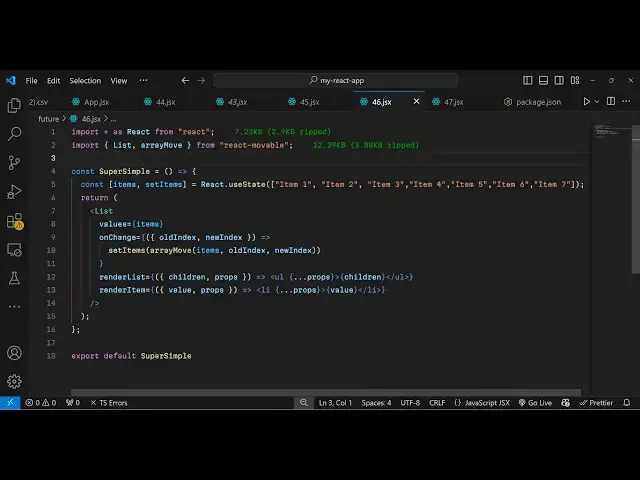
of item items which we want to display
2:32
and now in the jsx you simply type the
2:34
component name which is
2:36
list and it actually takes some
2:39
properties the first property it takes
2:41
as a values property and here you need
2:43
to Simply attach the items which we have
2:46
directly so we are attaching it so if
2:49
you refresh now you will actually
2:54
see we do need to
2:56
actually also bind a render function as
2:59
well well so render list so when the
3:02
list is rendered this function will
3:04
execute and here you need to
3:07
specify it takes children and props as
3:10
two arguments this function and here you
3:13
need to specify in how you want to
3:15
display so we have a simple unordered
3:18
list where we'll be
3:20
displaying these elements so we have the
3:24
props and inside this we will display
3:27
inside C bracket the children
3:32
so if you refresh
3:36
now and also you also need to specify
3:40
the render item function as well so this
3:43
this render list function executes a
3:46
render item function as well for each
3:49
item this function will execute render
3:51
item once again it will have the value
3:54
actual value and the props and right
3:58
here we dis play it inside the list
4:01
item same we will do
4:04
this this is just a little bit of
4:06
configuration that you want to
4:09
do and here you need to specify the
4:16
children sorry this is actually the
4:18
value not
4:20
children so now you will see now it has
4:24
added the capability now you can
4:27
actually reorder it
4:30
you can move
4:33
it and you will see the ordering process
4:37
hangs right here because we haven't
4:39
defined the onchange function because
4:42
when we change the order this onchange
4:45
function will execute so we do need to
4:46
Define this function as well so when we
4:49
change the order of
4:52
items we ex have this old
4:55
index and now there's a new index
5:01
so here we just need to call the set
5:03
items function which is actually our
5:05
hook function and we need to set the
5:08
items and we have this function of array
5:13
move so old index just move it to the
5:17
new index so when the position of items
5:20
change this function is very handy which
5:22
comes from this module to actually
5:24
rearrange the positioning uh changing
5:26
the old index with the new index so now
5:29
the you can change the order here very
5:32
easily by moving the items right like
5:35
this you can have as many items as you
5:38
want to display and this Library will
5:41
work perfectly and you can see this is
5:44
just a little bit of configuration that
5:46
you want to do and here you will replace
5:47
your own items that you want to display
5:49
which can come from database or API so
5:53
you can add a full fledge functionality
5:56
of drag and drop and directly the user
5:59
can move the the items in the list and
6:01
change their order so this was the
6:04
example I have given the source code in
6:07
the description you can check out the
6:08
source code and get started with this
6:10
module and thank you very much guys for
6:12
watching this video and if you like this
6:15
video please hit that like button and do
6:18
check out my website as well uh free
6:20
mediat tools.com uh which contains
6:23
thousands of tools regarding audio video
6:26
and image and I will be seeing you in
6:28
the next video
#Programming
#Computer Education