live_tv
Livestream Starting Soon
00
Hours
:
00
Minutes
:
00
Seconds
Up next in 10

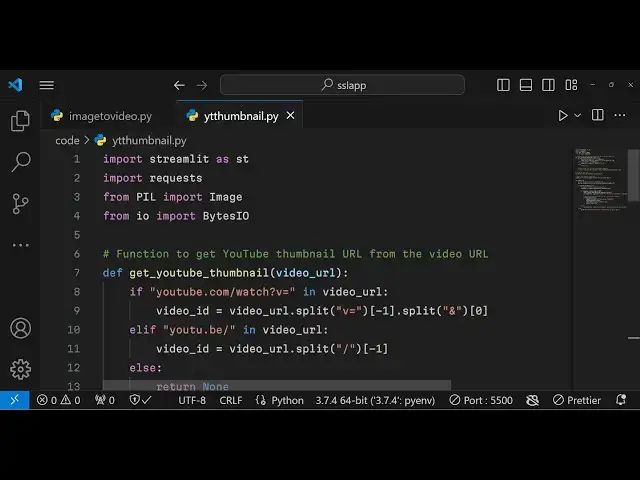
Python 3 Streamlit Project to Build Youtube Thumbnail Downloader From Video URL in Browser
Jan 9, 2025

Get the full source code of application here:
https://gist.github.com/gauti123456/735224a05b601f7ddaf569898c39775d
Show More Show Less View Video Transcript
0:00
uh hello guys welcome to this video so
0:02
in this video I will actually show you
0:04
how to make a YouTube thumbnail
0:05
downloader inside python using streamlit
0:09
web framework which allows you to build
0:11
out web application faster we have this
0:14
interface where we have this input field
0:16
where you can actually paste the URL of
0:19
the YouTube video that you want to
0:21
download the thumbnail so as you paste
0:23
it the URL automatically the fetch the
0:27
YouTube thumbnail will be fetched and
0:29
you have this download button out there
0:33
you can click this and your downloaded
0:36
thumbnail will be saved inside your
0:38
system very simple app you can pick any
0:42
video copy link address just paste
0:45
inside this input box enter and then
0:48
this thumbnail will be fetched and
0:50
easily you can click the download button
0:51
and fetch this thumbnail so we will try
0:54
to build this application and all the
0:56
source code is given in the description
0:58
so for building this
1:00
we are using streamlit streamlit if you
1:03
don't know it's a web framework of
1:06
python open source which is allowed to
1:09
actually make web application in a very
1:11
faster way and uh it has pre-built
1:15
components it doesn't need HTML CSS
1:19
anything it's a very good
1:21
framework and you can install it by the
1:24
PIP command I've already installed it so
1:27
first of all I will import this
1:29
streamlet
1:32
as import streamlit as STD then we need
1:37
to import the request module which will
1:39
be required for fetching the thumbnail
1:42
and then we need to have the pillow
1:46
Library we need to import the image
1:48
module and from input output module we
1:51
need to import the bytes
1:55
inputter so first of all what we need to
1:58
do we we need to specify the title of
2:02
the
2:04
app so we can specify the title using
2:06
the title method it will simply show the
2:09
user YouTube thumbnail downloader so if
2:12
you just refresh your application it
2:14
will look something like this YouTube
2:15
thumbnail downloader so in this way you
2:18
can actually specify the title using the
2:20
title method and then we will have a
2:23
simple input field inside
2:26
streamlit so we have a function right
2:29
here which is textor input so here we
2:33
will allow the user to Simply
2:37
enter YouTube video
2:41
URL so if you refresh you will actually
2:43
see this input field added here the user
2:46
can provide your YouTube video URL and
2:50
then you have if condition that if the
2:53
URL is submitted by the user in that
2:55
case we need to fetch the maximum
2:58
resolution thumbnail and we can get this
3:00
using a custom function that we will
3:03
Define which is get
3:06
YouTube
3:10
thumbnail we will pass this video URL as
3:13
a argument now we need to Define this
3:16
function at the very top so we can
3:19
Define this function using the def
3:21
keyword get YouTube thumbnail and we
3:24
will pass the video
3:28
URL and right here we will have this if
3:31
condition that if
3:33
youtube.com/watch
3:35
is equal
3:39
to in video URL so we are simply
3:43
checking this condition that if video
3:45
URL contains this
3:48
youtube.com/ you need to fetch the video
3:50
ID so now to get the video ID you need
3:53
to write
3:55
this we need to use the split method and
3:59
we need to get get the this
4:02
one the video ID from the URL so we can
4:05
easily get this using this uh synex
4:08
regular expression so we can get this or
4:12
we will have this elf condition that
4:17
if the URL is slightly different which
4:20
is uh this
4:26
one then in that case also
4:32
the video ID must be
4:38
fetched so we are tackling both the
4:40
scenarios in this if else condition and
4:44
based upon we fetch the video ID so
4:46
after we fetch the video ID it's very
4:49
simple or in the else block we will
4:51
return nothing so else again we need to
4:54
return
4:56
nothing and then we need to Simply using
4:59
this video ID that we got you can easily
5:02
get the thumbnail of the YouTube video
5:04
using this syntax https image.
5:10
youtube.com/ and here you will embed
5:12
your video ID that you fet dynamically
5:15
slash the maximum
5:17
resolution maximum resolution
5:20
default.jpg this is the actual format
5:23
where you will get your YouTube
5:24
thumbnail in a maximum resolution
5:27
quality so this is you define this
5:29
function guys get YouTube thumbnail we
5:31
pass the video URL and we will get this
5:33
thumbnail in this variable so after we
5:36
get this thumbnail we will write if
5:38
condition that if
5:41
this thumbnail exist in that case we
5:44
need to display this thumbnail now to
5:45
display this thumbnail we'll use the
5:47
request module request. getet and we'll
5:50
pass this maximum resolution thumbnail
5:52
URL and if the response comes
5:56
status status code is 200 100 in that
6:00
case we can display this thumbnail so
6:03
now to display it in the image tag and
6:05
open this image by the pillow Library
6:07
image open and you'll use the bytes
6:10
input output and response. content so
6:14
whatever content is there now to display
6:17
this image we'll use the streamlit
6:19
method st. image and we'll display this
6:23
image and the second argument is the
6:25
actual caption that you want to display
6:27
so it is will be YouTube Max
6:34
resolution
6:38
thumbnail and the third are use column
6:41
width to true so it will cover the
6:44
entire
6:45
space then we also need to display a
6:48
download button just below it so stream
6:51
L does provide you this function
6:53
download button so it will display this
6:55
download button it will take four
6:56
arguments first is the label of the but
6:59
so
7:00
download
7:03
maximum resolution
7:07
thumbnail the data will be the response
7:11
content the third argument will be file
7:13
underscore name what file name that you
7:15
want to give so I will say result. jpg
7:18
and the fourth one is the MIM type so it
7:20
will be image/ jpg that completes the
7:24
application we have showing the download
7:26
button which takes four arguments the
7:28
label the actual data that you want to
7:30
download file name and name type so if
7:32
you refresh now and if you paste the URL
7:36
of your particular you
7:38
video and you paste
7:41
it enter and you will fetch the YouTube
7:45
thumbnail and I think it is not
7:49
showing so gather user status is
7:55
true uh I think some error has taken
7:58
please let me
8:00
all the source code guys is given in the
8:02
description so I think I made some kind
8:05
of typo mistake so what I will do I will
8:08
simply copy this code and paste
8:14
it so again if you copy
8:26
this you will now see the YouTube will
8:29
be fished if you click the download
8:31
button this download
8:33
button the image will be downloaded so
8:36
in this way guys you can build out a
8:37
YouTube thumbnail video uh YouTube
8:40
thumbnail downloader inside browser
8:42
using the streamlit in Python so thank
8:45
you very much for watching this video If
8:47
you like this video then please hit that
8:49
like button and do check out my website
8:51
as well freem mediat tools.com which
8:53
contains thousands of free tools
8:55
regarding audio video and image and I
8:57
will be seeing you in the next video
#Fun & Trivia
#Flash-Based Entertainment
#Programming
#Clip Art & Animated GIFs
#Photo & Video Sharing
#Scripting Languages
#Video Sharing