Up next in 10

Python 3 FFMPEG Script to Export Text to Speech as MP3 & WAV Audio Using pyttsx3 & pydub Library
Jan 9, 2025

Official Website:
https://freemediatools.com
Show More Show Less View Video Transcript
0:00
uh hello guys welcome to this video so
0:02
in this video we will talk about how to
0:05
do text to speech in Python and we have
0:08
another Library which does the process
0:11
which is PYT sx3 this is actually the
0:15
name of the library it converts your
0:16
text into a audio file and we can
0:20
convert this into MP3 or wave file
0:22
anything that you can do so if I run
0:25
this python script right here we
0:26
actually have this text available in
0:30
this uh if you see we are providing this
0:32
text hello this is a sample text to
0:34
convert to speech so if I actually run
0:37
this python script python app 2 by P py
0:42
so just notice on the left hand side a
0:44
MP3 file will be created it will take
0:47
some time and you can now see first of
0:49
all it created the wave file and then we
0:51
converted the wave file into MP3 so if I
0:53
not need to play this file hello this is
0:55
a sample text to convert to speech you
0:58
see a m mail is actually speaking these
1:01
words and actually you can see that say
1:04
this is actual python script you can
1:06
have as much text that you want if you
1:08
have a blog post if you have a Wikipedia
1:10
text that you want to convert into text
1:12
you can do that so now let me show you
1:14
how I did that uh the actual name of the
1:17
library is
1:20
PYT
1:22
sx3 this is a text to speech conversion
1:25
library in Python and it the def
1:29
speciality of this this library is that
1:30
it works without internet connection
1:32
it's a offline Library so once you
1:35
install this it actually doesn't require
1:37
internet to for its functional
1:39
functioning you can actually develop a
1:41
desktop application which will work
1:43
offline as well without internet and it
1:46
supports multiple TTS engines text to
1:48
speech engines including sappy NSS and
1:51
ese this is their official documentation
1:54
on the python repository page you can
1:57
read more about it so we'll look at an
2:00
example right here very simple example
2:02
so just you need to have a latest
2:04
version of python installed I am
2:06
basically using the 3.1 2.2 version of
2:09
python as of recording this video This
2:11
is actually the latest version and it
2:15
works compatible with the latest version
2:17
you need to install this command pip
2:19
install
2:21
PYT SX 3 this is actually the command
2:25
here simply install this module and uh
2:28
also one more mod modle you will need
2:30
guys which is
2:33
uh py du py du I think this is actual
2:39
module yeah py
2:44
du so this is actually required guys it
2:47
uses fmpg in the background to actually
2:49
convert the wave file created into an
2:51
MP3 file you can also search it as well
2:54
py
2:55
du so this is actually it actually
2:58
manipulate the audio within a simple and
3:00
easy highle interface this is actual
3:02
Library simply install this also so
3:06
after installing all this thing I will
3:09
show you step by step how I coded this
3:12
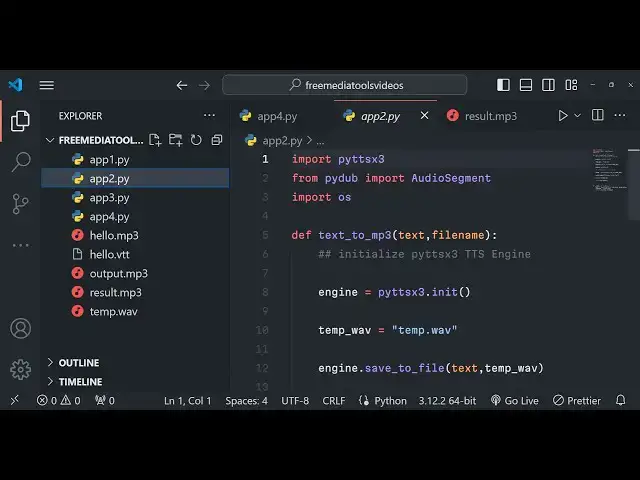
so just delete everything and at the
3:15
very top we will simply write here py TT
3:19
sx3 we will import this library and then
3:22
we will import py dub from here we need
3:26
to import audio segment
3:29
and then lastly we also need operating
3:32
system module which is a built-in module
3:33
of python to actually save the audio
3:36
file inside your computer now we will
3:39
simply have the main
3:41
function of
3:45
python so inside this main function guys
3:49
we need to provide the raw text so you
3:51
simply say hello my name
3:55
is
3:57
goam and I am trying
4:01
27 and I am
4:03
from this is actually raw text that I
4:05
provided guys you will basically see you
4:08
can take any text from a PDF file from a
4:11
text file as well and then we give it a
4:14
file name so let me give it a file name
4:17
of result.
4:20
MP3 and then we will Define a function
4:23
which actually converts this to a MP3
4:25
file you will give it a text and file
4:28
name as two arguments to this function
4:31
now we just need to Define this function
4:32
at the very top text to
4:36
MP3 we will be having the text and the
4:39
actual file name as two arguments so the
4:42
very first thing we will do is we will
4:44
initialize this py TTX 3
4:48
engine TTS engine and then we will
4:52
simply initialize it by using the
4:54
Constructor it contains a method which
4:56
is in it we will initialize this engine
4:59
pts engine at the very first line the
5:02
second line we will actually create a
5:04
temporary wave file which will get
5:08
created and then we will convert this
5:10
wave file to MP3 file so there is this
5:13
method available right here which allows
5:15
you to save to a save the text convert
5:19
the text into a wave file so we will
5:22
convert this text to a wave
5:26
file and then there is a method out
5:29
there
5:30
run and wait and we need to run this and
5:33
then wait for it for the result to
5:35
happen so after this now the process is
5:39
very simple we if you do if you just uh
5:43
like this if you do
5:46
this it uh if I delete that output. MP3
5:50
so what will happen it will actually
5:52
create this wave file that we created
5:54
temp dot if I execute this python script
5:58
app2 do py you will see this wave file
6:02
will be created and you see hello my
6:04
name is godam Sharma and I am 27 years
6:06
old and I am from India you can see a
6:09
wave file is created but if you want the
6:11
result in ramp3 file then you can
6:14
actually convert this
6:17
uh wave file to MP3 so for doing this we
6:22
can actually use the P library and it is
6:25
using fmpg to actually convert
6:29
you will see that all these methods are
6:31
pre-built here we need to convert from
6:34
wave to Temporary
6:39
wave and then we need to export this so
6:42
we have a function right
6:44
here inside this object we have the
6:47
function which is
6:50
export we will export
6:56
it to the file name and the format here
6:59
will be
7:00
MP3 that's all and then you will simply
7:03
remove the this file you will delete
7:06
this file by using the operating system
7:08
module programmatically and it basically
7:11
print out a statement that MP3 is
7:15
saved so like this this is actually the
7:17
function guys which is very simple if
7:19
you just now execute
7:25
it so first of all temp file will be
7:28
created and now result. MP3 so if you
7:31
just open
7:33
this hello my name is godam Sharma and I
7:35
am 27 years old and I am from
7:39
India so nice thing is that you can
7:41
basically use uh let's
7:46
suppose if you have a lot of text if you
7:49
want
7:52
to if you any article is there if any
8:02
you can paste
8:04
here I think it supports multiple
8:06
languages so by default English language
8:09
is there but you can have your native
8:11
language as well by using Google
8:14
translate you can copy paste the text
8:16
and then convert that JavaScript is a
8:17
high level programming language that
8:19
follows the ecmascript standard it was
8:21
originally designed as a scripting
8:22
language for websites but became widely
8:24
adopted as a general purpose programming
8:27
language so let's suppose if you want
8:29
want this to be in a different language
8:32
different native language you can
8:34
actually use a
8:37
tool
8:41
uh Google translate and just try it it
8:45
doesn't require any API key simply paste
8:47
it you will basically see
8:54
any Arabic language we have pasted and
8:59
try to run
9:03
this JavaScript excript
9:08
so so it doesn't support guys multiple
9:11
languages it only support the English
9:13
language so in comparison to Google text
9:16
to speech it is not that good we have
9:19
that module that we discussed in the
9:21
previous video guys GTS it's a very good
9:23
module GTS Google text to speech engine
9:27
but this py
9:29
uh DT sx3 TTS engine only supports
9:33
English language but this GTS supported
9:36
multiple languages you can even provide
9:38
an English language option as well there
9:40
is a language option variable here also
9:43
but in this it only supports by default
9:45
English language you can't be having
9:47
multiple languages so you can basically
9:50
provide English language text and it
9:52
will actually convert them into MP3 or
9:54
wave file this is actual TTS text to
9:58
speech
9:59
that I wanted to show in Python guys
10:01
thank you very much for watching this
10:03
video please hit that like button
10:04
subscribe to channel and I will be
10:06
seeing you in the next video
#Programming
#Engineering & Technology
#Computer Education