Up next in 10

PyScript Library Tutorial to Execute Python Code in Browser Using HTML & JavaScript
Jun 3, 2025

Get the full source code of application here:
https://codingshiksha.com/python/pyscript-library-tutorial-to-execute-python-code-in-browser-using-html-javascript/
Show More Show Less View Video Transcript
0:00
uh hello guys uh welcome to this video
0:02
so in this video I will show you uh a
0:05
library by which you can actually
0:08
execute Python code inside your browser
0:10
uh this is called as pycript is actually
0:13
it's open-source library uh this is
0:17
their official website if you just type
0:19
pycript on Google the very first link
0:22
which comes this is
0:24
a website here you can see it's an
0:27
open-source
0:29
platform for Python in the browser so
0:32
it's called as pycript this is the name
0:35
of it and uh you can actually try this
0:39
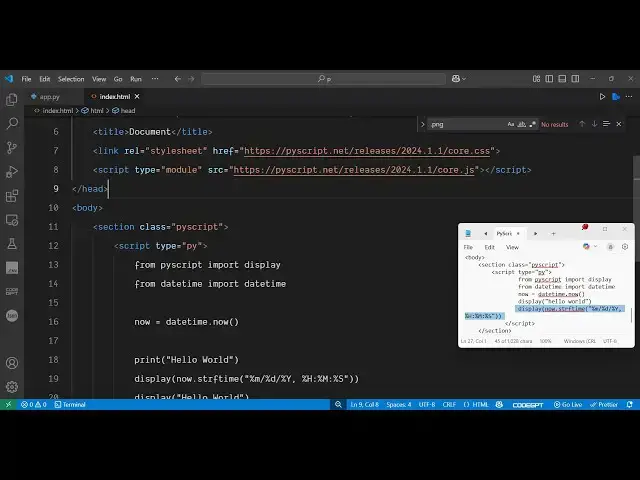
online by simply creating a simple index
0:42
html file so just create a simple index
0:46
html file normally that you create a
0:50
HTML file simply create this i have
0:52
given all the source code in the
0:55
description of this video just you need
0:57
to paste the CDN of this spy
1:01
script
1:03
so just copy the CDN after the title
1:08
paste it so we simply pasting the CDN
1:11
here the CSS and the JavaScript CDN of
1:14
PyScript
1:16
so once you include these uh tags now
1:19
you can actually write pi
1:23
script so for
1:26
this here we can actually have a script
1:29
tag and inside the script
1:33
tag this needs to be inside the body
1:36
here inside the body tag so right here
1:38
whatever wherever you need to execute
1:41
the python you have a section right here
1:44
so you'll just give it
1:46
a class to
1:48
it
1:50
of pi script and right inside this we
1:55
will have the script tag so you will
1:59
basically open and close the script tag
2:02
inside this you will actually write your
2:04
Python code and uh you just need to spe
2:08
first of all give the type parameter is
2:10
equal to py because it's a python code
2:14
that's why we need to give it the
2:15
extension right here which is py for
2:18
python code so now inside this you will
2:21
actually write your python code so if I
2:26
just write the print statement which is
2:28
the basic statement inside python so if
2:32
I want to now see this output
2:36
here so if I execute
2:40
this simply open this file in the
2:46
browser so you will see the output of
2:49
the print statement is not showing right
2:51
here because it will be showing in the
2:55
if you go to the inspect element go to
2:57
the console and now you will here see
2:59
hello world right here will be showing
3:02
here because the output of the print
3:05
statement will be in the
3:08
console so in the browser
3:12
console so now if you want to show it in
3:16
the browser there is a display function
3:20
inside pycript so if you write if you
3:24
now invoke this display function which
3:26
is present inside pi script and now if
3:29
you write hello world right here so now
3:32
what happens if you refresh hello world
3:35
will will show right
3:39
here it is saying that uh display is not
3:43
defined so for to use this display
3:47
function we first of all need to import
3:49
that for importing it we simply say from
3:53
pi script we need to import the display
3:56
function so we simply first of
3:59
all import the display function from pi
4:03
script import display and then we use
4:06
the display function and if you refresh
4:09
now the error will go away and you will
4:12
actually see your output hello world
4:15
scene right here so now you can just see
4:18
the power of this uh one line guys
4:20
because you can directly execute Python
4:23
code in the browser so here you can
4:25
actually use any third party package and
4:28
uh this can be any sort of
4:32
expression so we are 5 + 5 because it's
4:37
a numeric value here so 5 + 5 will be 10
4:42
so if you refresh now you will
4:46
see so this can be anything it can be
4:49
any library third party library that you
4:52
install using Python build out a
4:54
application and directly execute Python
4:57
code in the browser so as you can see
4:59
this is we we are simply having this
5:02
index html file and we are simply
5:05
executing the Python code directly with
5:08
HTML code so so this library which is
5:13
pycript makes it very much easy you can
5:16
try this library they have got a nice
5:18
little documentation the latest version
5:21
is maintained so I've given the full
5:24
example code in the description of this
5:26
video so you can actually find out this
5:28
code in the link in the description and
5:31
now let me show you some of the
5:33
functions that it supports so let's
5:36
suppose if you want to show the current
5:38
date and time so in Python you have the
5:42
built-in function which is from datetime
5:45
package we can import
5:47
this datetime
5:50
function and now what we can do we can
5:53
actually display the current date and
5:55
time using the display function so right
5:58
here as we do this and if I refresh now
6:03
you will see it will display the current
6:05
date and time which
6:08
is it is saying line number 45 there is
6:12
now is not defined sorry we first of all
6:16
need to create a variable where we need
6:18
to store the current date and time date
6:21
time dot now so we store the current
6:25
date and time in this variable and then
6:27
we display
6:28
it right here so if you refresh now you
6:33
will see it will display the current
6:34
date and time which is 10th of May
6:40
2025 it also displays the time as well
6:43
so this is the example guys a very
6:47
simple example of using Python code in
6:50
directly in the browser using pycript
6:52
library which is an open-source Python
6:56
library so I don't need to install it
6:59
simply create a index html file simply
7:02
include the CDN and start using the
7:04
Python code directly in the browser like
7:07
this so thank you very much for watching
7:09
this video and also check out my website
7:12
freemediattools.com
7:14
uh which contains thousands of tools
#Programming
#Scripting Languages