Up next in 10

PHP 8 Remove.BG SDK API Example to Remove Background From Image in Browser Using HTML5
Jan 9, 2025

See the Live Demo of the tool here:
https://freemediatools.com/canvabackgroundremoval/
Get the full source code of application here:
https://gist.github.com/gauti123456/45b61e827e23901b4fd1212c24b69cbd
Show More Show Less View Video Transcript
0:00
uh hello guys welcome to this video so
0:02
in this video we'll be looking at how to
0:04
basically build a background removal
0:06
tool inside PHP and for this we actually
0:10
deployed this application so that you
0:12
can try this application on my website
0:14
freem mediat tools.com canva background
0:17
removal tool so it is similar to canva
0:19
as well which actually allows you to
0:21
remove the background so here you will
0:23
select any image of your choice let me
0:25
select this image if I open this you
0:27
will actually see there are three
0:29
persons out there this this this so we
0:31
will try to remove that background that
0:34
you're seeing right here from this image
0:36
so what I will see I will simply select
0:38
this jpg image so this is actually the
0:41
live preview that you can see so as you
0:43
click this button remove background you
0:45
can see it will do the processing and
0:47
after processing this image it will
0:50
actually download you can see the
0:52
background has been successfully removed
0:54
you can open this you can just see
0:58
everything is removed here and you can
1:00
simply click the download button to
1:02
actually
1:03
download the image here you will see
1:05
that everything is removed
1:08
here so we are actually using uh in
1:11
background we using this API which is
1:14
remove.bg it's a really popular API
1:17
which uh allows you to actually do this
1:21
so they also have
1:25
their this is actually the
1:30
remove BG API that we using right here
1:34
so this is under mainers but we using
1:36
this
1:38
API so you can take any image for
1:41
example and remove the background so now
1:44
to get
1:45
started uh basically we actually have
1:47
this uh code right here you can actually
1:50
find the full source code in the
1:51
description and copy the full source
1:53
code so now to get started we are
1:55
actually using a third party module
1:58
which is this one
2:02
mtown remove BG it's a remove BG API
2:07
wrapper if you just type this on Google
2:10
and type GitHub it's a open source
2:13
package which allows you to
2:15
programmatically remove backgrounds from
2:16
your images using the remove BG API so
2:20
the installation is really simple you
2:22
need to install it using composer by
2:25
copying this command so just copy it
2:29
right in the command line simply paste
2:31
the
2:37
command so this will actually just uh
2:40
require it and uh it will install this
2:44
package so inside your composer. Json it
2:47
will install this latest version now to
2:49
get started we will actually show you
2:52
from scratch let me delete all the files
2:58
here you will get your own API key from
3:00
the dashboard so I already created one
3:03
API
3:05
key so this is not a free API it's a
3:08
paid API in the free plan you get 50
3:11
credits so 50 credits after 50 credits
3:14
you need to upgrade to your their paid
3:16
plan but 50 credits is more than enough
3:19
to actually show you the example so you
3:22
will actually have a simple form you
3:24
will simply say image
3:27
removal background app
3:31
and for this we will actually be using
3:33
uh
3:34
bootstrap just after the title paste
3:43
it we will have the container class in
3:46
the center position we will have a
3:51
heading image
3:55
background
3:57
removal and then we will have the simple
4:00
form it will submit to upload.php Method
4:03
will be post encoding type multiart form
4:06
data inside this we will have a simple
4:10
input field where we will allow the user
4:12
to Simply select the image file so you
4:15
will say select image
4:18
file so after this we will have this uh
4:21
input
4:23
feied input type file and giving a name
4:26
parameter of file only be accepting
4:29
images so image/ star it should be
4:35
required giving a class to it of form
4:41
control we will have a button right here
4:44
to submit the form so button type
4:48
submit so class will giving a BTN BTN
4:51
danger BTN block these are all bootstrap
4:54
classes and simply say remove
4:57
background this is actually the and uh
5:01
we can now simply go
5:03
to our path you can simply open Local
5:07
Host mark down sorry this is the
5:09
directory structure you will see like
5:12
this if you want to change the button
5:14
color let's support button primary this
5:16
will make it blue if I
5:23
refresh just make sure that you start
5:26
the exam control
5:28
panel so just start this server Apache
5:31
server so this is useful whenever you
5:34
developing PHP application you should
5:36
have this software installed on your
5:37
system which a crossplatform software
5:39
available for Windows Linux Mac so it
5:42
comes with the Apache PHP server and now
5:45
you can simply run your PHP applications
5:47
right here so by default it is located
5:49
in the C directory whenever you install
5:52
it C directory and inside the exam
5:55
directory you will have this folder HD
5:58
docs and here we have created our
6:00
project directory so this is our HTML
6:03
form and now we need to create this
6:04
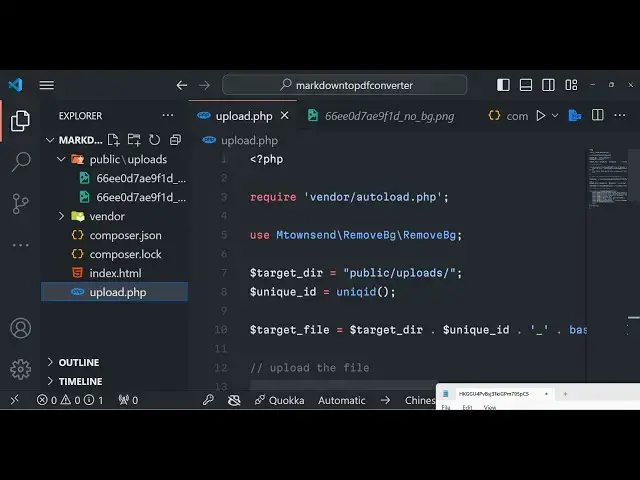
upload.php script so first of all uh for
6:08
doing this you need to have a public SL
6:11
uploads directory so just create a
6:13
public SL uploads directory where we'll
6:15
be storing the input image files which
6:17
the user will select so right here uh we
6:20
will write this PHP
6:26
code so right here we don't need the
6:29
ending tag we just need to require this
6:31
vendor autoload PHP file because we need
6:35
to load the plug-in and then we need to
6:37
Simply use this class Mt on sent and it
6:41
has this remove
6:44
BG class and inside this we also
6:48
have need to use this
6:51
bracket we have this class here
6:54
remove BG
6:58
again and then we need to Simply tell
7:01
the target directory so we have this
7:03
public SL uploads directory where with
7:04
the image will be stored we giving a
7:07
unique ID to it for the file name so
7:10
you'll be using the built-in function of
7:12
PHP unique ID then we will simply be
7:15
making the full path so this will be
7:17
inside Target directory concatenated by
7:20
the dot symbol followed by this file
7:23
name unique ID dot the extension for
7:26
having this extension
7:29
we will use the base name function of
7:31
PHP and right here we'll be using the
7:34
files array to get the name of the file
7:38
so like this so here you will given the
7:41
name parameter right here if you see
7:43
file this needs to be the same right
7:45
here if you see we have given the same
7:47
name attribute this needs to be the same
7:50
to get the file of file
7:52
name to get the name of the file so now
7:55
we need to Simply upload the file first
7:57
of all for processing it for uploading
8:00
the file we simply use this function
8:01
move uploaded file and uh we this is a
8:04
buil-in function for uploading files in
8:06
PHP so here the first argument it will
8:09
take is the actual temporary path of the
8:13
file which we can get using temporary
8:15
underscore name and then the second
8:18
parameter is the target path so where
8:20
you need to upload this so we'll simply
8:23
Target file this is actually the full
8:25
path that we constructed in the previous
8:27
step so it will actually upload this
8:29
from the temporary part to the Target
8:32
path so if this is successful it will
8:34
return true and in this case we can
8:36
simply say a message to the user that
8:38
your file has been
8:40
uploaded using the echo statement you
8:43
will see file has been
8:45
uploaded in the else block if the file
8:48
upload process is not complete then
8:50
you'll say sorry there was error
8:51
uploading your file now the most
8:54
important thing to actually remove the
8:57
background using the
9:00
remove BG API so for doing this we
9:03
instantiate a new class of
9:05
It new
9:07
remove BG and here you need to Simply
9:10
pass your own API key which you will get
9:13
from the dashboard of remove BG so I
9:16
already created one API key so what I
9:19
will do I will simply paste
9:23
it so after pasting it we can simply uh
9:28
inside this we have a
9:32
function you'll write all the code in TR
9:35
catch
9:37
block so it will basically make a output
9:41
file variable and uh we need to tell
9:44
where the output file will be there so
9:47
again we'll be using
9:49
this we will be creating in the same
9:51
directory but the file name will be
9:53
changed this time this will
9:56
be no background do
9:59
jpg just make it PNG because it's a
10:03
transparent image and then you'll say
10:06
remove BG this object that we created it
10:09
contains actually a method right here
10:11
which is
10:12
file so we can actually access methods
10:15
using objects and PHP using this symbol
10:18
arrow symbol and we are using this file
10:20
method so here we need to provide the P
10:23
file path Target file we need to remove
10:26
this background and then we again CH
10:28
need to chain it there is a save method
10:30
to actually save the output file inside
10:33
this path output file that's all you can
10:36
see we are using these two methods first
10:37
of all we are providing this input image
10:40
and then we are saving it the output
10:42
image in this so we are simply using
10:45
these two methods simultaneously
10:46
chaining
10:47
it and after you do this uh we now need
10:51
to download the
10:53
file in the
10:55
browser for doing this in PHP we do need
10:58
to add some headers whenever you some
11:01
download
11:02
file in PHP you do need to specify
11:05
headers related to that file in this
11:08
case it's a image file we need to add
11:10
all these headers so what I will do I
11:12
will simply copy this all the source
11:14
code will be present you simply telling
11:17
the browser with the description of this
11:19
file which is content description
11:21
content type content disposition expire
11:23
catch control pragma content length so
11:25
everything related to the file so
11:28
exactly browser know what sort of file
11:30
that we are
11:32
downloading so that's all this is all
11:34
the application guys which is needed
11:36
right here and uh now we can test this
11:39
application by going to the browser
11:41
simply select the image file that we
11:44
need to select click on remove
11:47
background
11:48
so now you can see that our file has
11:52
been uh created and if I try to open
11:55
this file
11:59
so you can see that the background has
12:01
been successfully removed you can see
12:03
that so now we are doing it
12:04
programmatically by using the remove BG
12:07
API so thank you very much guys you can
12:09
test out my tool which is deployed you
12:11
can basically use this tool as well to
12:14
test it out play with it
12:17
so you can just see the tool I also
12:20
given the link of the tool in the
12:22
description of the video by going to
12:24
freem mediat tools.com canva background
12:26
removal this is a tool thank you thank
12:29
you very much for watching this video
12:30
and I will be seeing you in the next one
12:33
thank you very much