Up next in 10

Node.js Express Youtube API Scraper to Fetch Transcript of Video & Fetch Channel Videos in Browser
Jan 9, 2025

Buy the full source code of the application here:
https://procodestore.com/index.php/product/node-js-express-youtube-api-scraper-to-fetch-transcript-of-video-fetch-channel-videos-in-browser/
Hi Join the official discord server to resolve doubts here:
https://discord.gg/cRnjhk6nzW
Visit my Online Free Media Tool Website
https://freemediatools.com/
Buy Premium Scripts and Apps Here:
https://procodestore.com/
Show More Show Less View Video Transcript
0:00
uh hello guys welcome to this video so
0:03
in this video I will basically talk
0:05
about how I actually build a YouTube API
0:09
scraper in nodejs
0:11
Express so let me open this application
0:13
on Local Host
0:15
3000 so you can see the interface on
0:19
your screen right here it is actually a
0:22
YouTube scraper and we actually built it
0:25
without using any YouTube API we haven't
0:28
we are not using the official YouTube
0:29
API guys so it is actually using a
0:32
python script which actually interacts
0:33
with the YouTube API in background and
0:36
uh the first one is it can actually uh
0:40
find the transcript of any YouTube video
0:43
so transcript is basically whatever the
0:47
word spoken in the video so let's
0:49
suppose I take an example here and if I
0:52
go to YouTube and actually take a
0:55
video Let's suppose I go to here type
1:05
so if I basically take this example copy
1:08
link address and simply paste it and uh
1:12
click on this button of get transcript
1:14
so what will happen it will actually
1:16
fetch all the things which are spoken in
1:18
this video in English language you will
1:20
see that what's going on welcome to
1:22
express crash course so this is a
1:24
revamped update version of the one you
1:26
can see scroll down you can see it has
1:28
actually
1:30
uh fetch all the transcript which is
1:33
there inside the YouTube video whatever
1:34
the guy has spoken in the video it has
1:37
actually converted into text you can
1:40
just copy this text store it anywhere
1:43
else that you want to it's a very
1:45
helpful thing if you want to fetch the
1:47
transcript of any YouTube video you can
1:49
simply copy link address so make sure
1:52
the transcript is in English language
1:55
click on get transcript and then it
1:58
will take five 5 Seconds it will process
2:01
the video entire video it will generate
2:03
this transcript and you can just
2:09
see so here for this we are not using
2:12
any YouTube API we are not using API key
2:15
so it is all happening due to that
2:16
python script that you developed it has
2:19
calling this python script in our nodejs
2:21
express code and the second one is the
2:23
channel URL if you want to fetch YouTube
2:26
videos of a particular Channel let's
2:28
suppose I take my examp example of my
2:31
own
2:31
channel you can fetch the videos of a
2:34
particular Channel and show on the
2:36
browser simply you need the channel URL
2:39
simply copy that and paste that channel
2:42
URL and then the videos amount of videos
2:46
that you need to fetch let's suppose I
2:48
want the 10 latest videos of my channel
2:51
click on get
2:52
videos so it will return a list of
2:55
videos of this channel you can basically
2:57
click on individual video and it will
2:59
open this video of my channel you will
3:02
see you can see that this is my
3:05
channel you can open click on that it
3:08
will open this video you will see that
3:11
you can even display these videos as
3:13
well but I just just displayed it in a
3:16
list so you can see 10 videos are there
3:19
you can even fetch let's suppose 100
3:22
videos you want click on get video so
3:24
now it will fetch 100 videos list of 100
3:28
videos of this particular Channel you
3:30
will see
3:33
that so in this way Guys these two
3:36
functionalities are there in this
3:37
application first is the fetching of
3:40
transcript of a particular video if you
3:42
want to fetch a transcript in text and
3:45
then if you want to fetch YouTube videos
3:47
of a particular Channel this is actually
3:50
a mini scraper of YouTube without using
3:53
YouTube API if you need the full source
3:55
code of this project guys the link is
3:57
given in the description you can go to
3:59
my website proc Cod store.com purchase
4:01
the full source code after you purchase
4:03
it you will actually redirect to Google
4:05
drive automatically you will be able to
4:08
download the zip file which will
4:09
actually contain this directory
4:10
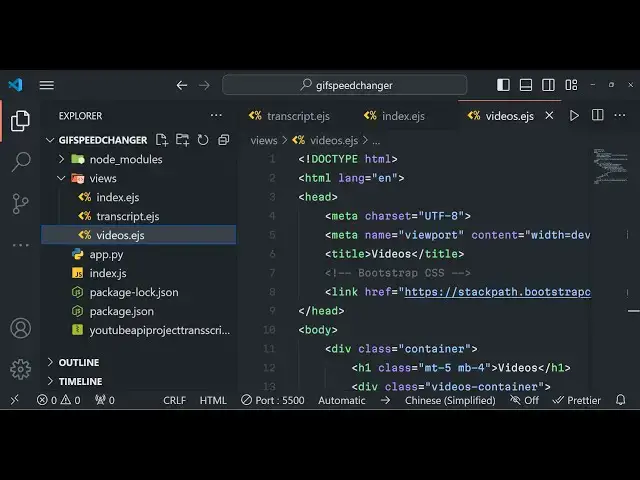
structure this is my python code right
4:13
here which I written this is a python
4:15
script which actually scrapes all these
4:18
things the YouTube transcript and the
4:20
amount of videos that a particular
4:22
Channel and these are the ejs code and
4:25
the JavaScript code so now I will first
4:27
of all start this project from Scrat
4:32
patch so this is our index.js file we
4:35
just make sure for you can see all these
4:38
things are returning in aray like
4:39
structure these are video IDs which are
4:41
returning right
4:43
here so the very first thing you need to
4:45
do we need to install ejs and express so
4:48
these two modules are required for
4:49
building this application ejs will be
4:51
the template engine and express will be
4:53
the backend server so I will now start
4:55
this node index.js so first of all what
4:58
we need to do
5:01
we now need to instantiate a new Express
5:14
app so you will basically see
5:20
that app is listening on Port 5,000 and
5:25
we will also be using body pass on
5:27
middleware since we are working with
5:29
forms
5:33
express. URL encoded extended to false
5:37
so these two lines you need to write
5:39
while we are working with
5:43
forms and now we will actually set the
5:45
view engine which in this case is
5:50
EGS which is a template engine and after
5:52
that we need to
5:54
basically write the get request so
5:57
whenever opens user opens the home home
5:59
page it will actually render out the
6:02
index.js file so by default ejs
6:05
templates are stored in the views folder
6:07
so just create a views folder in the
6:09
root directory and right here make
6:12
index. EGS file so here we will simply
6:15
make uh this will be the homepage of the
6:18
application and uh for doing this
6:29
we will actually be using bootstrap C
6:32
CSS CDN simply copy this title after
6:35
that so we are using bootstrap here and
6:40
here this will be the container class
6:42
here
6:47
and text Center margin top margin bottom
6:50
four sorry
6:55
MB and this will be YouTube scraper app
7:03
uh after this if you want to reload this
7:06
application uh app is listening on Port
7:09
5,000 so if you change this you will now
7:13
see YouTube scraper app and after this
7:16
you will be having a simple form which
7:19
will actually be going to this
7:23
transcript we will actually be making a
7:25
post request to this route so the method
7:28
here will be post so inside this form
7:30
guys we will actually be having a input
7:33
field where we will allow the user to
7:35
actually enter the YouTube U URL video
7:38
URL so we will simply say to the user
7:41
that video URL simply enter it and input
7:45
type will be of
7:47
text and it should be
7:51
required name sorry we will give it a
7:53
name parameter to it so that we can
7:56
Target in nodejs video URL and we'll
7:59
give it a class of form
8:02
control so if you just refresh there
8:04
will be this input field added video URL
8:07
where you can
8:08
enter and uh after this we will actually
8:12
be having a simple button to actually
8:16
submit the form so button type will be
8:18
of submit and here we will simply say
8:21
that get
8:24
transcript so we will giving a bootstrap
8:27
class of BTN BTN Prim
8:35
then we will have a break tag here and
8:38
again we will have a second form for
8:40
fetching the videos so we will actually
8:42
make a action here videos method here
8:45
Forst again so this time we we will
8:48
allow the user to actually enter the
8:50
channel URL instead of video so they
8:53
will enter the channel URL for fetching
8:57
the videos of a particular channel so
8:59
Channel
9:00
URL so again we will actually be saying
9:04
input type text this time we'll give it
9:06
a name parameter of Channel URL this
9:09
will also be
9:13
required so if you
9:17
see this is channel URL and
9:21
uh after this we will have a button
9:24
right here button type
9:27
submit this time BTN BTN danger this
9:30
will be red color and we will simply say
9:32
get Channel
9:37
videos so the interface is complete of
9:40
the application now we just need to
9:42
actually make these two post request
9:44
transcript and videos just go to
9:47
index.js right here we will make these
9:49
post request app.
9:58
poost the second post request is slash
10:05
videos so now inside these two uh post
10:08
request first of all what we need to do
10:09
right here we now need to get actually
10:13
the URL which is entered by the user in
10:16
both these cases first one is the actual
10:19
video URL so we will basically store it
10:23
in this variable so request body
10:26
do uh
10:28
video URL so it will be stored and now
10:32
we need to call this python script that
10:34
we actually prepared for you guys guys
10:38
app.py so programmatically for calling
10:41
this python script we do need to have
10:43
this module called as spawn which will
10:46
be coming from this built-in module of
10:49
nodejs which is child process so by
10:53
using this spawn module we can simply
10:55
write here make a python
11:00
process and right here we can use spawn
11:03
and basically you should have python
11:05
installed on your machine for calling
11:07
this python script and name of the
11:09
script is
11:10
app.py and here you'll be passing some
11:12
arguments first will be transcript
11:15
because in this case we are actually
11:17
calling for retrieving the transcript of
11:20
the YouTube video so the first argument
11:22
here will be this text static text which
11:24
is transcript the second argument is the
11:27
actual YouTube video you l so so we can
11:31
pass this video URL as a second argument
11:34
to this python script so now we can
11:38
actually listen to the various events
11:39
which are there on this standard output
11:41
Doon so whenever some whenever the data
11:44
is available from from this python
11:46
script we can simply listen for this
11:48
event and right here in this call back
11:50
function we will actually get this data
11:53
and what we can do we can rerender this
11:56
template we will reender the template
11:58
right here which will be
12:00
transcript this will be a new template
12:03
and in this template we will be
12:08
basically just sending out a new
12:10
variable which is data to string we will
12:14
convert this data which is coming to a
12:16
string by using this method and we will
12:18
pass this variable to this template
12:20
which is transcript now we just need to
12:22
make this template in the views folder
12:25
which is
12:27
transcript. EGS this is a new template
12:30
that we actually do so we are sending
12:32
this variable to this template if you
12:34
see the transcript is coming so now we
12:37
just need to display this transcript in
12:40
the browser so we actually change the
12:44
title transcript of YouTube video so for
12:48
this also we do need to
12:53
have our we do need to include CSS for
12:57
bootstrap so after the title P the
13:02
CDM so after doing this we do need
13:06
to just write this uh
13:18
container so now in the heading we will
13:22
simply say transcript
13:29
now to show that uh we will basically
13:37
we inside this preag we can display this
13:41
we can give it a class of margin top
13:44
four and right this is actual format of
13:48
displaying a variable in
13:50
ejs name of the variable is transcript
13:53
that we
13:54
sent so it needs to includ in these
13:57
brackets square bracket this percentage
13:59
sign is equal to transcript so if you
14:03
now
14:05
actually enter the URL click on this
14:07
button so what will happen it will
14:09
actually go to this page it will show
14:12
the transcript VI it will fetch the
14:14
transcript using that python script and
14:16
it is displayed you can test out with
14:18
any English language video copy this URL
14:23
and paste it in this application click
14:27
get transcript it will fetch the English
14:30
subtitles and transcript you can see
14:33
hello guys welcome to this video so in
14:34
this video we will basically Show You
14:36
background removal canver loan editor
14:37
that I developed inside this is my own
14:40
video which it has actually transcript
14:43
word by word whatever words that I speak
14:46
speak in this video so it has fetched
14:48
the transcript and subtitles you will
14:51
see that it's a great application and
14:54
coming back to the second application
14:56
which is fetching the videos so it is
14:58
very very simple right here go to the
15:01
this post request and right
15:06
here we will repeat the same process so
15:09
what I will do is that I will copy
15:13
this don't waste time in writing the
15:15
same code I will replace here Channel
15:18
URL and request for the channel
15:22
URL and one thing I missed guys which is
15:26
uh for this channel
15:29
we do have to have a
15:32
second variable here which will be for
15:36
limit how many videos you want to
15:41
look how many videos you want to
15:43
retrieve so for that we will need to
15:45
have this input type number and name is
15:48
limit and it should be
15:50
required and class form control and the
15:54
current value will be 10 by default
15:57
whenever you load this application
15:59
so the value here will be
16:03
10 so if you reload this we will have a
16:06
second field for enter number of videos
16:08
which will be 10 so now we will actually
16:11
also get the limit request body. limit
16:16
so after getting these two variables
16:17
Channel URL limit we can actually
16:20
replace Here video because we need to
16:22
fetch videos right here then we will
16:24
pass the channel URL and limit to this
16:27
python script it will execute and uh now
16:32
we need to render the videos
16:39
template and we will actually be sending
16:42
out a variable right here videos which
16:44
will be array so we will be sending
16:46
videos array so we do need to make this
16:48
videos array
16:50
variable so this is slightly complicated
16:53
logic so what I will do is that
17:03
so right
17:05
here so we are actually converting the
17:07
string which is returned to us from that
17:09
python script to an actual array and we
17:12
are basically sending this array to this
17:14
template which is videos ejs we using
17:17
some regular expression to actually
17:19
convert the string to an array we are
17:21
first of all triming out the white space
17:23
using the trim method and after that we
17:25
converting the string to an actual array
17:27
and then we are sending this to this
17:28
temp temp which is videos. EGS just make
17:31
this template which is videos.
17:35
EGS and right here he'll say
17:38
fetch Channel
17:41
videos so for doing we also need that
17:45
bootstrap again so copy that bootstrap
17:48
CDL after the
17:53
title so right here we will
18:15
mt5 so we'll actually be using a for
18:18
Loop
18:24
here so in EGS you can actually use this
18:27
for each like this
18:30
for each
18:42
video you can close this right
18:47
here so inside this we can have an
18:50
unordered list inside anchor tag we can
18:53
display the link right here
18:57
https YouTube
18:59
/watch question mark V is equal to here
19:02
you need to actually render out the
19:05
dynamically added which is uh
19:13
video so it will open it in a new tab so
19:17
Target is equal to blank that's all
19:19
that's all that we need to do guys for
19:21
this and here also we can paste the same
19:24
thing
19:26
for the label of the hyperlink so paste
19:29
the same thing right here
19:32
also so if you just refresh now give the
19:35
channel URL click on get Channel videos
19:38
start your application first of
19:43
all it is saying that cannot read
19:47
property map of
19:51
null okay I think uh for videos we do
19:55
need to say videos not video so I think
19:58
we are making a mistake right here while
20:00
we are calling this so it needs to be
20:03
videos because we are fetching
20:07
videos just make this
20:22
change uh again there is some kind of
20:25
error which is there Channel URL
20:30
okay this is channelcore URL sorry
20:34
because we have given the name parameter
20:36
if you see this is channelcore URL and
20:40
this is B just make sure that you give
20:43
the correct name parameter
20:47
click so if you see right here if
20:51
the unexpected token on while compiling
20:55
ejs
21:01
uh I think it is occurring in
21:10
this I think there is some kind of error
21:12
right here so what I will do I will
21:14
simply paste this
21:21
code okay I think I'm missing this
21:26
uh oh okay
21:29
there is some kind of syntax error which
21:32
is happening so what I will do you will
21:35
get all the source code the link is
21:36
given in the description
21:43
so so now you can see it will uh
21:46
displaying this list of videos you can
21:48
change this number to 50 now it will
21:51
display the 50 videos of a particular
21:54
Channel you can play this video you can
21:57
see that it will play this
22:01
video so thank you very much guys for
22:04
watching this project uh YouTube scraper
22:07
mini without using any sort of API if
22:10
you're interested the link is given in
22:11
the description you will get this full
22:13
python script full this full nodejs
22:15
express project with directory structure
22:18
full documentation the link is given you
22:20
can directly purchase it from my website
22:22
Pro C store.com and please hit that like
22:24
button subscribe the channel as well and
22:26
I will be seeing you in the next video
22:28
okay
#Programming
#Web Services