Up next in 10

Node.js Express Instagram API to Fetch Info Using Username Using Instaloader in Python
Jan 9, 2025

Buy the full source code of the application here:
https://procodestore.com/index.php/product/node-js-express-instagram-api-to-fetch-profile-using-username-using-instaloader-in-python/
Official Website:
https://freemediatools.com
Show More Show Less View Video Transcript
0:00
uh hello guys welcome to this video so
0:02
in this video I will basically build out
0:04
this application which is Instagram user
0:06
information finder app so with this help
0:09
of application you will be able to
0:11
actually get the information about any
0:13
Instagram user and you just need to
0:16
provide the Instagram username and you
0:18
will basically see this is the
0:20
application that I developed in
0:21
bootstrap njs and express and we are
0:24
using an external python script which
0:26
fetches the information about the
0:28
particular Instagram user so here you
0:30
need to provide the Instagram username
0:33
and let me
0:35
provide and click on this button
0:38
generate profile info and as you click
0:40
the button it will show the information
0:42
in a tabular structure and uh it will
0:46
calculate the information and show this
0:48
you will see full name username number
0:50
of followers number of following and if
0:52
you click this profile picture it will
0:54
show you in the next window or new
0:56
window where you can basically download
0:58
the profile picture
1:00
and this is the biography and number of
1:02
post if it's a verified account or not
1:05
it will tell you and also it will show
1:07
you the account URL so you can re simply
1:10
go to the account URL you will see all
1:12
these things matches 9357 so we simply
1:15
fetching all these details and showing
1:17
it in the browser you can do it for any
1:20
username that you want just change it
1:24
and it will still work click on that and
1:27
uh we are simply using a simple python
1:30
script which fetches all this data you
1:32
will see that you can basically enter
1:35
any Instagram username and it will
1:38
basically show you all this information
1:41
that
1:42
you so we will try to build this
1:45
application and uh for doing this we are
1:48
using a package of python which is insta
1:51
loader insta loader is a third party
1:54
package of python which allows you to
1:56
actually get all this information in
1:58
Python and we are using this python
2:00
script in nodejs to actually call this
2:03
script in nodejs to actually build out
2:05
this web application so if you need the
2:07
full source code of this application the
2:09
link is given in the description you can
2:11
directly purchase the full source code
2:12
after you purchase it you will be able
2:14
to download the zip file from Google
2:16
Drive and you will get this directory
2:18
structure let me show you this is the
2:20
actual directory structure of the final
2:22
application we have this insta profile.
2:25
py file which is actual python script
2:27
which is responsible for fetching the
2:29
details of inst user and we are
2:31
displaying it inside the ejs template
2:33
and this is our backend code of Express
2:36
so now I will start building this
2:37
application from scratch so first of all
2:41
you need to install Express ejs so these
2:45
are the two packages that we need to
2:47
install inside our nodejs application
2:50
Express will be the backend server and
2:52
ejs will be the template engine so these
2:54
are the two dependencies which are
2:55
needed for this application simply
2:57
install this I've already installed this
3:00
so I will start
3:01
my backend server so I will simply
3:04
delete all this source code and start
3:07
from
3:11
scratch so I will delete everything and
3:14
start from the blank we have this
3:17
index.js file which is uh currently
3:20
empty nothing is present so first of all
3:22
guys we will now be constructing our
3:24
Express server so what I will do is that
3:27
I will require the express and we will
3:29
simply make a new Express
3:32
app and this app will be listening on
3:35
port number 5,000 and in the call back
3:38
function we will simply write here that
3:40
app is listening on 5,000 hold
3:47
number so after that you do this guys we
3:50
need to set the view engine as well
3:51
which is ejs that we installed app. set
3:55
view engine which is ejs and also guys
3:59
we also need to include body parsel
4:01
middleware which is express. URL encoded
4:04
extended to false these two lines we
4:06
need to write because we are working
4:08
with forms we need to get the form data
4:11
just write these two middle wees which
4:12
is a body passer which is built in
4:14
inside Express in the latest version of
4:17
Express so after you do this we will
4:20
basically make a simple get request so
4:21
whenever you someone goes to the
4:23
homepage they will simply see the
4:25
template of ejs response. render and
4:28
simply will pass the name of the
4:30
template which will be index so by
4:32
default guys
4:33
ejs uh store the template in some views
4:37
folder you need to make the views folder
4:39
and just create the template which is
4:41
index.js which is extension and right
4:44
here EGS is nothing but JavaScript
4:47
containing J uh contain uh HTML code
4:51
containing some JavaScript code so we
4:54
will be writing logic with the help of
4:56
JavaScript conditionally we will show
4:58
some HTML based upon some JavaScript so
5:01
this is all EGS embedded JavaScript
5:03
template so right
5:05
here we will give it just a title to
5:08
this application that is Instagram info
5:12
finder and uh right
5:15
here we will have to include the
5:18
bootstrap CDN just after the title
5:20
simply paste the CDN we have included
5:24
the CDN so that we can use bootstrap so
5:26
you use container class of bootstrap and
5:30
we will have a heading in the center
5:31
position that is Instagram user info
5:37
finder and after this we will have a
5:39
simple form this form will actually go
5:43
to we make a simple get uh post
5:48
request get
5:51
Instagram info and this method will be
5:54
off
5:56
post and autocomplete I will set it to
5:59
off
6:01
and inside this
6:04
form we will have some Fields
6:09
here which will be a form group class of
6:12
bootstrap inside this we will allow the
6:14
user to enter the username so here
6:17
you'll simply tell the user please enter
6:19
Instagram
6:24
username this is our label and after
6:27
this you will have a input type of text
6:31
name will be username and it will be
6:33
required and we'll give it a class of
6:35
form
6:36
control that's all so if you just go to
6:40
Local Host 5,000 you will actually see a
6:43
input field available uh where you enter
6:45
the username after this we will have a
6:49
simple button so again form group class
6:53
this time button BTN BTN
6:56
danger BTN block so it's a full size
6:59
button and then you will simply say
7:01
generate profile info so if you just
7:04
refresh now there will be a button out
7:06
there and now if you click this button
7:09
we will actually make this post request
7:12
which is get Instagram info we'll simply
7:14
make this get request get Instagram
7:21
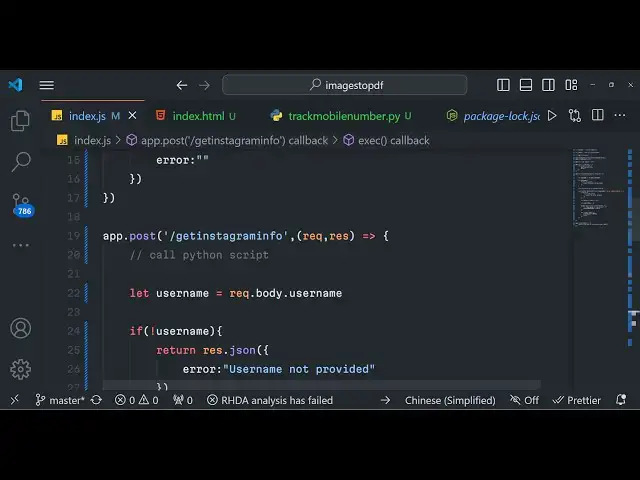
info so here guys you will use call the
7:24
python script and pass the username so
7:28
right here
7:32
we will first of all get the username
7:34
that the user is passing by using
7:36
request. body.
7:38
username so you just need to match
7:41
whatever name attribute that you have
7:43
given to this so this needs to be
7:45
matching you need to write the same
7:47
thing right here request. body. username
7:51
after this you will simply compare that
7:53
if the username is not available in that
7:55
case you will simply return an error
7:58
message that that is username not
8:02
provided so if the username is not if
8:04
the username is available in that case
8:07
we will call the python script path and
8:12
we will call that script as insta
8:14
profile. py which is present in the same
8:16
directory and now to call that python
8:19
script we will
8:22
actually use the execute method from the
8:25
child process uh package which is a
8:28
built-in in node JS so here we will
8:31
actually use this uh execute method and
8:34
we will actually call the python script
8:37
python followed by the address which is
8:39
python script and here we will pass the
8:43
username as an argument and we'll put a
8:46
comma which is error standard output
8:48
standard
8:51
error these three parameters will be
8:53
passed in the Callback function and here
8:55
we simply compare that if any sort of
8:57
error take place in that that case we
9:00
will return a error
9:04
message and error
9:06
occurred now just need to make this uh
9:09
script guys which is uh insta profile in
9:12
the same
9:13
directory and for this pack uh script to
9:16
work you need to install a package third
9:18
party package which is insta loader that
9:21
I already showed you at the starting of
9:23
the video you need to install this
9:25
package install loader in the command
9:28
line using this command simply install
9:30
this and I already installed it so I
9:33
will not install it once again so now
9:38
this python script guys which uh we need
9:40
to import install
9:45
order and we also need the system module
9:51
so every python script contains a name
9:55
sorry main function so we will Define
9:57
the main function right here we will get
10:00
the username that the user passes
10:02
system.
10:03
arv1 and we will basically calculate the
10:06
user information by calling a function
10:08
which is get user info this is a custom
10:10
function that we will write we will pass
10:12
the username like
10:14
this and uh after this we will simply
10:17
compare that if user info is returned
10:20
then we will basically print
10:23
out so now we just need to Define this
10:25
function which is Def get user info
10:31
we have the username passed in this
10:33
function
10:35
so right here you simply say install
10:38
loader do install loader instantiate it
10:42
and then
10:44
try install loer package contains a
10:47
method called as profile you will see as
10:50
I drop down you will see all these
10:52
methods are available one such method is
10:55
profile and in that we will basically
10:58
get biography for followers external Ur
11:00
all these methods are available one such
11:02
method is from
11:05
username and here we can actually
11:07
provide our context and the actual
11:11
username and based upon that username we
11:14
will calculate the user
11:15
info and this will be a simple object
11:18
that we will construct which will have
11:20
all these properties which is full
11:23
name and full name will be equal to the
11:26
profile do full name let me just show
11:29
you what this return to you let me print
11:33
out the
11:34
profile just to show you if it is
11:36
working or not so we will also have a
11:39
except block right
11:42
here if any ex exception take this so
11:46
exceptions do profile if the profile
11:49
doesn't exist in that case uh this
11:52
exception will take place profile not
11:54
exist
11:55
exception we will simply return none
12:00
and if any other exception take place we
12:03
will return exception as Z and we will
12:06
print out error
12:09
message error fetching profile of
12:13
user return
12:18
none so now if you want to call this
12:21
python script we will simply call this
12:24
like this python insta profile and py
12:27
and Then followed by the usern if you
12:29
just pass the username so if the profile
12:32
doesn't exist then it will return an
12:34
object you will see it has returned this
12:36
object right here now we need to
12:38
destructure this
12:40
object uh if you
12:43
see we need to construct an object here
12:46
user info and this object will contain
12:49
some properties full name property we
12:52
can get this profile do full
12:54
name put a comma and then you'll get the
12:58
username using profile.
13:02
username then followers in this way
13:06
profile.
13:10
followers and we need to format that so
13:13
we can basically call a third party
13:15
method that you will Define we will
13:17
simply pass this followers to this
13:19
function as an argument so this function
13:22
will actually convert these followers
13:25
to if the followers are large
13:29
so I will Define this method so it's
13:31
simply adding this million or
13:35
k so if the user has million followers
13:38
then it will show 1 million followers so
13:41
it is just formatting the numbers so it
13:45
is using some mathematics and is doing
13:47
this process and uh after we get the
13:50
followers in the same way we will get
13:53
the following as well the persons which
13:58
the user is following profile
14:02
do
14:06
followes and then we need to get the
14:08
profile picture which is a
14:15
profile
14:18
profile. profile pick
14:21
URL then we get the biography all these
14:24
details you can get using this module
14:26
profile. biography
14:30
number of
14:33
post
14:38
profile. media
14:40
account and
14:43
then verified
14:47
account profile dot is
14:58
verified
15:01
and then account
15:06
URL so this thing you can get like
15:11
this
15:14
https whether the account is valid or
15:20
not profile.
15:27
username so after you construct this
15:30
object we will simply return this object
15:33
back to the user using this function
15:35
return user info
15:38
so now we are actually getting this
15:43
object and based upon
15:46
that if the user info is we are getting
15:48
we will
15:50
simply let me just once again call this
15:53
you will actually get an object right
15:55
here we are simply printing this object
15:57
that you can see right here this is
15:59
actual Json object that we constructed
16:00
and it has contained all these details
16:02
right here full name username followers
16:04
following profile picture account URL
16:06
verified account all these properties
16:08
are available now we simply need to
16:12
Simply transfer these details key value
16:17
in user info
16:20
items and here we just need to
16:27
print
16:31
so we just need to print these
16:34
details like
16:40
this copy this and paste
16:49
it so we have just formatted the
16:52
response and now if you do this it will
16:55
look something like this you can see so
16:58
every is coming per line so so we will
17:01
pass this response coming from this
17:03
python script in our
17:06
nodejs to actually show this details in
17:09
the browser so after you do
17:12
this we will actually
17:17
now after this we will construct our
17:20
output by using standard output do trim
17:25
we will trim all the white space and
17:28
then we will construct and profile data
17:30
object which will be empty by default
17:32
and right here we'll simply split
17:35
output.
17:37
split we will pass the data by new line
17:40
corrector so for each new line we will
17:44
run a simple for each Loop for each line
17:47
we need to get the data so we'll
17:49
construct this key value pair key
17:53
value and you will simply say line do
17:56
split and we will split this by
17:59
colon and by colon we will say profile
18:02
data key is equal to Value so by the
18:07
simple logic we are simply passing all
18:10
these responses by one line at a time
18:12
and we are whenever we have colon we are
18:15
storing these in our
18:19
so after we do this our profile data is
18:23
now constructed now we can reenter the
18:26
template and this time now we can simply
18:29
pass
18:32
our
18:33
profile which is equal to profile data
18:36
and error will be nothing and we also
18:39
need to pass these two things whenever
18:41
we render it for the very first time
18:42
right here so this time here profile
18:45
data will
18:46
be
18:48
undefined and error will be
18:51
nothing that's all so now we just need
18:54
to display this profile data object
18:56
inside our ejs template
19:01
so right
19:03
here now to display this just after the
19:06
form is ending we will simply use some
19:09
EGS which is like this we have a if
19:12
condition we are writing some valid
19:13
JavaScript right here if the error
19:15
variable is available in that
19:21
case we will basically show a alert
19:24
message to the user that this user
19:26
doesn't exist
19:30
so we'll give it a class of alert alert
19:34
danger we'll basically display the error
19:36
message which is coming from the like
19:49
this so we also need to close this so
19:52
like this we also have the else block
19:55
else if if the profile is available in
19:58
in that
20:02
case so these are the brackets that we
20:04
want to do this is a EGS
20:10
syntax if the profile is available in
20:13
that case if the error is there we are
20:16
showing the alert alert message if the
20:18
profile
20:20
variable is there in that case if you
20:23
see we are basically passing the
20:27
profile
20:30
we are actually passing the profile if
20:32
you see so whatever variable that you
20:34
call in this in this file
20:37
index.js we are calling it profile and
20:40
error so we are just in our ejs template
20:43
we are replacing here profile because we
20:45
are checking here if this two variable
20:47
exist in that case conditionally we are
20:49
entering the
20:51
HTML so now we are simply telling that
20:54
if the profile is available in that case
20:57
we will show the detail tails in a table
20:59
structure bootstrap table so table table
21:04
striped
21:09
and so this will we will display this
21:12
information full
21:15
name all these
21:21
things which is full name username
21:23
followers following profile picture
21:25
biography number of post so if you just
21:28
refresh
21:30
now just start the server nodemon
21:34
index.js it is saying that profile is
21:36
not defined sorry we just need to make
21:39
sure that we call it profile not profile
21:42
data
21:45
profile so if you now see that section
21:49
is not executed because profile is
21:53
undefined if you see an error is also
21:55
not there that's why these things are
21:58
not
21:59
showing the table is not showing
22:02
so now as you write the
22:06
username then only the table will show
22:09
as
22:10
you so now you can see the table is
22:13
showing but the information is not
22:14
showing now to show that information we
22:17
need to use a simple for Loop just after
22:19
that we can simply table
22:22
body and we can basically
22:26
say profile
22:31
this is a array so we are basically
22:33
writing this indexes which is full
22:38
name this is a simple way by which we
22:41
can embed variables in ejs so simply we
22:44
will copy
22:47
this username followers
22:50
following we will change this to
22:57
username
23:13
so if you just refresh
23:18
now the information will show you will
23:20
see that followers following are showing
23:23
in the same way we
23:25
can show the profile picture as well
23:32
in know you can see profile is equal to
23:34
profile
23:35
picture and this is biography number of
23:45
post you can see biography it is number
23:48
of post verified account all that so if
23:51
you just refresh
23:57
now
23:59
enter the Instagram username and now it
24:01
will show you all this information in a
24:03
tabular structure you will see full name
24:05
username followers following profile
24:07
picture you can just download you can go
24:10
to the actual account so this makes it
24:12
very much easy to actually explore any
24:15
account by using just the username and
24:18
it will show if the user doesn't exist
24:20
then it will show this error message and
24:23
error occurred so if the username is not
24:25
valid in this case so h
24:34
so if the username is valid in that case
24:36
it will actually show you this
24:38
information you will see
24:43
that so thank you very much for watching
24:46
this video guys please hit that like
24:48
button subscribe the channel if you need
24:49
the full source code you can directly
24:51
purchase the link is given you can
24:53
directly purchase it you will get this
24:55
directory structure after you purchase
24:57
and you can download it from Google
24:58
Drive and I will be seeing you in the
25:01
next video Until then thank you very
25:03
much