Up next in 10


Get the full source code of application here:
https://gist.github.com/gauti123456/06501a3d7032e1d23e28cce9979de922
Show More Show Less View Video Transcript
0:00
uh Hello friends welcome to this video
0:02
so in this video we will look at how to
0:05
convert raw text to PDF document with
0:08
the formatting
0:10
automatically so for this purpose we
0:12
will be using a open-source JavaScript
0:16
client side PDF generation Library
0:18
called as PDF make this is their
0:21
official website pdfm
0:23
make.or it can even be used on the
0:25
server side as well on nodejs but in
0:28
this example we will be looking at how
0:30
to generate a PDF document right in the
0:33
browser itself we have this application
0:36
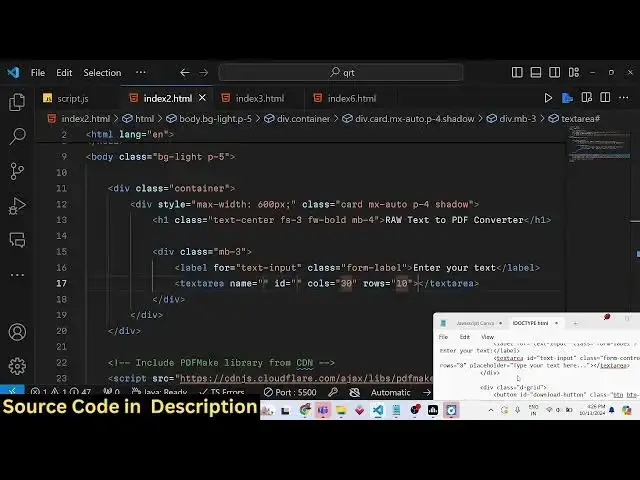
and the user interface is coded inside
0:38
bootstrap we have the text area where we
0:41
allow the user to Simply paste raw text
0:46
you can paste unlimited number of
0:47
correctors and as you paste the text you
0:51
have the button out there click this
0:52
button and you will actually see your
0:54
PDF file will get downloaded and you can
0:57
see real formatting will be there you
0:59
will see see that so it actually appears
1:02
on a single page typically depends upon
1:05
the length of the
1:07
text
1:09
so if the text is larger let's suppose
1:11
if I paste it number of
1:15
times so this application will handle as
1:19
much text as you paste right here it
1:21
will automatically create Pages
1:23
depending upon that length of text so
1:26
now you will see it will contain Nine
1:28
Pages depending upon the text
1:30
length the formatting will do
1:32
automatically you'll see PDF make will
1:35
handle the formatting automatically for
1:37
you you don't need to write extra code
1:40
for this so it's a great application
1:43
that you you can uh Deploy on your
1:45
website uh using PDF make I will show
1:47
you in this video how to build this all
1:50
the source code will be given in the
1:52
description of this video so now let's
1:54
get started so first of all we are
1:57
actually including the CDN
2:01
of PDF make Library so that we can
2:04
directly use it in the browser so you
2:06
can see we are using this 0.2.0 version
2:09
we are using the CDN from cloudfare
2:13
docomo the font file as well VFS fonts.
2:18
JS so we using these two script tags and
2:22
then we will be using our external
2:24
script which will be located in the
2:27
script.js so here you'll be writing the
2:29
custom from JavaScript code
2:33
so now what we need to
2:36
do for the HTML we are actually included
2:40
the CDN for bootstrap if you see and for
2:43
building this interface it's really easy
2:46
let me just show you we will be using
2:48
the container class of
2:50
bootstrap so we will be having a
2:53
diff which will have the container
2:58
class inside this we'll have the card
3:00
class MX Auto to make it in the center
3:03
position padding for
3:06
shadow be giving a Max width of 600
3:12
pixel inside this we will have a heading
3:15
which will simply say that raw text to
3:20
PDF
3:26
converter so
3:30
we will just align this in the center
3:33
using the bootstrap class of text
3:36
Center phone size I will set to three
3:39
font weight bold MV4 margin bottom
3:44
four so it will look something like this
3:47
if you refresh your
3:51
browser uh then we need to have
3:57
a diff margin bottom three we will have
4:02
a label right here where we will
4:08
simply give it a bootstrap class of form
4:12
label and here will be simply be saying
4:14
enter your text we will allow the user
4:17
in order to a text area where the user
4:20
will copy
4:22
paste the raw text we'll give it an ID
4:26
text input so that we can Target in
4:28
JavaScript
4:33
so we will give it a bootstrap class of
4:37
form
4:39
control rows I will set it to
4:45
eight columns I will remove it so it
4:49
will look something like this your text
4:51
area and
4:53
uh after that you will have a simple
4:57
button
5:05
which will simply say download
5:08
PDF so you'll give it an ID to this
5:11
button of a download button and a
5:13
bootstrap class of BTN BTM
5:19
primary so you can see that so this is
5:22
actually the
5:25
interface so now to actually write the
5:29
JavaScript
5:30
first of all we need to get reference to
5:32
the text input so whatever text the user
5:35
has
5:36
pasted so for that use the document get
5:40
element by ID so we have given that ID
5:42
to the input field text area and also
5:45
the download
5:47
button so we have given
5:56
the we use the get element by ID
5:59
function
6:00
so we'll Target the button by its ID
6:03
download button we get references to
6:06
both these elements in the Dawn and now
6:08
we'll be binding a on click listener to
6:10
the button so when we click the download
6:13
PDF button so this call back function
6:15
will execute so right here will be first
6:17
of all get all the text which is pasted
6:21
in the text
6:22
area using text input dot value and
6:26
we'll trim trimming that value coming by
6:29
using the trim function in
6:30
JavaScript
6:32
and after we get this text we can
6:36
actually use PDF
6:39
make library to convert to PDF so first
6:44
of all you'll be making a document
6:46
definition in PDF make you need to make
6:49
a document definition first of all so
6:52
this is actually an object which
6:54
contains information about the data that
6:56
needs to be inserted in the PDF document
6:58
so there is a content property this is
7:00
actually array which contains an object
7:04
which is contains a property of text so
7:07
whatever text that you want so we'll be
7:09
providing the text which the user has
7:11
pasted in this property the second
7:14
property is the font size you can
7:16
control it I will set it to
7:18
12 and then we have another additional
7:22
properties that you can set it which is
7:24
the page size of the PDF document so
7:27
various sizes are there I will set it to
7:29
to the common size A4 size page margin
7:32
you can even set like
7:35
this left margin is let me set you to 40
7:39
this is the top
7:41
margin bottom margin I will set all the
7:44
four margins to be 40 so you can here
7:46
you can control all these
7:49
margins and now to download the file PDF
7:52
file we simply write PDF make m is
7:56
capital and it contains a function which
7:58
is create PDF p is capital right here
8:01
and here we pass the document definition
8:03
that we provided and then it contains a
8:06
download function and here you give your
8:08
file name result. PDF that's all this is
8:12
a very simple Library here we provide
8:14
your document definition provide the
8:16
additional properties about the text
8:18
size phone size page size page margin
8:20
then we download the PDF document so if
8:24
I run this file
8:28
now if i p something uh T something
8:31
click download you will see that result
8:33
PDF has been downloaded and let me
8:35
change the phone size
8:39
uh let me just make 100 let me make the
8:44
phone size to be
8:46
100 so if you write something right here
8:50
you will see that the phone size will be
8:52
larger because we made the change so if
8:55
you copy this
8:58
now I change the phone size to Let's
9:00
suppose
9:04
20 paste it click on download you will
9:07
see that so now
9:09
automatically the page will be the text
9:12
will be splitted into multiple Pages
9:14
depending upon the size of the text and
9:16
you will actually see the PDF file has
9:18
been generated from draw text so in this
9:21
way you can make this online good
9:23
converter web app and write in the
9:25
browser itself using the PDF make
9:28
Library
9:29
please hit that like button subscribe
9:31
the channel and also visit my website
9:34
freem mediat tools.com where I post
9:37
quality tools daily so a lot more tools
9:39
are there on this website you can try
9:41
this for totally free and please
9:43
subscribe this Channel and I will be
9:45
seeing you in the next one