live_tv
Livestream Starting Soon
00
Hours
:
00
Minutes
:
00
Seconds
Up next in 10

How to Setup Tailwind CSS 4 in Qwik Vite Project in Visual Studio Code For Beginners
Feb 12, 2025

Get the full source code of application here:
Hi Join the official discord server to resolve doubts here:
https://discord.gg/cRnjhk6nzW
Visit my Online Free Media Tool Website
https://freemediatools.com/
Buy Premium Scripts and Apps Here:
https://procodestore.com/
Show More Show Less View Video Transcript
0:00
uh hello guys welcome to this video so
0:02
in this video I will show you how to
0:04
integrate the Tailwind CSS 4.0 version
0:07
which is a latest version inside your
0:09
quick
0:10
framework so I am just following the
0:13
documentation of tailin css.com they
0:16
have given this step by-step instruction
0:18
so we will initialize a brand new quick
0:20
project so for this I will just copy
0:23
this command here that they have given
0:26
so paste it the command look like npm
0:29
create qu at theate latest empty and
0:32
Then followed by your project name
0:37
so it will now install the packages it
0:40
will ask you some questions that need to
0:42
install the following packages create
0:44
quick so I will say yes and so it is
0:47
installing the packages so now it's
0:49
completed so now it is telling us to CD
0:53
into this directory so CD my project
0:57
quick and I will open it inside
1:03
CD
1:06
sorry CD my project
1:12
quick and then I will open it inside vs
1:16
code which will be the IDE that we will
1:18
be using so this is a sample quick
1:20
project if you see we are using
1:22
typescript for
1:24
this so for this we are using the Ved
1:27
development environment
1:30
so for this we do need to install the
1:32
Tailwind CSS and the V plugin just go to
1:35
the command line and execute this
1:38
command npm install Tailwind CSS and
1:41
also this plugin for V at the Tailwind
1:45
cssv so just install these two packages
1:48
and after
1:50
that once it is
1:53
installed inside your package.json file
1:56
it will be added in the dependent dep
1:59
pendy
2:20
section so it is just installing it so
2:22
just wait for the installation to
2:24
complete
2:36
so now it is installed here in the
2:38
dependency sections the latest version
2:39
of tailin CSS which is 4.0.6 you'll see
2:43
that and now the next step is to you
2:46
need to open this V config.txt
2:50
side here you will see that this is
2:53
actually your file so just open this
2:55
file and we need to
2:58
paste a a series of plugins this is your
3:03
the Tailwind CSS plugin so just after
3:07
this paste
3:10
it so import Tailwind CSS from this
3:13
plugin that we installed at theate
3:15
Tailwind CSS vat so we just need to add
3:18
this in the plug-in
3:21
section right here if you
3:25
see just search for this
3:28
plugins so here you will find
3:31
out so just add this
3:33
plug-in just put a comma I think yeah
3:38
just at the starting here just add this
3:41
plugin Tailwind CSS parenthesis and put
3:44
a comma so we added this plugin here in
3:46
the plugins areay so in this way you can
3:49
add this configuration code that's all
3:52
that we need to do and now you need to
3:54
go to your Source
3:56
directory and uh inside the source
3:58
directory that you will find this file
4:00
here global. CSS and just open this file
4:03
and add this code here which will be add
4:06
theate Import in double codes Tailwind
4:10
CSS and put a semiconon so in this way
4:14
you can add your Tailwind CSS in the CSS
4:17
file and after that you just need to go
4:20
to
4:22
whatever is your starting file so in
4:25
this case it will be index
4:31
uh where is the this is the root one
4:43
and where is
4:47
the
4:55
entry uh where router Outlet
5:01
so if you just run your project here npm
5:04
run Dev you need to paste the whatever
5:07
is your Tailwind CSS
5:12
code so by default it will open it
5:15
inside Local Host 5173
5:29
uh where it is
5:33
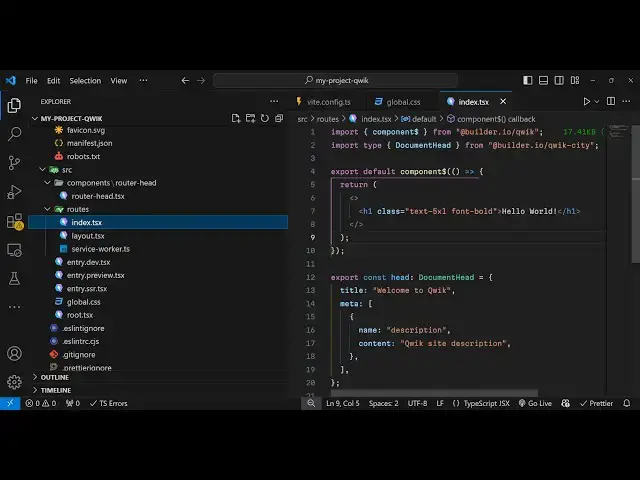
located yeah so in the routes folder you
5:35
will see this file here index. txe so
5:38
this is actually the file here if I make
5:40
any sort of changes you will see it will
5:41
reflect back so now here you need to
5:45
replace your Tailwind classes so let's
5:47
suppose I print out a very simple hello
5:49
world message in this in index route so
5:53
if you see we are using these classes
5:55
text 3XL phone bone addline class if I
5:59
refresh now you will see this hello
6:01
world will be printed out and now let's
6:04
suppose I increase the size here to 5
6:07
XEL so this size will increase and if I
6:10
remove the underline class you will see
6:12
the underline will get removed so in
6:14
this way guys you can integrate this
6:16
Tailwind CSS 4.0 in this way step by
6:19
step I showed you in the quick framework
6:22
it's a little bit more configuration
6:24
needed as opposed to the previous
6:25
versions that's why developers are
6:27
facing problem so so thank you very much
6:30
for watching this video and also hit the
6:33
like button subscribe the channel and
6:35
also check out my website as well free
6:37
mediat tools.com uh which contains
6:40
thousands of tools regarding audio video
6:42
and image and I will be seeing you in
6:45
the next video