0:00
uh hello guys welcome to this video so
0:02
in this video I will show you how to
0:04
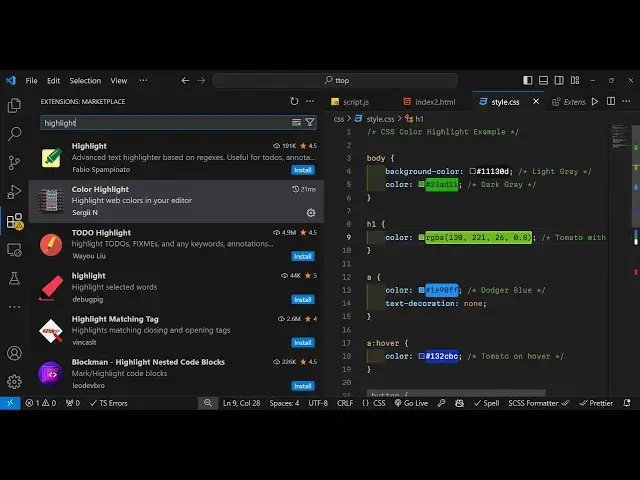
highlight colors inside CSS uh inside vs
0:07
code so this is actually extension right
0:09
here uh color highlight and it is having
0:13
7 million downloads which is developed
0:15
by this person serg and so in this way
0:18
uh you go to extensions just type
0:20
highlight in the search bar the very
0:23
first extension which comes is second
0:26
extension this is the extension 7.5
0:29
million down downlo so you can see how
0:31
much download it has 4.5 rating and it
0:34
is developed by this person and it can
0:36
be used to highlight web colors inside
0:38
your editor so while we are coding CSS
0:41
files it's very difficult to see which
0:43
color that we are applying but using
0:45
this extension you can see by the
0:47
default behavior is that it basically
0:50
shows a very short little preview of the
0:52
color so we can't understand which color
0:54
that we are applying if you basically
0:56
choose the color from the Color Picker
0:59
so very short little preview so you
1:02
don't seem to understand which is the
1:04
color so now if I act simply enable this
1:08
extension so now you will see the
1:09
difference after applying this extension
1:12
you will see the difference now the
1:14
preview now the colors that are shown
1:16
right here it's totally big so you can
1:19
now see totally you can see which color
1:21
that you're applying so if you now
1:22
change this color you'll see that now
1:25
you have this perfect color so it
1:28
actually beauty Beauty ify the code
1:30
while you writing the CSS you can
1:33
essentially see which color you are
1:34
applying without having to refresh the
1:36
page and see the actual content you can
1:39
actually see inside the CSS while you
1:41
are applying the code you will see
1:44
this so this extension is very really
1:47
good guys I personally use it on a daily
1:49
basis while we are working with CSS so
1:52
it actually does a great job you can see
1:55
how it it makes a beautiful job in
2:04
see it can work with hexad decimal RGB a
2:08
color as well so you can see it
2:12
basically does does a great job in
2:27
so so you can see that
2:30
so this is actually the extension guys
2:32
that I wanted to show you so again the
2:35
name of the extension is color highlight
2:37
so it can be used to highlight colors in
2:39
CSS so install this thank you very much
2:43
for watching this video and I will be
2:45
seeing you guys in the next video