0:00
uh hello guys welcome to this video so
0:02
in this video I will show you how to
0:04
tackle the error message so whenever you
0:05
type py this message comes puty is not
0:08
recognized as an internal or external
0:10
command puty is a special Pro program
0:13
which connects to your VPS virtual
0:15
private server and transfer files from
0:18
the location to server and one of one of
0:22
problem program which is
0:24
PSP secure version of puty so if you are
0:28
seeing these two error messages you
0:30
haven't installed puty so just first of
0:32
all just say puty download and just
0:35
select This Ss such client for Windows
0:38
so I've already downloaded this simply
0:40
click on that download puty option and
0:43
you will install this MSI exe file so by
0:47
default if you follow the setup it will
0:50
store inside your C drive and there will
0:53
be a folder called as program files so
0:57
just go to this folder and just select
0:59
this puty it will create a folder called
1:02
as puty p u t y and here you will see
1:05
all your executables which are there
1:07
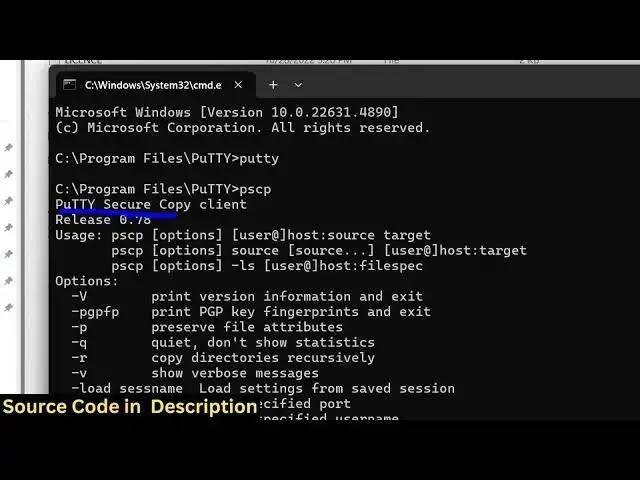
pscp puty and if you try directly open
1:11
Terminal here and just Ty puty it will
1:14
open the puty client here and similarly
1:16
pscp and it will actually the command
1:19
will perfectly work puty secure copy
1:21
client so now what what we need to do is
1:24
that we need to copy this whole path
1:26
right click and copy and just you need
1:29
to register it inside your environment
1:31
variable and uh just go to the system
1:33
variable right here and just select this
1:38
variable and uh just click on edit and
1:42
add a new entry right here and just
1:44
paste this full path C program files
1:48
puty so as you just make the change here
1:50
just restart your terminal and once
1:53
again if you open this puty command you
1:55
will see the puty command will open this
1:57
client for you and then pscp
2:00
the command will perfectly work in the
2:02
terminal so in this way you can fix this
2:05
error message so first of all download
2:07
the puty client inside your machine and
2:09
then copy this path inside your
2:12
environment variables so it's a very
2:14
easy fix so thank you very much for
2:17
watching this video and also check out
2:18
my website as well free mediat tools.com
2:21
uh which contains thousands of tools
2:24
regarding audio video and image and I
2:26
will be seeing you in the next video