live_tv
Livestream Starting Soon
00
Hours
:
00
Minutes
:
00
Seconds
Up next in 10

How to Download & Install Rust Compiler & Setup & Run Rust in VSCode Full Tutorial For Beginners
Feb 19, 2025

Get the full source code of application here:
Hi Join the official discord server to resolve doubts here:
https://discord.gg/cRnjhk6nzW
Visit my Online Free Media Tool Website
https://freemediatools.com/
Buy Premium Scripts and Apps Here:
https://procodestore.com/
Show More Show Less View Video Transcript
0:00
uh hello guys welcome to this video so
0:02
in this video I will show you how to
0:04
download and install rust and set up
0:08
inside your vs code so this will be a
0:10
full setup video how to set up the rust
0:13
programming language and I will run a
0:14
simple hello world program as well and
0:16
run it in this video so first of all you
0:19
need to download and install rust so
0:22
just type here rust download and the
0:24
very first link which comes right here
0:27
install rust just go to this website
0:30
rust language.
0:32
G and this is actually a program which
0:37
rust up which is the exe program if you
0:39
are on Windows just select your 32bit or
0:43
64bit mine is
0:45
64-bit so I will simply select this so
0:47
it's almost
0:49
8.53 megabytes of size exe file so
0:53
simply download this after downloading
0:56
it simply run this setup file so as soon
0:59
as you run the setup file in the command
1:01
line You'll see this message the cargo
1:03
home directly is located at C users so
1:08
just go with the default
1:09
location and uh
1:12
now enter proceed with the standard
1:16
installation so just enter
1:18
it so now it is installing the rust
1:21
compiler and also the car cargo which is
1:24
the package manager for installing third
1:26
party rest packages so it will just take
1:30
some time for installation so just wait
1:32
here and as soon as it finishes it will
1:35
give you the notification that the
1:36
installation has completed so just wait
1:39
here I just want to show you the
1:42
complete process so I will not pause the
1:45
video so just see the entire process and
1:47
follow along with this video so just
1:49
wait for the installation to
1:54
finish so this is a uh rust up program
1:58
which is a simple exe5 file which you
2:02
run it after downloading it so it will
2:05
automatically install all the packages
2:08
of rust
2:10
compiler and after that we can run a
2:12
simple rust project inside vs
2:18
code so in the meantime guys uh for
2:22
setup process in vs code you need a one
2:25
extension
2:27
inside vs code so just go to the
2:30
extension stab and you need one
2:32
extension for specifically for rust
2:35
which is rust analyzer so just search
2:38
for this
2:39
extension right here just type here R Us
2:44
analyzer so as you type this extension
2:47
this is provided to you by the official
2:50
rust programming language if you see it
2:53
is
2:55
checkmark so this is the rust analyzer
2:58
it's almost used by 4. 4 billion weekly
3:06
downloads so now you can see that guys
3:09
uh we have installed this extension rust
3:12
analyzer and also if I check guys you
3:15
will see that our rust compiler and
3:19
cargo has been installed so you can
3:22
either close this window or you can just
3:27
uh so let me just close it installation
3:30
is finished so now if after that you can
3:33
open a command line and just
3:36
type to confirm rust compiler so if you
3:40
type basically this command will be
3:42
successful so this is actually your rust
3:45
compiler and then this is Cargo cargo is
3:48
actually the package manager for rust so
3:50
you can see rust package manager to
3:52
install third party packages so now
3:55
inside your terminal we will create a uh
3:59
brand new first project so just open a
4:04
very
4:05
simple let me go to my projects
4:08
directory and WR
4:11
here let me navigate to rust
4:15
project or let me make
4:17
this there is a command here which you
4:20
can cargo which is new and Then followed
4:24
by your project name so we are just
4:28
initializing a new new rust project
4:31
cargo new and followed by your project
4:33
name so if you type this you will see it
4:35
is creating an simple
4:38
package so now we just need to navigate
4:41
into sample
4:42
rest and open it inside vs code so if
4:46
you open it inside vs code you will see
4:48
this package sorry project has been
4:51
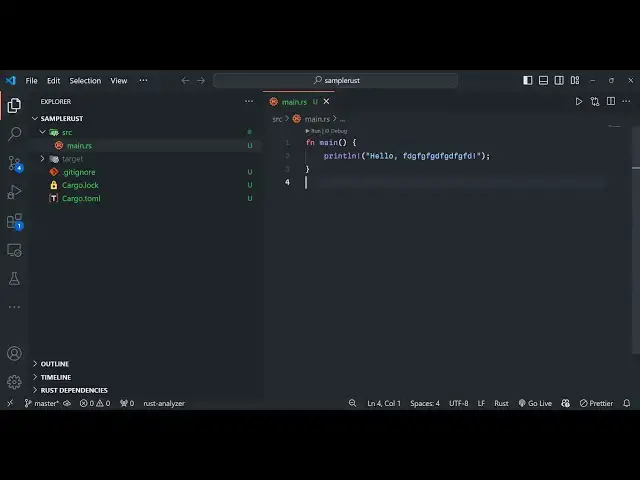
created and we have the source folder
4:54
main. RS file this is the rust
4:57
here and we also have the cargo lock
5:01
file cargo which is a package manager we
5:03
have a simple
5:14
git so now what we need to do uh by
5:18
default hello world program will be
5:21
written right here so if you want to run
5:23
this now how we can run this file we can
5:27
simply use the cargo command cargo
5:30
run so it is compiling your project and
5:33
now if you see the hello world statement
5:35
has been successfully printed out so in
5:39
this way guys you can download install
5:42
rust and then run a simple program I
5:45
showed you step by step in vs code how
5:47
to set up this process very simply you
5:49
can make this customization let me
5:51
change the message to this one
6:03
so you can see
6:05
that the program has been compiled and
6:08
is running here right here see we have
6:11
more commands right here if you
6:13
see we can build this
6:19
project so if you want to build this
6:22
project or publish it we have all these
6:24
commands available
6:31
so thank you very much guys for watching
6:33
this video please hit that like button
6:36
subscribe the channel and also check out
6:39
my website as well free mediat tools.com
6:41
uh which contains thousands of tools
6:43
regarding audio video and image and I
6:46
will be seeing you in the next video
#Programming
#Development Tools
#Computer Education