0:00
uh hello guys welcome to this video so
0:02
in this video I will show you a very
0:04
popular theme in vs code which is called
0:07
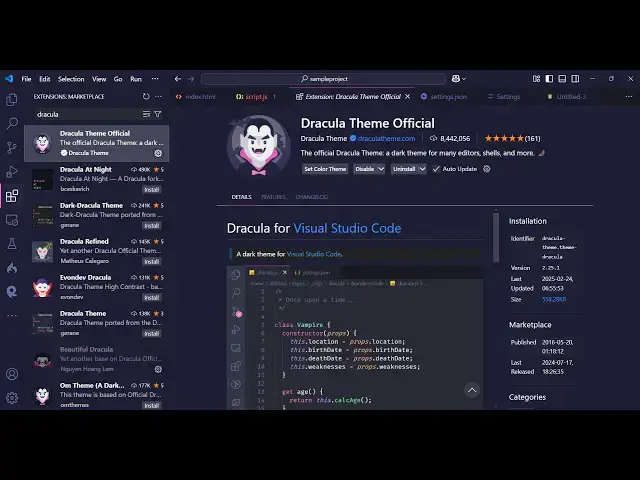
as Dracula theme official so this is
0:11
actually the extensions you go to the
0:12
extensions and just search for
0:16
Dracula and if you just type it this the
0:20
very first extension which comes the
0:22
Dracula theme official it's a paid theme
0:25
but uh I can personally say it's a very
0:30
it's a onetime investment and it has
0:33
various color schemes available in the
0:35
pro version it does offer the free
0:37
version as well you can try this it's
0:40
almost having 8 million installs rating
0:44
is also good so they do have their own
0:47
website as well Dracula theme.com so
0:50
where they actually show you all 394
0:53
themes that they have in the pro version
0:57
uh it's available for notepad Plus plus
1:01
all the famous editors that is there in
1:03
the sublime Tex jet prints
1:05
telegram but let me show you the demo
1:08
theme right here there is a install
1:09
button simply click the install button
1:11
and now it will have these three
1:14
themes which is the two themes which
1:17
offers in the free version Dracula theme
1:19
and the Dracula theme soft so let me
1:22
just use the Dracula theme so if you now
1:24
see this is actually the color
1:26
combination and the color theme it look
1:31
and you can see this font that I'm using
1:34
is the premium font which is dank mono I
1:39
have also made a video comparing all the
1:41
five fonts that I use so if you want to
1:43
watch that video the link is given in
1:45
the description and uh so this is
1:48
actually the theme right here which
1:50
looks this is the HTML code this is a
1:52
JavaScript code the theme looks
1:55
great and uh the second theme is the
1:59
Dracula theme soft theme this is
2:02
slightly soft in terms of the color
2:05
scheme but in the pro version if you
2:08
want to buy the pro version simply go to
2:11
Dracula theme.com they are basically
2:13
running a if you go to Dracula Pro so
2:17
this is actually the theme you will get
2:20
in the pro version various color
2:22
palettes this is a greenish you will
2:24
also see this nice little background
2:26
color this is a pink version and you can
2:30
various themes will be there and it's
2:33
available for vs code Vim slack
2:36
notepad++ all these famous terminals
2:39
which are Ides which are
2:42
there so if you want to purchase it you
2:45
just need to get to get it now and uh
2:47
they are offering a full discount 79 to
2:52
29 it it will come with 20 themes six
2:57
variants four handpick phones one
2:59
productivity so all these things you
3:01
will get it's a onetime payment and you
3:04
will can pay with card or PayPal so the
3:09
discount is 79 then it the total cost
3:15
is here you can pay this and use this
3:18
theme but if you want to use it for
3:20
completely free then just install this
3:22
extension Dracula theme official the
3:25
free theme also looks very good
3:27
because you can see how be f it is
3:30
looking the color scheme is quite good
3:33
this is having this nice little uh
3:36
grayish background and top of that the
3:39
color scheme also looks quite great so
3:43
you can see that so this was
3:46
actually the Dracula theme official
3:50
extension that I wanted to show you and
3:53
uh thank you very much guys for watching
3:55
this video and also check out my website
3:58
as well free media tools
4:01
uh which contains thousands of tools
4:03
regarding audio video and image and I
4:05
will be seeing you in the next video